Table of Contents
Whether you are cutting dialogue for video, mixing a podcast, or polishing music tracks, unwanted background noise, distortion, and technical glitches can quickly ruin an otherwise great recording. This guide breaks down the core concepts of audio restoration, walks you through common noise challenges across different mediums, and shows you how to use iZotope RX to achieve clean, professional sound.
Discover new audio cleanup features
Learn about groundbreaking tools for audio cleanup and background noise removal with the new iZotope RX.
The basics of audio cleanup and background noise removal
When do I need to use audio cleanup and noise reduction software?
You need audio cleanup and noise reduction software whenever a recording has a problem you can't just re-record — a tool like iZotope RX can help you repair the issue or reduce background noise to get better quality audio. In today's world, audio and video recordings can be made by almost anyone, from smartphones to sophisticated studios and sound stages, and large amounts of media content are created daily. And as our world becomes increasingly and audibly congested, the rate of ruined recordings is rising in tandem. Human error, unexpected electrical or mechanical interference, and unwelcome intrusions from aircraft, cell phones, pets, people, and Mother Nature regularly impact even the most seasoned professional, particularly when editing coverage of a live event, or working to meet budgets and deadlines.
How do I clean up audio?
Cleaning up your audio with iZotope RX combines familiar visual selection tools that are found in plug-ins and digital audio workstations (DAWs) with a visual spectrogram display and advanced audio processing, enabling you to perform powerful audio edits.
The goal of good audio repair and restoration is to render the best possible sonic result with the least audible human intrusion. In essence, your intervention in the original recording should be transparent and not introduce new artifacts that distract the listener.
Sometimes it's possible to solve an audio problem entirely, and other times it's about finding the right balance between reducing the problem and preserving the original audio. It's useful to remember that no recording is truly perfect, and any statement as such is purely subjective.
Cleaning up your audio can yield the following results:
Reduce both ambient and signal-based background noises such as hiss, hum, and buzz—without sacrificing the fidelity and clarity of the original audio.
Isolate and then reduce or accentuate specific audio events, such as sudden background noises.
Replace damaged or missing sections of an audio file with seamless, natural sounding patches.
Eliminate pops, clicks, and mouth noises without audible artifacts.
Repair audible analog and digital clipping with perfect precision.
Is there a way to remove background noise from audio?
Yes, there are ways to reduce and even remove background noise from audio. Background noise in recordings, if left untreated, is likely to create problems down the road when EQ and compression are applied. Frequency boosts or cuts and dynamic range adjustments can make the noise more noticeable.
There are two types of background noise: steady (also called ambient noise) and sudden background noise. Steady background noise means noise that is not changing, like hiss, hum, and buzz. Removing steady background noise can improve the overall listening experience, increase intelligibility in dialogue tracks, remove interferences like electrical hum from a musical performance, and make it easier to combine different audio files into one scenario when mixing sound for picture.
Sudden background noise includes coughs, ringing cell phones, beeping, etc. Sudden noises can include a wide range of intrusive sounds that don't fall into the steady or impulse categories. These can include a cell phone ringing at a violin recital, a door hinge squeaking during an interview, or traffic noise interrupting the dialogue being recorded for a film.
Most types of interference, especially those that happen on dialogue recordings, can be tackled with iZotope RX plug-ins including De-noise, De-hum, Dialogue Isolate, De-Bleed, Spectral Repair, and more.
What does background noise removal sound like?
Here are audio examples of audio cleanup and background noise removal using Dialogue Isolate in iZotope RX.
Take note of the differences you’re hearing in the before and after of this interview using RX Dialogue Isolate. Notice how the background noise disappears with minimal disruption to the interview itself?
What are the basic steps to clean up audio?
While there are many aspects of audio cleanup, these are basic steps and techniques used to achieve a professional sound.
What tools do you need before you start cleaning up audio?
Before you learn how to remove background noise and clean up audio from your recording, it's important to get familiar with the tools used to process the audio.
All of your audio edits will be done by viewing a waveform or a spectrogram. A spectrogram is a detailed view of audio, able to represent time, frequency, and amplitude all on one graph. A spectrogram can visually reveal broadband, electrical, or intermittent noise in audio, and can allow you to easily isolate those audio problems by sight.
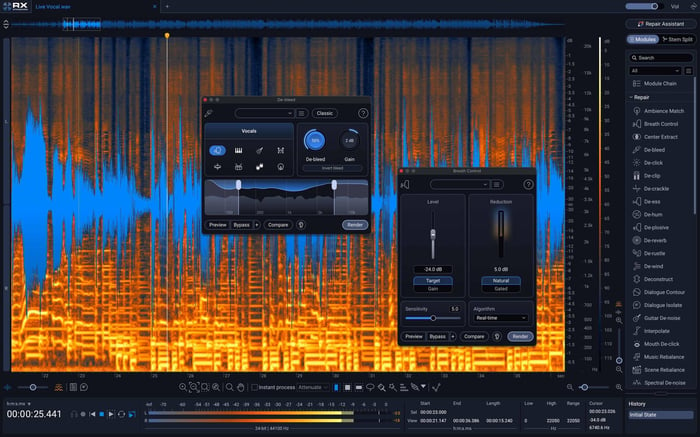 iZotope RX 12 Spectrogram with modules
Much of the process in audio cleanup involves removing artifacts. Artifacts are sonic material that is accidental or unwanted, resulting from the editing or manipulation of a sound.
Cleaning up audio typically involves working with the following types of processors:
iZotope RX processor type | What it does |
De-noise | Reduces and removes steady-state background noise; can be based on FFT with thousands of bands or a simple crossover with just a few bands, and is sometimes designed for a specific use case, such as vocals |
De-click | Reduces and removes intrusive clicks and pops, caused by anything from dust and scratches on an old record, a CD skipping on playback, or even mouth clicks and lip smacks from a voiceover |
De-crackle | Closely related to de-clickers, but optimized to reduce and remove a more continuous, quieter stream of clicks that blend together to cause what the human ear perceives as a general crackle |
De-clip | Repairs digital and analog audio clipping artifacts caused by overloading an A/D converter or over-saturating magnetic tape |
RX has many modules based on these types of processors to tackle certain audio problems. For example, if your recording has guitar noises such as squeaks, picking sounds, or the hum and buzz that comes from guitar pickups or amplifiers, RX offers Guitar De-noise to help you easily adjust these noises or eliminate them completely.
How do you clean up audio and remove background noise for video?
Whether you're a post production professional or creating your own videos at home, here's how you can clean up your audio and remove unwanted background noise for video.
The process of recording, editing, and mixing for mediums such as TV, film, and online videos is often challenging. From news reports to reality TV and streaming, the current emphasis on field recording (made possible by advances in portable recording technology) also introduces audio problems such as distortion and background/ambient noise, to name a few.
Here are some of the most common types of audio issues and ways to clean them up.
What kind of noise are you dealing with in your video?
Listen to your scene. Is there audible traffic in the background of a scene? Is there an air conditioner fan that's creating noise in the background? Are you hearing digital clicks and pops from an electronic interface? These different types of audio will require different repair processes and techniques.
How do you clean up voice recordings for video?
There's a lot to watch out for when recording the human voice. Plosives, weird mouth sounds, and background noise are common audio issues in voice recordings. A standard process to clean up voice recordings to sound clear and professional can be the following:
Use RX De-plosive to remove plosives
Use RX Mouth De-click to eliminate unwanted mouth noises
Use RX Spectral De-noise to reduce or remove background noise
If you're a content creator that is looking to quickly clean up your voice recordings, RX Elements can easily remove background noise and create consistent levels for your voiceovers, whether you're creating videos, podcasts, or other content mediums.
How do you remove steady background noise like hum or fan noise?
Background noise such as cars passing by or audible fans and humming from nearby electronics can distract listeners from the scene and make it harder to hear what's important. To reduce steady background noise, tools like RX Spectral De-noise or Voice De-noise can be useful to reduce a constant hum or fan noise.
Listen to RX Spectral De-noise and Voice De-noise in action:
How do you fix sudden background noise like beeps or dropouts?
Sudden or intermittent background noise like alarms, beeps, dogs barking, can take a listener out of the scene completely. Gaps, dropouts, and short sections of corrupted audio are also a common audio problem. These can be caused by everything from a loose audio cable to digital errors.
These audio problems tend to occur suddenly and last for a short duration—that's what differentiates them from the conventional noises we dealt with above.
RX Spectral Repair can help push unwanted audio events into the background, particularly useful if the unwanted audio events don't completely obscure the desired signal.
RX Spectral Repair can also replace damaged audio, including dropouts and gaps. It can resynthesize audio using the audio information surrounding the damaged area.
How do you preserve room tone when editing dialogue?
RX Ambience Match can help you preserve the room tone of your recording throughout the editing process. Room tone is the natural noise of your recording environment, shaped by the materials of the space and any existing background noise — when it suddenly goes missing between edits, the brain notices, and it becomes clear the performance was artificially edited. Adding a layer of room tone under audio that was recorded in a separate session disguises the edit instead.
How do you clean up audio for podcasts and audiobooks?
Learn how to clean up audio for podcasts, fixing issues like mouth sounds, noisy interview settings, and more.
Podcast audio cleanup with Guitar Nerds
In this series, learn how to remove unpleasant mouth noises, reduce background noise, fix audio clipping, and more in your podcast audio with iZotope RX Elements.
It has never been easier to produce, edit, and distribute podcasts to the masses. Though podcast editing is similar to dialogue editing for videos, there are a few podcast-specific instances of audio cleanup to keep in mind, including the background noise of your podcast studio, the number of speakers in your podcast, and any guests that could be speaking on a platform like Zoom or a phone recording.
What kind of noise are you dealing with in your podcast?
The first step for getting great sounding podcast audio is listening to your recording. Is there any steady background noise in your audio like fans or humming? What about plosives, audio clipping, or distortion?
Take notes of what you're hearing so you can determine what steps you need to take next.
Learn more about some of the most common audio problems in podcasting and how to remedy them below.
How do you clean up a noisy podcast interview?
Maybe you have a home studio that doesn't have the best room treatment, or maybe you're out in the field recording with your phone. In either situation, there's a risk of unwanted audio or even compressed dialogue coming into your session. A few steps to cleaning up a noisy interview can include the following:
Use VEA to quickly get consistent levels and clarity
Use RX De-clip to remove irritating artifacts in the audio
Use RX Spectral De-noise to learn the background audio profile and reduce it
Use RX Spectral Recovery to bring life back into the hollow sounding dialogue
NEW: RX Spectral Recovery
Is your recording lacking highs and lows? Was it recorded on a mobile phone or using non-studio-grade equipment? RX Spectral Recovery can help to bring life back to thin-sounding audio to match the rest of your productions. The new version improves upon the quality of re-synthesized upper frequencies and can now add missing lower frequencies, too.
Is there an easier way to remove background noise and clean up audio in my podcast?
There is an easier way! iZotope RX Elements is a smart solution for cleaning up audio from a podcast recording with just a few clicks. If you're new to audio repair, or you just want to save time, RX Elements uses machine learning to find and fix audio issues quickly without leaving your DAW. The Assistant automatically recognizes specific problems and intelligently proposes a repair chain that you can modify to your liking with easy-to-use dials.
How do you clean up audio for music recordings?
Recorded music can be rife with issues, including distortion, audio clipping, harsh transients, hissing, and more. And it's important to clean up your recorded audio before you start the mixing phase, because issues like humming and distortion can be emphasized with further processing down the line like EQ, compression, and audio effects.
What kind of noise are you dealing with in your music recording?
Take a listen to your recording. Is there too much sibilance in your vocal? Is there an extra snare drum hit where there shouldn't be? Or is there amp buzz that just won't go away? Take notes of what you're hearing, and then move into the next steps below.
How do you clean up sung vocals?
In some ways, sung vocals are even more tricky to clean up than spoken words. Sung vocals can be extremely dynamic, which can cause issues like distortion and clipping. Softer vocals can also get buried and sound thin in a live recording. And there's also plosives, mouth sounds, and breaths to consider.
Here are some basic steps to take to clean up your vocal recording with iZotope RX.
Use RX De-plosive to remove plosives
Use RX De-ess to remove unwanted vocal sibilance
Use RX Mouth De-click to eliminate unwanted mouth noises
Use RX Vocal De-noise to reduce or remove background noise
How do you isolate a vocal to remix a song?
Remixing a song (with legal permission) is a practice frequently used in music production to bring familiarity to a new composition, expand skills as a producer, and develop an artist's brand. But what if you don't have the original stems of the song to use in your track?
The answer: Use the original track and extract stems using iZotope RX.
Most remixes build off of the vocal. To isolate a vocal you can use RX Music Rebalance, which allows you to adjust the volume of various elements in a mono, stereo, or multichannel export of a single track. Voice, bass, percussion, and other instruments all have their own adjustable level, and sensitivity can be adjusted to determine what audio is identified as each type of element.
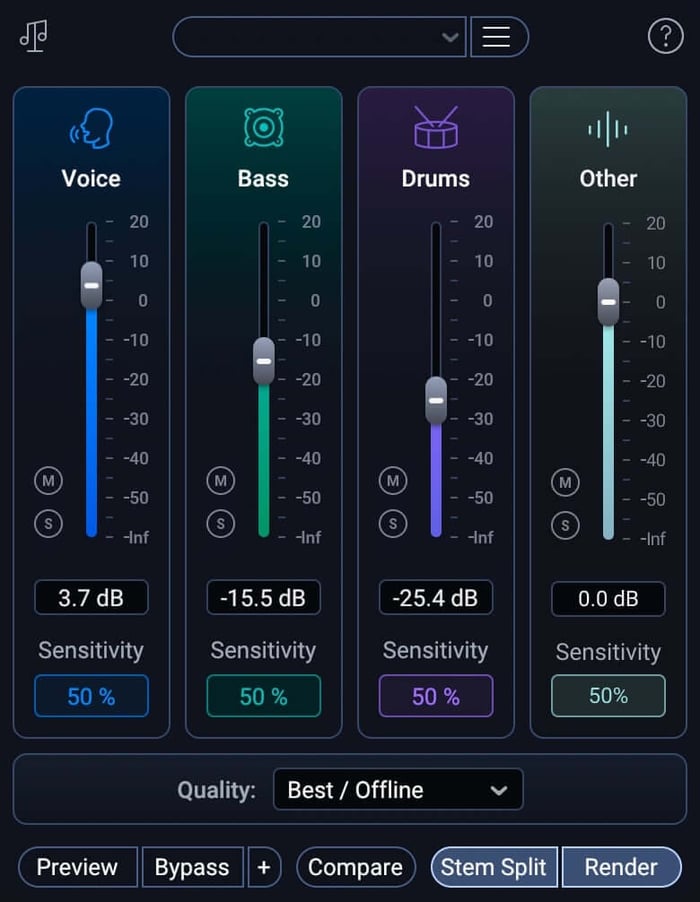 iZotope RX 12 Music Rebalance module
How do you clean up recordings of musical instruments?
Recordings of musical instruments like drums, guitar, and piano can be full of amplifier buzz, microphone bleed, harsh transients, and more. Here are some of the most common audio issues with recorded instruments and how to tackle them.
How do you clean up drum recordings?
Since drums are often recorded with multiple microphones, you can run into issues like cymbal spill on a kick drum track, excess reverb due to the room you recorded in, and extra drum stick hits. iZotope RX has a few ways to tackle these problems, including RX Spectral De-noise, which can analyze your noise profile and fix audio imperfections automatically.
Other RX plug-ins that are great for cleaning up drums include RX De-Bleed and RX De-Reverb.
How do you clean up guitar recordings?
Guitars are one of the most popular instruments to record, and yet they are full of artifacts including fret squeaks, string slaps, and amp noise.
For acoustic guitar and electric guitar recordings, RX Guitar De-noise is the first tool to consider when fixing guitar issues in a recording. It has an Amp tool to attenuate hiss and electrical interference, a Pick tool to control pick-generated transients, a Squeak tool to adjust the presence of fret noise and string slides, and Sensitivity and Reduction sliders on each tool for precise refinements.
How do you clean up audio samples?
Whether you're getting samples from a site like Splice or you're making your own, music samples may require audio clean up in order to perfectly compliment your track. Live samples can be filled with unwanted background noises. Vintage samples often have crackle, a continuous stream of irregular noise that can clash with a modern sound in your mix.
Here are some ways to clean up audio samples in your productions:
For recorded samples, RX Spectral De-noise in Adaptive mode can help clean up unwanted background noises
RX De-crackle can help remove crackling noises out of vintage samples and vinyl
RX De-rustle and RX De-plosive can help clean up recorded vocal samples
How do you clean up audio issues during mastering?
Mastering is the final stage of audio production—the process of putting the finishing touches on a song by enhancing the overall sound, creating consistency across the album, and preparing it for distribution.
Sometimes, audible problems can move all the way to that final stage of audio production, like low end thump in a stem or harsh sibilance on a vocal. There are also unwanted audio byproducts that can occur in the mastering stage.
For example, the song "Foraker" by Cyrus Reynolds is an ambient folk record that showcases a lush production with a sweeping vocal performance by S. Carey. The mastering approach was to highlight these qualities in the final mastered sound. Achieving this, however, resulted in a byproduct which made the high-frequency vocal timbre pop out too much in the climactic section ("ay" from the word "same").
With RX Spectral Repair, however, you can isolate your desired fundamental note and harmonics without being intrusive to the overall sound.
Listen to the before and after of using Spectral Repair:
Learn even more about audio clean up with RX in the mastering stage and discover audio clean up scenarios in mastering for vinyl and mastering an old recording.
Common questions about audio cleanup
1. What are some common types of unwanted background noise in audio recordings?
Common background noises include hum, clicks, clipping, and general ambient noise such as fans, traffic, or room echo.
2. How can you remove background noise from audio using iZotope RX?
Use the Voice De-noise module in iZotope RX, which reduces noise either in real time or by learning the noise profile.
3. What is the best way to remove clipping from an audio file?
Use the De-clip module in iZotope RX to repair digital and analog clipping artifacts, which occur when overloading an A/D converter or over-saturating magnetic tape.
4. How do you reduce reverb or echo in a recording?
The De-reverb module in RX can help reduce room echo and reverberation, improving clarity.
5. What's the difference between steady and sudden background noise?
Steady (or ambient) background noise doesn't change over time — think hiss, hum, or buzz — and tools like Spectral De-noise or Voice De-noise work well on it. Sudden background noise is intermittent, like a ringing phone, a door hinge squeaking, or passing traffic, and is better handled with RX Spectral Repair.
6. How do you isolate a vocal from a song to remix it?
Even without the original stems, RX Music Rebalance can extract and adjust the volume of a track's vocal, bass, percussion, and other elements from a mono, stereo, or multichannel export, which is enough to build a remix around.
Ready to clean up your audio and remove background noise?
Start repairing your audio with iZotope RX, the industry-standard audio cleanup tool.