Award-winning audio restoration software to fix every flaw
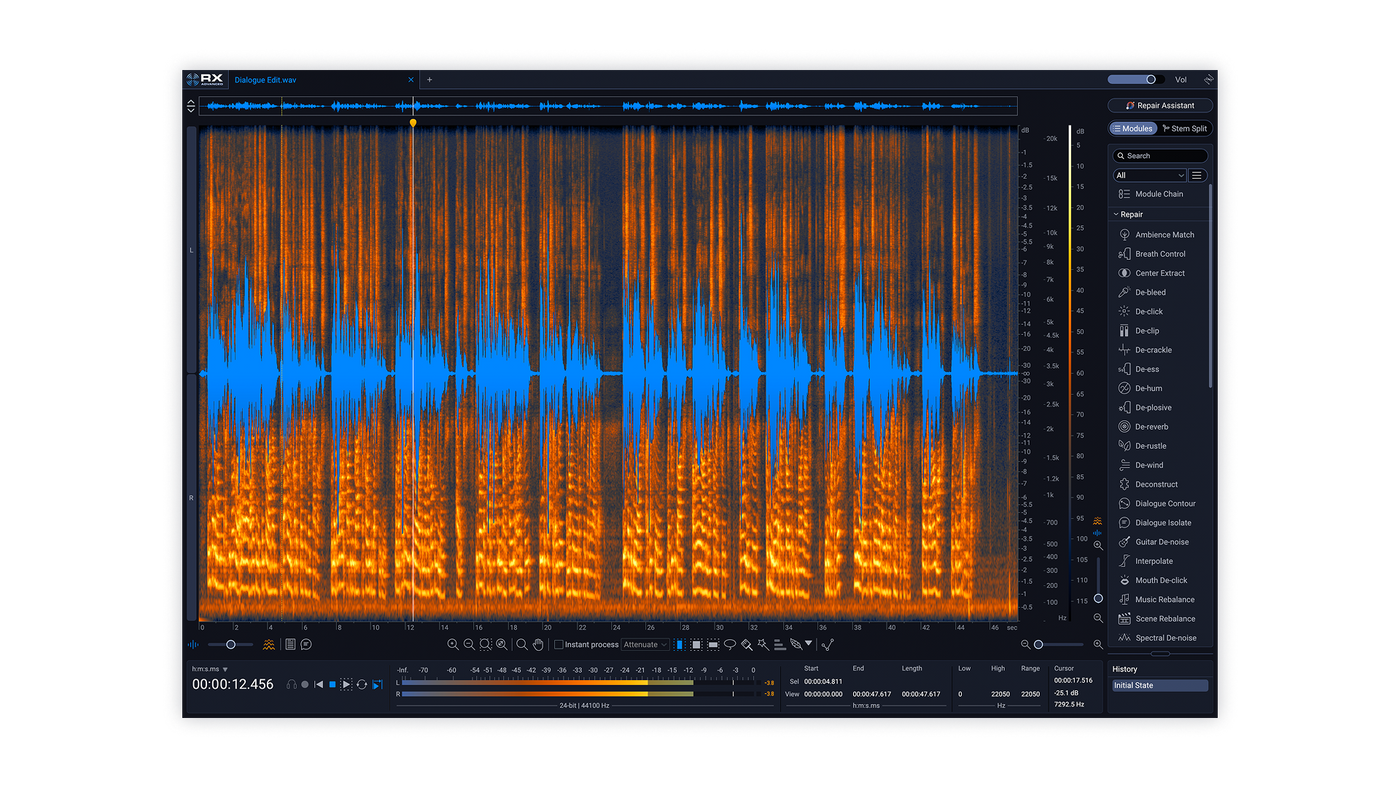
RX 12 Advanced is everything you need to rescue dialogue, avoid ADR, and save the scene. Fix the unfixable with our complete 50+ tool audio restoration software, the industry standard for post. Blend surgical precision with lightning speed thanks to intelligent new features, upgraded modules, and an award-winning ecosystem. Save precious time rebalancing scene mixes, unlock new depths of detail for every module, and much more.
All-in-one audio restoration
Paint problems away
Visually target and replace unwanted sounds like dog barks, string squeaks, and sirens in RX’s Spectrogram, and tackle clicks, clips, hum, rustles, reverb, background noise, and tons more with bespoke repair modules.
Make surgical edits
Easily split stems in post production sound mixes and fully mastered tracks. Make final mix tweaks easier, isolate stems for remixes, and unlock deeper editing for any audio with the all-new Stems View.
Release with confidence
Polish up vocal and instrument recordings, maximize the perceived loudness of your masters with the Loudness Optimize module, and avoid release-day surprises with Streaming Preview.
Rescue audio in seconds
If you’re looking for a helping hand to get great results fast, RX’s Repair Assistant intelligently recognizes and proposes fixes for specific problems that you can tweak to your taste with easy-to-use controls.
Audio repair for any project
Crafting an Oscar-worthy sound mix? Adding the final polish to chart-topping tracks? Making sure your home recordings are clean, clear, and crisp? However you work with audio, RX is your pro partner for flawless sound.
Post Production
Music Production
Content Creation
What's new in RX 12?
Brand-new modules
Independently adjust dialogue, music, and effects in post production with the new Scene Rebalance module, and manage long audio files in a flash with Trim Silence.
Deeper control
Visually split your audio into stems with Stems View (via Scene Rebalance, Music Rebalance, or Dialogue Isolate), then apply any RX tool exactly where you need it.
Better results, faster
Updated neural nets, new realtime plugins, rebuilt fan-favorites with cutting-edge machine learning – the new RX 12 toolkit makes crystal-clear audio easier than ever.
Overhauled experience
Make finer edits with a larger default spectrogram, skip menu diving with a new module search, easily trace your steps with a resizable History panel, and much more.
"On Mad Max Fury Road, Blade Runner 2049 and Dune: Part One, we relied on iZotope RX extensively to create pristine production dialog and otherworldly sound effects. Relying on tools like Spectral Repair, Dialog Isolate, Radius and many others, we were able to make noisy dialog pristine, remove blemishes in recordings from the field, and process design elements into sounds no one has ever heard before."
—Mark Mangini, Academy Award winning Sound Designer, Sound Editor, Re-Recording Mixer (Dune, Mad Max: Fury Road, Blade Runner 2049)
"I restore a lot of classic feature films and TV shows for a living. For cleanup and restoration of audio my first choice is always iZotope RX. RX can solve almost any audio issue whether it’s removing unwanted noises or extracting and cleaning dialog, music, and effects, it gives me many options to get the job done. The RX editor allows me to do very precise surgical adjustments and restore the sound to the way it was meant to be."
— Doug Mountain, Audio Engineer (The Walking Dead)
"RX is like a Swiss Army knife for audio. I’ve recently been using it a lot for stripping out vocals from old songs for edits in my sets. It’s so effective."
— Chris Lake, GRAMMY-nominated Producer, DJ, Founder of Black Book Records
"RX is literally a miracle product. The Music Rebalance feature does what every DJ and producer used to think was impossible. It’s already opening so many possibilities, and I still have to remind myself that it exists and it’s real."
— A-Trak, Grammy-nominated producer & DJ, Fools Gold Records, 5x DMC World Champion
Award-winning audio repair and restoration tech
Time and time again, RX has introduced groundbreaking features that solve the unsolvable – earning major awards that include two Engineering Emmy Awards and a Scientific and Engineering Award from the Academy of Motion Picture Arts and Sciences. Powerful, fast, and reliable, RX is the trusted partner to audio professionals working across film, TV, music, podcasts, video games, and content of all types.
Discover more about RX 12
Discover what's new in iZotope RX 12, the industry standard for audio repair. Explore new machine learning features like Scene Rebalance, Stems View, and rebuilt modules for dialogue and music.
Flawless stem separation is here. Learn how to use the rebuilt Music Rebalance in RX 12 to isolate vocals, bass, and drums for cleaner remixes and better mixes.
Stop baked-in music from ruining your dialogue. Learn how to use Scene Rebalance in iZotope RX 12 to separate dialogue, music, and effects for a perfect mix.
What's new in RX 12?
Faster. Smarter. Sharper. RX 12 is your pro partner to fix flaws, protect performances, and serve the story. Blend surgical precision with lightning speed thanks to intelligent new features, upgraded modules, and an award-winning ecosystem.
[cta label="Explore all features" link="https://www.izotope.com/products/rx-advanced?tab=all-modules" target="_self"]
Scene Rebalance
Built specifically for post production, this brand-new module gives you the power to independently adjust levels and make detailed edits for dialogue, music, and effects in seconds. A real timesaver when the balance needs a tweak. A real lifesaver when you’re editing without stems.
Stems View
Unlock new depths of detail by visually splitting your audio into stems through Scene Rebalance, Music Rebalance, and Dialogue Isolate. Then, apply tools from the RX toolkit with immediate precision. The slightest brush of a lav mic in your dialogue? Gone, with De-rustle. A hint of hum on the bass? Gone, with De-hum. You name it, you can fix it. Then, when you’re done, easily export as individual stems or a single audio file.
De-bleed
It’s never been easier to keep signals clean and separate thanks to the rebuilt De-bleed. Remove tricky issues like headphone bleed in Classic mode with a reference track, or instantly isolate competing instruments reference-free thanks to state-of-the-art machine learning. Just let De-bleed find the interference and remove it in a flash, in the De-bleed module or new real-time plugin.
Breath Control
Polish up vocals and speech, fast. Intelligently detect, reduce, and remove breaths with finer accuracy, thanks to the rebuilt Breath Control module, powered by advanced ML tech. Less time drawing gain edits for vocals and dialogue. More time protecting the performance. Another distraction, gone.
Music Rebalance
Drums too loud? Vocals too thin? Bass too muddy? Now you can adjust individual mix elements instantly with Music Rebalance’s real-time plugin. Easily reanimate an existing mix, prep for a remix, or create instrumentals and vocal stems. Split vocals, bass, percussion, and other instruments with pristine source separation – thanks to improved neural nets. Offline or real-time. Now, the choice is yours.
Dialogue Isolate
Rescue clarity from chaos with Dialogue Isolate, upgraded with state-of-the-art neural nets for finer accuracy across both offline and real-time modes. Whether you’re cleaning up speech for TV, movies, and podcasts – or vocals for your track – it’s never been easier to salvage recordings buried under noise and reverb. Dialogue Isolate will make sure your audience hears every word, clear as day.
Trim Silence
Editing a series of interviews with inconsistent periods of silence? An audiobook punctuated with long lulls? Normally, this would mean tedious, lengthy edits up against a tight deadline. Now, with the new Trim Silence module, you can automatically detect and delete gaps in audio files. Just set your threshold and let Trim Silence do the rest.
Overhauled experience and design
Larger Default Spectrogram
Make finer selections and edits, even on your laptop.
Module Search Bar
Skip menu diving and find the tools you need faster.
Instant Stem Splitting
Activate Stems View directly from the main editor.
Resizable History Panel
Retrace your steps no matter how long the session.
Listen to the new RX 12 neural nets in action
For RX 12, our award-winning research team has developed brand-new neural nets for some of our most popular tools, letting you achieve cleaner processing with fewer artifacts.
Music Rebalance
Listen “Before” with RX 11, and “After” with RX 12. Want to catch every detail? Listen with headphones!
Dialogue Isolate & Breath Control
Listen "Before" with RX 11, and "After" with RX 12. Want to catch every detail? Listen with headphones!
Every audio restoration plugin you need
RX is the answer to every audio problem, featuring 50+ tools for everything from background noise removal to dialogue intonation. Edit with surgical precision in the Spectrogram thanks to tailor-made modules – fixing everything from sibilance to intonation. Or skip the setup with the intelligent Repair Assistant, and clean up your sound in seconds. Whatever your flow, fix any flaw and protect every performance with RX.
[cta label="Explore all features" link="https://www.izotope.com/products/rx-advanced?tab=all-modules" target="_self"]
Which edition of RX is right for you?
Audio example credits
Scene Rebalance: Party USA (scene from film)
De-bleed: Eager Sails – A Trace
Breath Control: Hummingbyrd – Bright Lights
Breath Control: STL GLD – Gon Shine
Music Rebalance: Maya Manuela – American Doll
Dialogue Isolate: Party USA (scene from film)
Explore every tool in RX 12
RX is an entire ecosystem for audio repair and restoration, featuring 50+ specialized modules in the standalone editor and 20+ plugins that can load in your DAW or NLE. Learn about every single RX module below, or dive into the user manual if you want to explore non-module features and more info.
[cta label="User manual" link="https://docs.izotope.com/rx12/en/index-en.html" className="button-sm button-inline"] [cta label="Compare editions" link="/products/rx-advanced?tab=compare" className="button-sm button-inline" type="secondary"]
Popular RX features
Spectral De-noise
Remove unwanted tonal and broadband noise from any type of recording with unparalleled clarity and control.
De-click
Automatically identify and remove clicks, pops, and digital impulses that can ruin a listening experience.
Music Rebalance
Relevel vocals, bass, drums, and instruments to revive a mix, create instrumentals, or isolate vocals.
Spectral Repair
Use familiar drawing tools to identify, select, and repair problem frequencies or unwanted sounds.
Voice De-noise
Restore noisy vocal recordings in real time, removing anything from air conditioners to street noise.
De-clip
Recover recordings with clipping artifacts from pushed A/D converters or oversaturated magnetic tape.
Guitar De-noise
Remove distracting amp hum, squeaks from fingers moving across strings, and overly plucky picking.
De-hum
Remove hum, wireless ring, or interference, without artifacts or affecting the audio quality.
Mouth De-click
Keep listeners’ attention on the performance and detect and reduce mouth noises like clicks and lip smacks.
Table of Contents
* = New Module/Plugin ^ = Fully Rebuilt ° = New Neural Nets
Ambience Match
Ambience Match lets you match the noise floor of one recording to another recording. Fill in consistent ambience beds under constructed sentences and ADR lines right from within Pro Tools AudioSuite. No more spending hours of time manually looping sections of ambience under a scene with ADR and broken up sentences.
Seamlessly connect dialogue and ADR cuts with real background movement and textures with Complex mode, allowing you to quickly match never before possible ambiences: ocean, wind, traffic, crowds, and more. Or, use Static mode to match stationary ambiences, like a quiet room with a soft hum.
Included in RX Advanced.
Azimuth
Azimuth provides control over left and right channel gain and delay. Azimuth adjustment can help repair stereo imbalances and phase issues that can occur with improper tape head alignment or other speed related issues.
Included in RX Advanced.
[REBUILT] Breath Control
Intelligently detect, reduce, and remove breaths with Breath Control. Now with finer accuracy, thanks to brand-new neural nets. Saving you time and effort drawing gain edits for vocals and dialogue.
Included in RX Standard and Advanced.
Center Extract
The Center Extract module preserves or removes the center channel of a stereo file. Extracting the center will retain the center of a stereo field and attenuate everything on the sides, such as signals panned to the left or right.Included in RX Advanced.
[REBUILT] De-bleed
It’s never been easier to keep signals clean and separate thanks to the rebuilt De-bleed. Remove classic issues like headphone bleed, or instantly isolate competing instruments and multi-mic’d drum kits using state-of-the-art machine learning – now without needing a reference track. Just let De-bleed find the interference and remove it in a flash. And now, with De-bleed’s new real-time plugin, you can clean up your signal instantly.
Included in RX Standard and Advanced.
De-click
De-click automatically identifies and removes clicks, pops, and digital impulse noises that can ruin a listening experience. Use De-click when polishing audio transfers and other recordings suffering from quality degradation, digital errors, cell phone interference, and more with its low-latency algorithm.
Included in RX Elements, Standard, and Advanced.
De-clip
De-clip repairs digital and analog clipping artifacts. Audio clipping occurs when A/D converters are pushed too hard or magnetic tape is over-saturated. De-clip is extremely useful for reducing distortion in recordings that were made in a single pass, such as live concerts, interviews, and any audio that cannot be re-recorded.
Included in RX Elements, Standard, and Advanced.
De-crackle
De-crackle is designed to treat continuous background crackles in your audio. Use it to remove crackle on vinyl recordings and treat problems like dry-mouthed spoken word or reed noise from woodwind instruments.
Included in RX Standard and Advanced.
De-ess
De-ess audio attenuates or reduces sibilance, the harsh, high-frequency spoken sounds that come from S, F, X, SH, and a soft C. RX includes two modes to remove sibilance: Classic and Spectral.
Classic Mode detects sibilants and attenuates them with a broadband gain envelope. Spectral Mode is more transparent, intelligent, and frequency-specific than Classic Mode. Spectral Mode only attenuates the high frequencies where sibilance is most active, leaving the lower frequencies untouched.
Included in RX Standard and Advanced.
De-hum
De-hum instantly removes any amount of hum, wireless ring, or interference, without artifacts or affecting the audio quality. In one pass, eliminate radio and transmitter interference, camera and generator hum, and more.
The Dynamic Adaptive Mode lets you start getting rid of noise on the go in the Audio Editor. The Adaptive De-hum has high latency and works best in standalone app and offline plugin formats.
In Static mode, you can target hum with a fundamental tone and 16 harmonic bands above it. In Dynamic mode, you can learn and remove any amount of hum with up to 1024 dynamically variable notch filters.
Included in RX Elements, Standard, and Advanced.
De-plosive
Quickly remove plosives with De-plosive. Improve the quality of your dialogue by getting rid of plosive pops and mic bumps that can occur during a recording.
Intelligent analysis detects the presence of a plosive between the desirable harmonics of a dialogue or vocal signal. It then transparently reduces the plosive far more effectively than simply using an EQ to roll off the low end.
Included in RX Standard and Advanced.
De-reverb
Reduce some of the reverb from a recorded space with De-reverb. Salvage dialogue recordings containing too much reverb/acoustic space without needing to spend time/money on a re-shoot or ADR.
Take control over the amount of ambient space captured in a recording: make large cathedrals sound like small halls and make roomy vocals sound like they were recorded in a proper studio space.
Included in RX Elements, Standard, and Advanced.
De-rustle
De-rustle removes the noise or rustle generated by a lavalier microphone rubbing or brushing against a person's clothing during a recording. Lav rustle can vary unpredictably over time and exhibit a wide variety of sonic characteristics, from high frequency "crackling" to low frequency "thuds".
De-rustle uses a machine learning algorithm trained on isolated rustle samples, clean dialogue samples, and dialogue samples with rustle. When processing, De-rustle leverages the trained data to identify and separate the rustle from the dialogue and effectively reduce or remove it.
Included in RX Advanced.
De-wind
Easily remove distracting wind noise from audio with De-wind. De-wind removes the low frequency rumble that occurs when intermittent bursts of wind come into contact with a microphone diaphragm.
Included in RX Advanced.
Deconstruct
Deconstruct lets you adjust the independent levels of tone and noise in your audio. This module will analyze your audio selection and separate the signal into its tonal and noisy audio components. The individual gains of each component can then be cut or boosted.
This can be useful for a variety of audio files and applications, ranging from increasing the “breathiness” of a flute to removing noisy distortion buried among tonal content. The Deconstruct module may produce better results than the De-noise module when the noise is highly time-variable, such as residual vinyl noise after de-clicking/de-crackling has been applied.
The Transient Gain slider adjusts the level of transient components of the signal. This can work as a transient shaper or a de-clicker, allowing you to attenuate or boost clicks and attacks.
Included in RX Advanced.
[IMPROVED] Dialogue Isolate
Make sure your audience hears every word, clear as day with Dialogue Isolate. Now upgraded with state-of-the-art neural nets for finer accuracy across both offline and real-time modes. Whether you’re cleaning up speech for TV, movies, and podcasts – or vocals for your track – it’s never been easier to salvage recordings buried under noise and reverb.
Included in RX Standard and Advanced.
Dialogue Contour
Adjust the character and expressivity of a voice with new levels of control in Dialogue Contour, ensuring that dialogue edits flow seamlessly. Smooth out fluctuations in pitch or tone in voiceover recordings, and seamlessly piece together Frankenbites to create a cohesive performance. Achieve nuanced vocal adjustments and seamless dialogue edits for professional-quality results in both post and music production.
Included in RX Advanced.
Dither
Dithering is a necessary process when converting audio from a higher bit resolution to a lower bit resolution. Dithering is used to tame the quantization distortion that happens when converting between bit depths due to requantization. Dither also preserves more of the dynamic range of a signal when converting to a lower bit depth. The Dither module applies iZotope’s MBIT+ dithering and noise shaping technology to maintain the highest audio quality possible when you are converting to 24, 20, 16, 12, or 8 bits. MBIT+ uses psychoacoustic methods to distribute dithering noise into less audible ranges. The result is a more pleasing sound and smoother fades.
Included in RX Standard and Advanced.
EQ
Make corrective EQ adjustments within RX. The EQ module can often be a simple first step to preparing a file for cleanup and repair. RX's EQ features six fully parametric bands for cutting harsh high frequencies, rolling off low rumbles, reducing standing waves from a boomy location recording, or increasing the intelligibility of dialogue.
Included in RX Standard and Advanced.
EQ Match
EQ Match lets you match the EQ profile of a selection with a different selection. Instantly capture a spectral profile with the offline Learn feature, then apply it to your target audio by selecting Render. This comes in handy if you’re ever tasked with matching a lav mic with a boom mic, matching location dialogue to ADR or vice versa, or for multiple mics on an audio source that you’d like more closely aligned in terms of frequency response.
Included in RX Advanced.
Fade
The Fade module can be used to apply a gradual increase or decrease to gain throughout your selection. Different amplitude curve options are available in the Fade Type menu. For in-phase tonal material, a Cosine fade curve will work well, while the Equal power fade type can be more effective on noisy material.
Included in RX Standard and Advanced.
Find Similar
When you have multiple similar events to repair in an audio file, manually selecting and processing each one can be time consuming. RX includes a Find Similar tool, which will take your selection and move it to the next, or a previous, similar event. The Find Similar tool also has the capability of selecting all similar events at once, allowing you to fix multiple issues at once.
Included in RX Standard and Advanced.
Gain
The gain module is useful for bringing the level of your audio up or down. Gain can also be applied to a specific time-frequency selection, allowing you to manually attenuate or boost selections in the Spectrogram window.
Included in RX Standard and Advanced.
Guitar De-noise
Guitar De-noise helps manage distracting equipment sounds for clean, yet human acoustic or electric guitar recordings. Eliminate distracting amp hum, squeaks from fingers moving across strings, and overly plucky picking.
Included in RX Standard and Advanced.
Interpolate
Interpolate is used for repairing individual audio clicks below 4000 samples in length. This mode replaces your whole selection with the replacement signal. It can be used instead of the “pencil” tool found in other software.
Included in RX Standard and Advanced.
Leveler
Use the Leveler to level the volume of your dialogue with consistency while keeping the breaths and sibilance lower. Take hours of production dialogue and non-destructively level it in just a few minutes, leaving you time for fine-tuning and creative mixing.
Included in RX Advanced.
Loudness Control
Loudness Control is an intelligent automatic loudness control tool built for professional broadcast and post production engineers. Prepare your recordings for final delivery with the detailed level readings, instantly load preset loudness standard targets, conform your production audio to broadcast requirements in seconds, and monitor your levels using the built-in numeric and histogram readouts for integrated, short-term, and momentary loudness. Plus, resize the module to fit your display perfectly and suit your own unique workflow.
Included in RX Standard and Advanced.
Loudness Optimize
Have you ever released a song on a streaming platform and felt like it didn’t sound as loud as your favorite songs? Your loudness may not have been optimized, but RX can help. Loudness Optimize offers an unprecedented approach for controlling the LUFS algorithm to maximize your music’s perceived loudness after normalization.
Due to a gate in the LUFS algorithm, you can lift quiet sections of your music and actually decrease the integrated loudness measurement, resulting in higher level playback on streaming platforms. The Loudness Optimize module features metering to help you understand this gate and its effect, as well as upward compression processing to lift those quiet sections. The Learn function automatically analyzes every opportunity to optimize your song to sound its loudest and best for your streaming listeners.
Included in RX Standard and Advanced.
Markers
Markers and Regions allows you to define and save particular points or selections in time for your audio file. All markers and regions that are created will be saved with your audio file when exporting.
Included in RX Standard and Advanced.
Mixing
The Mixing module provides specific control over both left and right signal and balance levels. This simple operation can be used to downmix stereo material into mono, invert waveforms, transcode left/right stereo into mid/side, subtract a center channel, and much more.
Included in RX Standard and Advanced.
Mouth De-click
Mouth De-click is a de-clicker that is finely tuned to detect and reduce mouth noises such as clicks and lip smacks. It's designed for use on longer audio selections, but it can also be used to remove individual clicks.
Included in RX Standard and Advanced.
[IMPROVED] Music Rebalance
Drums too loud? Vocals too thin? Bass too muddy? Adjust individual mix elements instantly with Music Rebalance, now also available as a real-time plugin. Easily reanimate an existing mix, prep for a remix, or create instrumentals and vocal stems. Split vocals, bass, percussion, and other instruments with pristine source separation – thanks to improved neural nets. Offline or real-time.
Included in RX Standard and Advanced.
Normalize
The Normalize module applies enough gain to set the sample peak level of your signal to the specified Target Peak Level.
Included in RX Standard and Advanced.
Phase
The Phase module can balance asymmetric waveforms by rotating signal phase. Rotating the phase of a signal changes its peak values but doesn’t change its loudness and otherwise has no audible effect on the signal. Asymmetric waveforms can occasionally occur from audio such as dialogue, voice, and brass instruments. Making the waveform more symmetrical gives the signal more headroom.
Included in RX Standard and Advanced.
Plug-in
The Plug-in module enables you to use other iZotope or third-party plugins within RX. This supports the use of VST 3 and AudioUnit (AU) plugins. With a plugin loaded into RX's plugin module, you can make use of the same audio selection tools and Preview and Compare options that are available in other RX modules. This can allow for very detailed processing and greater accuracy when working with your existing plugins, giving you audio selection options unavailable in a traditional DAW setup.
Included in RX Standard and Advanced.
[IMPROVED] Repair Assistant
Clean up tracks faster than ever with enhanced precision. Just select the type of material – voice, tonal/harmonic instruments, percussion, or sound effects – and let RX 12 analyze the audio. Polish dialogue and sung vocals with ease thanks to new machine learning tech, and make final tweaks with deeper controls. Get the best result with different processing suggestions, as well as three different intensities (light, medium, or aggressive) for each. Review and audition different suggestions, hit render, and you’re all set.
Included in RX Elements, Standard, and Advanced.
Resample
Resample allows you to convert an audio file from one sampling rate to another with our renowned Sample Rate Conversion (SRC). SRC is an essential process when converting material from one sampling rate (such as studio-quality 96 kHz or 192 kHz) to another rate (such as 44.1 kHz for CD or 48 kHz for video).
Included in RX Standard and Advanced.
[NEW] Scene Rebalance
Working on a “final” mix that needs less score and more dialogue? Time for some deep, tedious edits, right? Not anymore. Scene Rebalance, built specifically for post production, gives you the power to independently adjust levels and make detailed edits for dialogue, music, and effects in seconds. A real timesaver when the balance needs a tweak. A real lifesaver when you’re editing without stems.
Included in RX Advanced.
Signal Generator
RX includes a Signal Generator that's able to synthesize silence, tones, and noise. This is useful for creating test tones, calibration tones for post production delivery specs, repairing DC offset, and even using it as a “bleep” module to eliminate obscenities in a dialogue edit. The Signal Generator module is capable of generating extremely accurate test tones for research and testing purposes.
Included in RX Standard and Advanced.
Spectral De-noise
Spectral De-noise provides natural noise reduction with unparalleled clarity and control. Built with the most troublesome audio imperfections in mind, Spectral De-noise removes unwanted tonal and broadband noise from any type of recording – such as music, old recordings, home movies, production recordings, and more.
With transparent noise suppression technology that minimizes artifacts, the Spectral De-noise module is carefully designed to preserve the character of your audio. RX features Adaptive Mode, which analyzes changing noise profiles and fixes audio imperfections automatically. It's the ideal choice for fast, efficient audio repair on the fly.
Included in RX Standard and Advanced.
Spectral Recovery
With the increasing prevalence of remote meetings, video calls, and podcast interviews, Spectral Recovery helps restore frequencies above 4k that are removed when the audio is compressed for real-time streaming. Turn once-grainy, inarticulate recordings into crisp, clear conversations.
In RX’s Spectrogram, it’s easy to see the re-synthesized frequency content that Spectral Recovery was able to restore. The Spectrogram itself is resizable, allowing you to click and drag the module for more precise edits. Spectral Recovery improves upon the quality of re-synthesized upper frequencies and can add missing lower frequencies, too.
Included in RX Advanced.
Spectral Repair
Spectral Repair is the key to discovering what your waveform won't show you. Use familiar drawing tools to identify and address problem frequencies and unwanted sounds. Salvage unusable material by filling in audio gaps instantly. With a unique visualization and a variety of selection tools at your fingertips, Spectral Repair lets you get closer to your audio and take a hands-on approach to repairing and enhancing the finished product.
Once a sound has been identified, the Spectral Repair algorithms (available in the module or Instant Process Tool) are able to resynthesize the audio, while taking into consideration tonal harmonics, nonlinear pitch changes like vibrato, background noise characteristics, and transient events. With the power of these tools, you can remove or attenuate unwanted, interfering sounds from barking dogs and breath noises to string squeaks, fret noise, and missed/wrong notes. RX includes a multi-resolution mode that more accurately separates unwanted noise from the desired audio.
Included in RX Standard and Advanced.
Spectrum
A spectrum analyzer uses a fast Fourier transform (FFT) to extract frequency information from a waveform. Depending on the size of the FFT, the signal energy of thousands of frequency bands can be visually represented on a graph. The RX Spectrum Analyzer will show the momentary spectrum of audio around the current playhead position, the average spectrum of a selected time and frequency range, or the real-time spectrum of the audio at the output of RX’s playback.
Included in RX Standard and Advanced.
Streaming Preview
There’s no worse feeling than putting heaps of time into a track only to be disappointed with how it sounds on streaming services. That’s where the new Streaming Preview comes in. Now you can hear your tracks the way the rest of the world will hear them and release with confidence. Just bring your final master into RX 12, open Streaming Preview, select the preset for your streaming platform of choice, and hit Render. Listen to how your track sounds on each streaming platform and compare it with target references. Happy with how it sounds? You’re release-ready. Needs a little work? Jump over to Loudness Optimize or back into your mix.
Included in RX Standard and Advanced.
Time & Pitch
The Time & Pitch module uses the iZotope Radius™ processing algorithm to allow for independent control over the length and pitch of your audio. It is useful for retuning audio to fit in a mix better, or adjusting the length of a selection to account for changes in BPM or timecode.
Included in RX Standard and Advanced.
[NEW] Trim Silence
Editing a series of interviews with inconsistent periods of silence? An audiobook punctuated with long lulls? Normally, this would mean tedious, lengthy edits up against a tight deadline. Now, with the new Trim Silence module, you can automatically detect and delete gaps in audio files. Just set your threshold and let Trim Silence do the rest.
Included in RX Advanced.
Which edition of RX is right for you?
Whether you're starting your journey or perfecting your craft, you’re in the right place.
Take your first steps with Elements. Finesse your sound with Standard. Complete your suite with Advanced.
Fix audio flaws in seconds with 6 plugins, all brought together through RX's intelligent Repair Assistant.
Take tracks from raw to flawless with an intelligent suite of 18 pro audio restoration plugins.
Fix the unfixable with our complete 50+ tool audio restoration suite, the industry standard for post.
RX New Features Comparison
| Elements | Standard | Advanced | |
|---|---|---|---|
| New: Scene Rebalance | ✓ | ||
| New: Stems View | ✓ | ✓ | |
| New: Trim Silence | ✓ | ||
| New: Music Rebalance Realtime plugin | ✓ | ✓ | |
| New: De-bleed Realtime plugin | ✓ | ✓ | |
| Rebuilt: De-bleed (now ML-based) | ✓ | ✓ | |
| Rebuilt: Breath Control (now ML-based) | ✓ | ✓ | |
| Improved: Music Rebalance neural nets | ✓ | ✓ | |
| Improved: Dialogue Isolate neural nets | ✓ | ✓ | |
| Improved: Repair Assistant neural nets | ✓ | ✓ | ✓ |
RX Plugin Comparison
Review the table below to understand which plugins you get with each edition of RX.
*AAX Audiosuite only
** Include ARA support for Logic Pro 10.7+ on Intel or Apple silicon Macs (in Rosetta only) and Studio One 7 & Studio Pro 8
| Elements | Standard | Advanced | |
|---|---|---|---|
| Ambience Match* | ✓ | ||
| Breath Control | ✓ | ✓ | |
| Connect | ✓ | ✓ | |
| De-bleed [NEW] | ✓ | ✓ | |
| De-click | ✓ | ✓ | ✓ |
| De-clip | ✓ | ✓ | ✓ |
| De-crackle | ✓ | ✓ | |
| De-ess | ✓ | ✓ | |
| De-hum | ✓ | ✓ | ✓ |
| De-plosive | ✓ | ✓ | |
| De-reverb | ✓ | ✓ | ✓ |
| De-rustle* | ✓ | ||
| Dialogue Isolate | ✓ | ✓ | |
| Guitar De-noise | ✓ | ✓ | |
| Monitor | ✓ | ✓ | |
| Mouth De-click | ✓ | ✓ | |
| Music Rebalance [NEW] | ✓ | ✓ | |
| Repair Assistant | ✓ | ✓ | ✓ |
| Scene Rebalance* [NEW] | ✓ | ||
| Spectral De-noise | ✓ | ✓ | |
| Spectral Editor** | ✓ | ✓ | |
| Voice De-noise | ✓ | ✓ | ✓ |
RX Audio Editor – Module Comparison
The standalone audio editor included with RX Standard and Advanced comes loaded with purpose-built modules that help you tackle a huge range of audio tasks. Review the table below to understand which modules you get with each edition of RX.
^Note: The Advanced version of Dialogue Isolate module also includes a high-quality offline mode and multi-band processing.
| Standard | Advanced | |
|---|---|---|
| Ambience Match | ✓ | |
| Azimuth | ✓ | |
| Breath Control [IMPROVED] | ✓ | ✓ |
| Center Extract | ✓ | |
| De-bleed [REBUILT] | ✓ | ✓ |
| De-click | ✓ | ✓ |
| De-clip | ✓ | ✓ |
| De-crackle | ✓ | ✓ |
| De-ess | ✓ | ✓ |
| De-hum | ✓ | ✓ |
| De-plosive | ✓ | ✓ |
| De-reverb | ✓ | ✓ |
| De-rustle | ✓ | |
| De-wind | ✓ | |
| Deconstruct | ✓ | |
| Dialogue Isolate^ [IMPROVED] | ✓ | ✓ |
| Dialogue Contour | ✓ | |
| Dither | ✓ | ✓ |
| EQ | ✓ | ✓ |
| EQ Match | ✓ | |
| Fade | ✓ | ✓ |
| Find Similar | ✓ | ✓ |
| Gain | ✓ | ✓ |
| Guitar De-noise | ✓ | ✓ |
| Interpolate | ✓ | ✓ |
| Leveler | ✓ | |
| Loudness Control | ✓ | ✓ |
| Loudness Optimize | ✓ | ✓ |
| Markers | ✓ | ✓ |
| Mixing | ✓ | ✓ |
| Mouth De-click | ✓ | ✓ |
| Music Rebalance [IMPROVED] | ✓ | ✓ |
| Normalize | ✓ | ✓ |
| Phase | ✓ | ✓ |
| Plug-in | ✓ | ✓ |
| Repair Assistant [IMPROVED] | ✓ | ✓ |
| Resample | ✓ | ✓ |
| Scene Rebalance | ✓ | |
| Signal Generator | ✓ | ✓ |
| Spectral De-noise | ✓ | ✓ |
| Spectral Recovery | ✓ | |
| Spectral Repair | ✓ | ✓ |
| Spectrum | ✓ | ✓ |
| Streaming Preview | ✓ | ✓ |
| Time & Pitch | ✓ | ✓ |
| Trim Silence | ✓ | |
| Variable Pitch | ✓ | ✓ |
| Variable Time | ✓ | ✓ |
| Voice De-noise | ✓ | ✓ |
| Waveform Stats | ✓ | ✓ |
| Wow & Flutter | ✓ |
RX Audio Editor – Non-Module Features Comparison
Alongside the modules, the standalone audio editor includes additional features, utilities, and capabilities for processing your audio. Review the table below to understand which features you'll get with each edition of RX.
| Standard | Advanced | |
|---|---|---|
| Batch Processor | ✓ | ✓ |
| Instant Process | ✓ | ✓ |
| Mid/Side Mode | ✓ | ✓ |
| Module Chain | ✓ | ✓ |
| Module List View Filters | ✓ | ✓ |
| MP3 Export | ✓ | ✓ |
| Multichannel Processing | ✓ | |
| Multiple Speaker Detection | ✓ | |
| Recording & Monitoring | ✓ | ✓ |
| Restore Selection | ✓ | ✓ |
| Spectral Editing Tools | ✓ | ✓ |
| Spectrogram | ✓ | ✓ |
| Text Navigation | ✓ | ✓ |
| Time/Frequency Feathering | ✓ | ✓ |
Compare versions of RX Advanced
| RX 9 Advanced | RX 10 Advanced | RX 11 Advanced | RX 12 Advanced |
|---|---|---|---|
| Neural Nets: Improved Dialogue Isolate | Neural Nets: Improved Spectral Recovery | Neural Nets: Dialogue Isolate HQ Offline Mode, Multi-Band Processing | Module: Scene Rebalance |
| Neural Nets: Improved Ambience Match | Feature: Multiple Speaker Detection in Text Navigation | Neural Nets: Improved Dialogue Contour | Module: Trim Silence |
Compare versions of RX Standard
| RX 9 Standard | RX 10 Standard | RX 11 Standard | RX 12 Standard |
|---|---|---|---|
| Plugin: Spectral Editor for Logic | Module: Rebuilt Repair Assistant | Feature: De-reverb in Dialogue Isolate | Workflow: Stems View |
| Feature: Dynamic De-hum | Feature: Dynamic Adaptive Mode in De-hum | Neural Nets: Improved Dialogue Isolate | Module: Rebuilt ML De-bleed |
| Feature: Restore Selection | Feature: Text Navigation | Plugin: Realtime Dialogue Isolate | Module: Rebuilt ML Breath Control |
| Feature: Selection Feathering | Neural Nets: Improved Music Rebalance | Plugin: Realtime De-bleed | |
| Module: Streaming Preview | Plugin: Realtime Music Rebalance | ||
| Module: Loudness Optimize | Neural Nets: Improved Music Rebalance | ||
| Feature: Mid / Side Mode | Neural Nets: Improved Dialogue Isolate | ||
| Plugin: Spectral Editor ARA for Pro Tools, Studio ONe, Logic (Rosetta) |
Compare feature of RX Elements
| RX 9 Elements | RX 10 Elements | RX 11 Elements | RX 12 Elements |
|---|---|---|---|
| None | Plugin: Rebuilt Repair Assistant | Neural Nets: Improved Repair Assistant | Neural Nets: Improved Repair Assistant |
Which edition of RX is right for you?
RX 12 Advanced
Fix the unfixable with our complete 50+ tool audio restoration suite, the industry standard for post.
If you own another version, you might qualify for a better price, sign in to see.
Download: available immediately
System Requirements
Operating Systems
RX12 has confirmed compatibility on the following operating systems
Mac: macOS Sonoma (14.7), macOS Sequoia (15.7), macOS Tahoe (26.2)
* Supported on Intel Macs and Apple silicon (M-series) Macs (Native & Rosetta)
Windows: Windows 10 (22H2), Windows 11 (24H2)
Plugin Formats
RX 12 is available in the following DAW plugin formats
AU, AAX, AAX Audiosuite, VST3, AU ARA*, VST3 ARA*.
Notes
- All formats are 64-bit only.
- Repair Assistant plugin formats: AAX Audiosuite, AU, VST3.
- Spectral Editor AU ARA: Logic Pro 10.7+ on Intel or Apple silicon Macs (in Rosetta only).
- Spectral Editor VST3 ARA: Studio One 7 & Studio Pro 8.
Supported Hosts
The RX 12 plugin suite has confirmed compatibility with the following DAWs and hosts
Logic Pro 12, Pro Tools 2025, Ableton Live 12, Cubase 15, Nuendo 15, Fender Studio Pro 8 (Studio One 7), Reaper 7, FL Studio 25, Adobe Audition 2026, Adobe Premiere Pro 2026, DaVinci Resolve 19, Reason 13.