
Joe Caithness is a UK-based mastering engineer who has carved out a unique niche in the audio world: video game soundtrack remastering and vinyl releases. With over 260 releases for Laced Records alone – including credits spanning from Resident Evil to Zelda soundtracks – Joe has become the go-to mastering engineer for transforming game audio into commercial releases.
His completely in-the-box workflow and deep technical knowledge make him the perfect person to handle complicated, multi-format projects that other engineers might shy away from.
In this article, we’re going to cover methodology, workflow, tips, tricks, and advice. Let’s have at it.
Find out why industry legends master with Ozone .
Joe’s completely in the box – and you can be too
Joe's studio setup is refreshingly minimal for a mastering engineer with 18 years of experience. He works from a purpose-built garden studio with an RME ADI-2 converter, Focal Trio 6BE monitors, a treated room, and a PC. That's it – no analog hardware, no racks of vintage gear.
The decision to abandon all analog equipment wasn't made lightly. Joe used to own plenty of the classic mastering hardware, but he eventually found that hybrid workflows created more problems than they solved.
Say he needed to revisit an album for a client six months down the line. That would be made difficult by the realities of working with hardware, where gear goes down or gets replaced.
“I realized that just having to stop somebody else's workflow because I fancied buying a piece of equipment – or I didn't have enough money that month to get the valves replaced – I wasn't serving the client.”
Ultimately, he found software caught up, and he made the jump without trouble. “I'm really focused on the future,” he told me. “I'm 38, and I've got a long career ahead of me, so it makes a lot of sense to be like a real modernist and minimalist.”
Working digitally, Joe finds he can:
- Recall any session perfectly, regardless of the time elapsed between sessions
- Work mobile if he has to
- Make quick revisions without second-guessing technical variables
- Focus entirely on serving the client's workflow rather than maintaining equipment
Joe starts with getting the final levels right
Some mastering engineers prefer to wait until the end to set their levels or loudness targets. Joe isn’t one of them. He works on ensuring a consistent level going into his processors, followed by creating a master-limiter setting for the whole project.
“When I load something in, I'll do some normalization, depending on where it's coming from. If it's an album, I might normalize it to -18 LUFS.”
That’s the input handled, and next the output. Here, Joe will use a relatively old-school limiter – the TC Brickwall – just for finding “the loudest point on the album, or the thing that's going to require the most limiting at least. And then I do loudness analysis on that.”
The TC became a sort of catch-all at the end of the album’s chain, with Joe using it to “set the amount of overall loudness that I want to reach and then work backwards.”
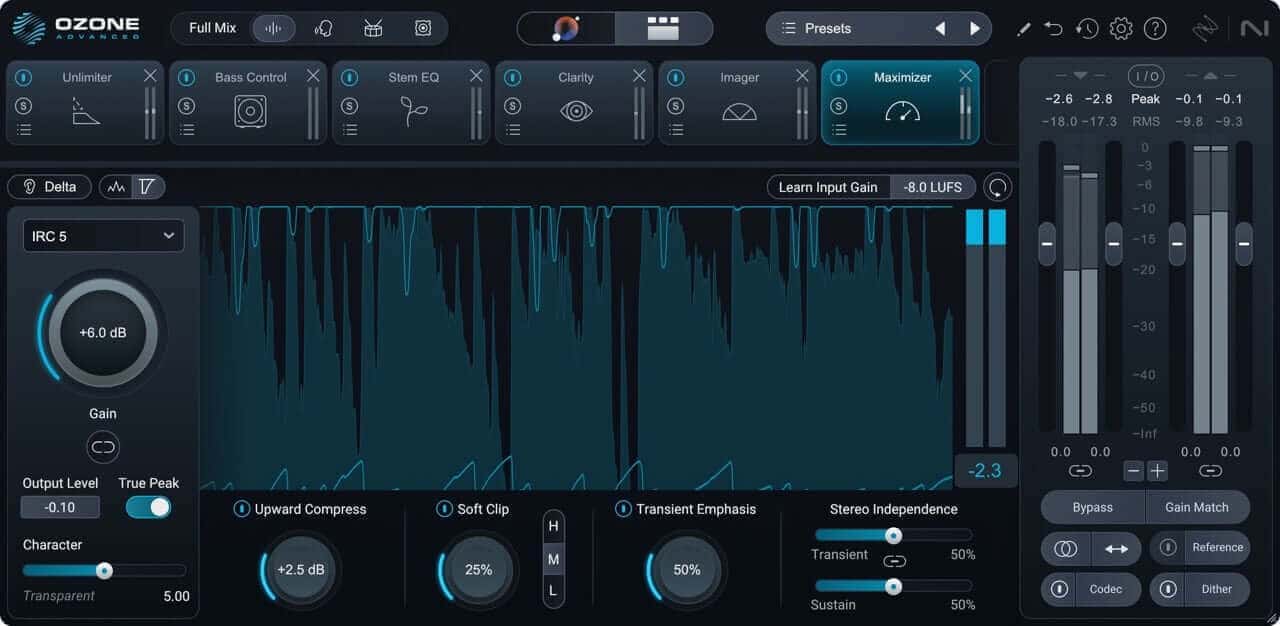
Ozone 12 Maximizer
On specific songs, he’ll tend to load different limiter – usually the Maximizer in Ozone – and “work backwards to remove the peak reduction out of the TC.” This allows him to adjust the overall, controlled level of the output at one place and control the amount of peak reduction on a per-song basis if needed.
If he worked the other way, he’d “end up getting really stuck when you start limiting stuff, because as I'm sure you know, limiters can completely change the tone. They're the most destructive of all things.”
Take equalization, for instance: “You can spend hours getting your sub bass exactly where you want it,” says Joe, “and then you can spend half an hour just trying to find a limiter that doesn't take that sub bass out.” That’s not a position he wants to be in. He’d rather work into his limiter.
“I know that anything I'm adding earlier on, if it modulates badly with the limiter, I have to change that.”
Joe likens this methodology to tape recording, where you'd need to establish your loudness limits before you started tracking.
“I’m using that holistic methodology to get it together,” Joe says. That way, if the album changes in the course of his tenure with it – if new music comes in, let’s say – it’s very easy to work what comes. “I could add a new track to the album, and everything will still fall into place because those limits are already.”
So, to recap:
- Start with a master safety limiter on your master channel
- Normalize all to-be-mastered tracks to the same loudness level (your ear being the final judge of that metric)
- Find the loudest passage on the record and use it to adjust your desired LUFS target and output ceiling level with the master limiter
- On a song-by-song basis, adjust different limiters to handle the gain-reduction appropriately for each track – taking the gain-reduction work off the master limiter’s plate.
- Leave the master limiter as a sort of overall gain control of the limited tracks
Joe thinks holistically: album chains over stacked plugins
Again, holistic mastering is the name of the game. That’s why Joe likes to build an album chain for projects.
“I'll listen to the tracks, and I'll build some general EQ settings and compressors,” Joe told me. “I'll put them on the channel strip where I think I'm going to put them, and then I bypass them.”
In a way, he’s thinking as though “I have an analog chain and I've patched it all in,” waiting, in bypass, to be switched on one by one.
Sharing processes amongst songs has virtues for cohesive records.
“I might have a tape emulator or a soft clipper or something that every single track is going into,” Joe told me, “almost like a master tape machine that will glue the whole thing together.
In fact, using the digital tools on offer these days, Joe says “you can kind of make your own bespoke box tone for the whole album, but then not have to do any compression for the whole album.”
On digital masters, Joe literally imports each song into the DAW on a different track and feeds them to the same output bus (where that safety limiter sits).

Mastering engineer Joe Caithness
He frequently repairs “overdone” mixes with modern tools
Much of Joe’s work involves reviving overly crushed or poorly archived material. It could be a video game that was never meant to see a turntable or hi-fi system in the first place, or a harsh digital remaster from the early 2000s. Either way, it tends to be material that is “really, really badly overdone.”
With today’s tools, however, Joe can do things he’s never done before, including:
- Restoring dynamics to overly crushed material
- Fixing the EQ balance of constantly shifting and dynamic material.
- Rebalancing specific elements within the mix if needed.
He was quick to mention how tools like the Unlimiter Module in Ozone are handy for these cases.
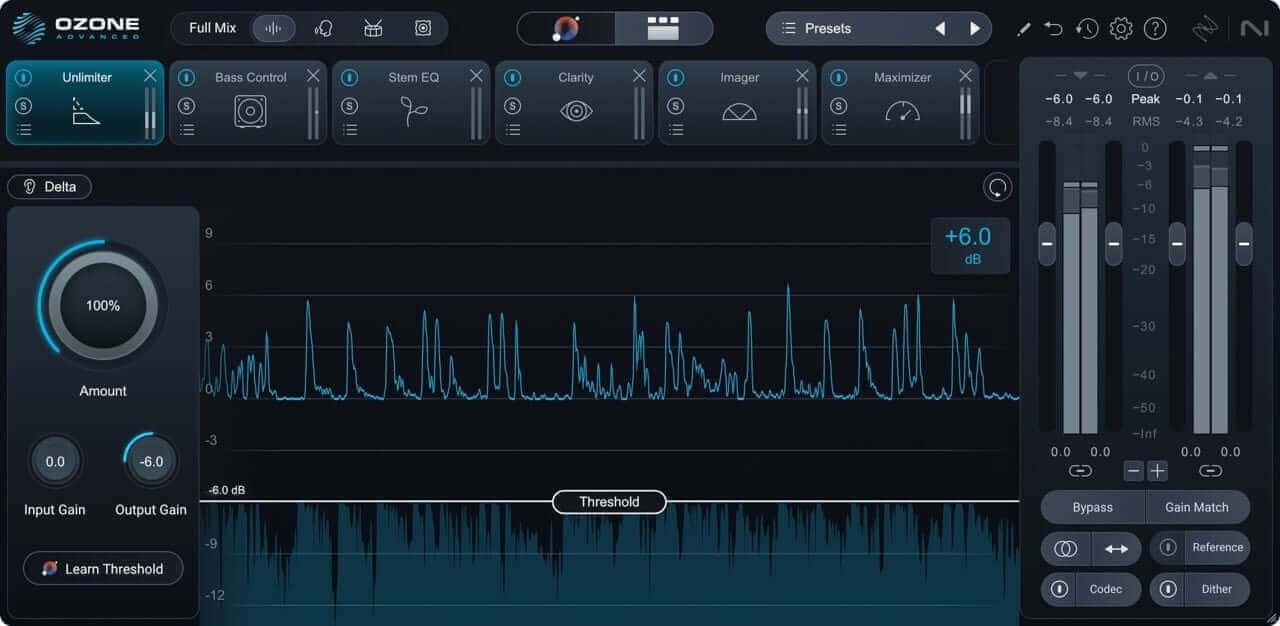
Ozone 12 Unlimiter module
“Unlimiter and a couple of other bits are really good for undoing things that five or six years ago were almost impossible to undo,” he told me.
One of his favorite tricks is using a dedicated high-frequency limiter to remove “the harmonics of super hard clipping” in conjunction with Unlimiter to “build the peak back up” to “as far as it should have done originally.”
As for the resonant suppressors, at first, he was hesitant to even use them. “I resisted it for years because I don't like to jump on the hype much,” he told me. But then he found that spectral resonant suppressors could help him rescue projects that needed the help, allowing him to sculpt frequency areas that he “used to have to cut out entirely.”
Finally, Ozone’s Stem EQ comes in handy for rebalancing individual elements, mostly vocals.
“With the latest release,” Joe told me, “I find myself using Stem EQ on vocals often to reduce the amount of high frequency processing – such as de-essing – where the mix has inconsistent balance between high frequency elements. Stem EQ has opened up a few new remastering ideas for me. I am keen to get out of the toolbox.”
These tools even help him with mastering for vinyl formats, specifically remasters of overblown material, or vinyl releases of video game soundtracks never meant to meet the stylus.
Using the Unlimiter on overly squashed material, Joe has new tools for “when the vocal has been clamped, or when the guitar solo comes and the snare changes by 2 dB.”
“I can kind of cheat and get some of it back through all kinds of clever processing to the point that it probably sounds closer to the mix than it did to the super-smashed master,” he says. “Then I can do what I want to this sort of imaginary mix.”
There is no single "correct" way to master for vinyl
Joe is emphatic about this point: there is no universal vinyl mastering specification, as methodologies vary from pressing plant to pressing plant.
“The biggest piece of misinformation about doing a master for vinyl,” he told me, “is that there is ‘a way’ to do it – because there literally isn't.”
Joe’s advice? “Get off the forums,” first and foremost. Then, find out who’s doing the vinyl cutting and get in touch with them directly. “If it's a good pressing plant, they can send you a PDF, or they can put you in touch with the production manager.”
Once you know specifically what the presser wants in terms of format and frequency requirements, then you can master to their standard.
Take “GZ for example,” Joe said, referring to the biggest vinyl pressor in Europe. “They've got certain things that they put on the website.”
Those things are very specific: “they have quite extreme requirements for low frequency phase.” Joe will meet those requirements as closely as he can, given the material he was given, and then make sure his client is okay with those changes.
But for an American plant working in Lacquer, the workflow could be very different. The point is identifying the specific requirements of your chosen vinyl cutter so you can “have that in front of you when you're working.”
Make your own detailed presets
Lots of engineers have their own dedicated presets that they’ve made themselves. Joe’s delve into aspects of processors people might not pay as much attention to – for instance, sidechain filtering.
Joe’s favorite compressor is Plugin Alliance's Cenozoix, made by the same company that programmed beloved EQ Kirchhoff. In fact, “Cenozoix has a mini Kirchhoff in the sidechain.” In conjunction with Cenozoix’s model of an API 2500, he uses this sidechain to basically rebuild the original hardware sidechain path – but you can change it.”
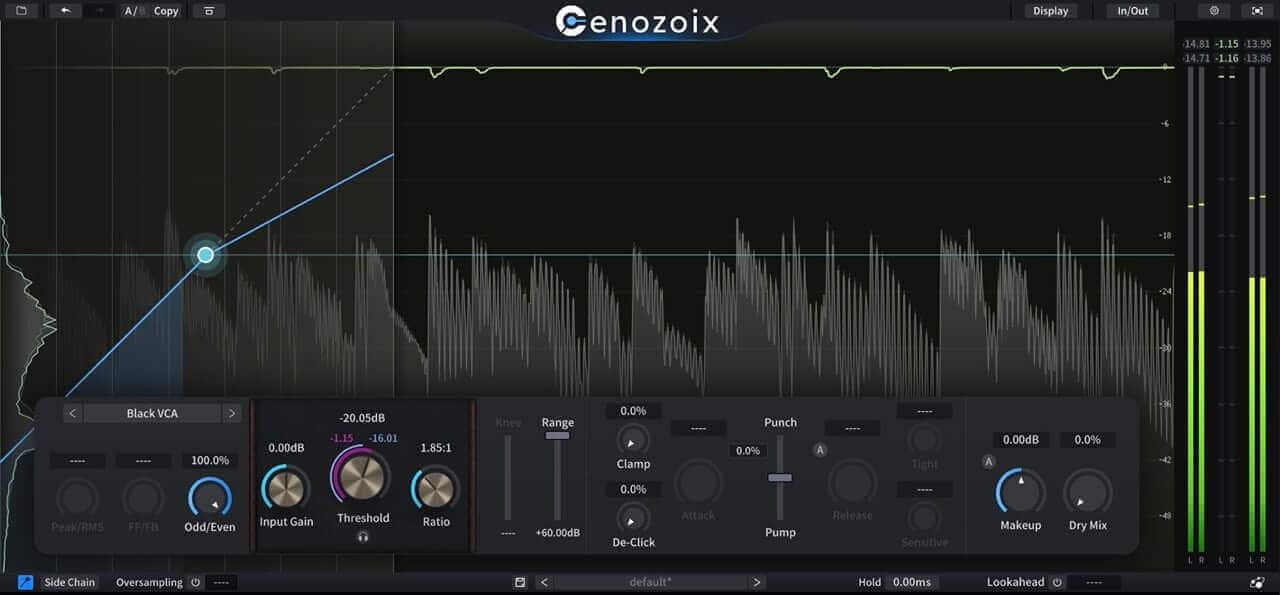
Three Body Technology Cenozoix compressor on bass, sidechained to kick
Like many mastering engineers, Joe favors this compressor for material that’s “a little bit too harsh and a little bit too brittle,” he told me. “Because of the sidechain, if there’s any really harsh vocals or cymbals, it will squish [them] down very nicely.”
So Joe made himself a bunch of presets for the sidechain of his favorite 2500 emulation, categorizing them as “dance, rock, etc.” That way, “when I'm doing like any heavy rock stuff, I literally just put that plugin on the way I used to have the hardware set. And within like, literally 10 seconds, I've got the setting, I just don't think about it again.”
Joe also uses presets for vinyl exports – remember, these have different specifications depending on who is handling the cutting.
“For example,” he told me, “most of the stuff I do with GZ, I basically have a preset that pretty much matches their recommended specs.” This is important because their specs have frequency constraints. “They’ll literally tell you where they’re going to put filters. Like, anything over 19 kHz? They’re just going to filter it out.”
“There’s absolutely no point to modulating loads of interesting harmonics and sending [the file] in 96 kHz if it's just going to be cut off,” Joe says. So it’s far better to have a preset that allows you to do the filtering yourself – and accommodate any potential loss in brightness.
Go-to tricks for presence and low end cohesion
These aren’t presets as much as techniques that are beneficial for working within the constraints of vinyl media as a whole – though it’s worth understanding and implementing them in strictly digital masters, too, if the material calls for it.
Controlling the presence of vocals with mid/side Processing
Joe calls this trick “audio osteopathy,” because you’re essentially dealing with the harshness of a vocal by pushing it to a place it’s not normally found.
Here’s the basic procedure:
- Use a de-esser or a dynamic high-frequency processor to target and soften harsh material in the vocals
- Use this effect on the center (i.e., “mid” or “sum” channels)
- Add a compensating and high-shelf boost with a mid/side equalizer on the sides (or “difference” if you think of it that way)
The first part of the process might dull the proceedings, and you will lose “some of the aggression and focus” in the center. Losing it might not be the right phrase, however, since the sides will be brightened in response.
“The vocal still sounds really bright,” says Joe, “but it's the stereo elements of the vocal.” In a vinyl release, this helps ensure that “the cutting engineer isn't going to put loads of acceleration limiting on the whole thing, or a high shelf that takes down everything – the strings, the drums.”
Controlling stereo bass without creating phase anomalies
It’s a common misconception that a pressing plant will reject a master with stereo bass content. The real culprit, most of the time, is out-of-phase bass content, and Joe has a tip for this as well:
- Generate harmonics from sub information on the side/difference channel with some sort of exciter plugin
- Use a mid/side equalizer to filter out offending sub information after you’ve sent it to the exciter
This technique allows the listener to perceive the intended effect of any out-of-phase bass content as harmonic information, rather than unstable wobble that might throw the lathe off course.
You can create this effect in Ozone as follows:
- Use the Exciter set to mid/side mode
- On the sides, add gentle harmonics to the subs, so that they excite the low mids
- Follow this instance with Ozone EQ in mid/side mode
- Use the Imager, if need be, in the lows to recover side information
Use RX to find and fix what others miss
Joe describes himself as a "details guy," and that's not an understatement. His quality control process is comprehensive and catches issues, which is a blessing in video game soundtracks, where so many file formats are intermingled.
One time, Joe received files that were going to be “uploaded to a portal, so that people could purchase and download [them],” but he quickly noticed that it “played at the wrong speed. I found sample rate conflicts. Everything you could ever imagine I found in audio that was intended to be released.”
He was able to spot these issues visually, as well as audibly, thanks to RX . Everything from the Spectrogram to the Batch Processor comes in handy for “being able to spot [issues], fix it, have no changes to the audio whatsoever apart from the fact that it's got a low pass filter on it from being down-sampled.”
The work doesn’t stop there: keeping the organization in line is of the utmost importance, because he has to deliver the client “exactly the same folder structure,” as what they sent to him, “keeping it so neat that they can just look at it and go: ‘that's right. Send it to the distributor!’”
This is all because “a release might have a CD box set, a two LP version, a six LP version, a digital master, an additional digital master,” Joe said. They all have to have the right “headroom, loudness, metadata format: everything has to be one release basically. So that's what I do. I do a lot of things like working on one project for two weeks, nonstop sort of stuff.”
Learn the difference between stereo bus processing and actual mastering
With so many AI tools and mastering assistants out there, many people “think about mastering as EQ and limiting,” Joe told me. “You know, and uploading it.”
But Joe emphasizes that mastering is so much more than stereo bus processing.
“There's a lot more to it,” Joe said. “Like, I can make a production master for anything you want. If you've got a DDP (digital description protocol) that's wrong, I can fix it in seconds, you know? I've fixed up ISRC codes for people, translated metadata, and made a new DDP, things like that – like actual mastering, not just stereo processing.”
That’s the job, because a mastering engineer is the last person in line, often dealing with people “who are not musicians – like label people – who are just like, ‘I've been given all this stuff, here's a spreadsheet, here are a couple of folders, here's some notes. Turn this into a record.’”
He emphasized this: “It’s actually not as easy as people think it is.”
Know your role as a mastering engineer
In talking to Joe, what struck me wasn’t just the technical fluency. It was the posture he brought to all of it. The job, as he sees it, isn’t about showing off taste or stamping a personality onto someone else’s music. It’s about stewardship. You’re shepherding fragile, often historically messy audio into a format that will outlive both you and the gear you’re using.
That means caring enough to work slowly when the world around you is screaming to work fast, listening past the obvious problems to the ones hiding underneath, and building systems that won’t fall apart the moment a client emails two months later with a revision.
If there’s a lesson here for the rest of us, it’s that yes, the tools of our age may help speed up a workflow, but they’re nothing without an organized and thoughtful person at the helm.
This is why Joe often sees the conversation about encroaching AI as a bit silly. “We all use AI,” he says, “but to suggest any serious label or artist would ever consider outsourcing the final stage of their production to a closed box processor is for the birds.”
Because that’s what mastering is, at its core: the human art – and science – of paying attention to the details.
That’s Joe’s ultimate message for all of you. “People want to work with engineers they feel will be invested and interested in their work,” said Joe. In order to do that, it pays to be mindful of all the details.