
Table of Contents
Ever isolate a vocal and come across an unwelcome instrument in the mix? That, my friend, is mic bleed: sound from one source picked up by a mic meant for another. It isn't always bad. We'll cover when bleed helps and when it hurts, how it happens, how to reduce it while recording, how to remove it in post, and how to use it to your advantage. Let's begin.
Follow along with this tutorial using iZotope RX and Neutron.
What is mic bleed?
Mic bleed – also called microphone bleed, spill, or leakage – happens when a mic picks up a source it isn't pointed at. You'll usually run into it in one of four forms:
- Headphone bleed: the click or backing track leaking from a performer's headphones into their mic
- Instrument bleed: a loud instrument picked up by other mics when musicians play in the same room
- Drum bleed: hi-hat and cymbals spilling into the snare, tom, and vocal mics
- Podcast mic bleed: one host's voice picked up by another host's mic
Is mic bleed always bad?
Nope. If it still sounds good with both mics up – your instrument mic and the unintentional one – then it's not bad bleed, it's good bleed. It only becomes a problem when it stops you from editing or processing one source without changing another.
| When bleed helps | When bleed hurts |
|---|---|
| Live and jazz records where the band plays together | You need to edit, comp, or replace one part |
| It adds room sound and glues instruments together | Phase issues make sources sound thin or hollow |
| The mix sounds good with every mic up | EQ or compression on one track changes another, like a brighter vocal that also brightens the hi-hat |
| You want a natural, played-together feel | Podcast voices double up and sound distant |
How does mic bleed happen?
A stray source can get into a mic in a few ways.
Headphone bleed
Most notably, bleed can come right through the headphones and into the mic, especially if the performer is tracking alone and likes their headphone feed loud. Singers are the usual suspects here.
Bleed between instruments in the same room
Bleed also happens when several musicians play in the same room. One instrument – say, a piano – can overpower whatever isolation you've set up, like gobos (an acoustic isolation panel) or glass isolation booths. Then the piano leaks into the acoustic bass, drum, or electric guitar mics. Here's a bass track with prominent piano in it:
This can even be intentional, and it can add to the cohesion of a track. I personally love mixing jazz records where bleed is all over the place. With the tools I'll get into shortly, I can make some really creative decisions about how to use that bleed.
Bleed on multi-mic'd instruments
Bleed also shows up on multi-mic'd instruments in a way engineers often hate with the fire of all their being. The prime example is the hi-hat on a drum kit. Steve Albini, blessed be he, once said the hi-hat gets everywhere. He wasn't wrong.
If people are playing in the same room at the same time – particularly at a concert – you're going to get some bleed. The vocal mic will probably have some drums in it. The drum mics will probably have some of the band. It goes with the territory.
Podcast mic bleed
Over in post production, podcasts can have bleed from one host into another's mic, and this too can be exceedingly annoying. It's the same principle as recording a band in one room: put people next to each other, and each mic picks up both of them.
There are things you can do with mic placement, but they often run counter to what the video side of a podcast needs. More on this later. Well, actually, now.
How to prevent mic bleed while recording
If you're lucky enough to be recording the session, you have a chance to fix bleed at the source. Closed-back headphones, polar patterns, isolation panels, and room treatment all help – but each one comes with a catch.
| Technique | How it reduces bleed | The catch |
|---|---|---|
| Closed-back headphones | Keep the headphone mix out of the mic. Open-back headphones are going to get signal all up in that mic. | Some singers take one ear cup off to hear themselves better, and some performers don't want headphones at all. Let them. It's much better than bullying a singer into an uncomfortable situation, and their performance will suffer if you don't. |
| Acoustic treatment | Cuts down reflections off hard surfaces like wood walls, mirrors, and windows, which tend to sound cheap and terrible in a mic | Go too far and you squeeze the life out of the instrument and make the mix harder. There's a science to it [TBD: link to home studio treatment article]. |
| Gobos and iso panels | Block sound between instruments, and work to a surprisingly effective degree on directional sources like horns | Same story: they can color the sound, perhaps negatively |
| Directional polar patterns | Point the mic's least sensitive side at the sources you don't want | Probably your best bet at the source, but try as you might, you won't get rid of bleed entirely |
| Phase-aware mic placement | Uses mic distance and instrument placement so the bleed accentuates what you want | You really have to know what you're doing, and it takes time – which can cost you the spark of a performance |
Choose a polar pattern that rejects bleed
Mic placement and selection is important. An omnidirectional mic picks up sound from all directions. A cardioid picks up sound in a heart-shaped pattern: most sensitive at the front, most rejecting at the rear. For the best rejection of sounds you don't want, a figure-8 is your best bet. It picks up audio at the front and back and is very dead on the sides.
| Polar pattern | Picks up | Rejects | Best for |
|---|---|---|---|
| Omnidirectional | All directions equally | Nothing | Room sound when bleed isn't a concern |
| Cardioid | The front, in a heart-shaped pattern | The rear | Most close-mic'd single sources |
| Figure-8 | The front and rear | The sides | Aiming the side null at a loud source nearby |
Use mic placement to make bleed work for you
Somewhat counterintuitive but true nonetheless: if you learn about the science of wave propagation, you can use mic distance and instrument placement to create phase relationships that accentuate what you want out of a sound. You're aiming for the best sound possible right there in the room, and it frequently takes a while to set up.
A helpful tip: monitor in mono when you mic instruments this way. If each instrument sounds full and clear and lovely through all the mics in mono, you're probably good to go in stereo.
Just keep the clock in mind. A musician who's spent three hours banging on a tom to serve your miking scheme might not be primed to give you their best performance!
How to remove mic bleed in post production
What if you didn't track the session? Start by deciding whether the bleed is actually a problem. Then work from the least invasive fix to the most: time and phase alignment, manual editing, gating, and finally iZotope's machine learning tools.
| Method | Best for | Watch out for |
|---|---|---|
| Time and phase alignment | Live records, podcasts, multi-mic'd drums | Do this first – gating and EQ can't fix bad phase |
| Manual editing and strip silence | Toms, podcasts with clear pauses | Tone changes when sources overlap |
| Gating | Drums, podcasts | Timbre shifts as the gate opens on overlapping sources |
| RX 12 De-bleed | Vocals, snare, toms, cymbals, guitar, piano | Use the least amount needed to avoid artifacts |
| RX 12 Dialogue Isolate | Noise and reverb in dialogue | Targets noise, not a second voice |
| RX 12 Music Rebalance | Bass, full drum submixes | Works on whole sources, not individual mics |
Start by telling good bleed from bad bleed
Remember: not all bleed is bad. You might, however, make it bad with downstream processing. It helps to think of the two instruments as one group you work on together. That means busing them to the same group and processing them the same, or using linear-phase EQ on both channels to preserve their phase relationship. Either way, the least amount of processing will do.
Here's an example of bleed between two instruments sounding good:
I can make this bleed sound bad if I mess with one track's EQ:
Align time and phase
If the bleed between two instruments is making processing a nightmare, experiment with time-aligning or phase-aligning one to the other. You can do it by sight and sound – literally watching the waveforms and dragging one until it looks locked in phase:
For live records, I find this technique to be a crucial starting point. Same for podcasts. All the gating and fancy processing in the world will fall flat if the phase relationships aren't right.
Here's a short video showing the difference phase relationships can make on a mix. It's from a promo video I made last year, but it does the trick.
Edit manually
If you have the time – or it's not too hard to do – simply muting regions where an instrument isn't playing or a podcaster isn't speaking is a great way to go. Many DAWs have a built-in strip silence function you can tune to catch bleed.
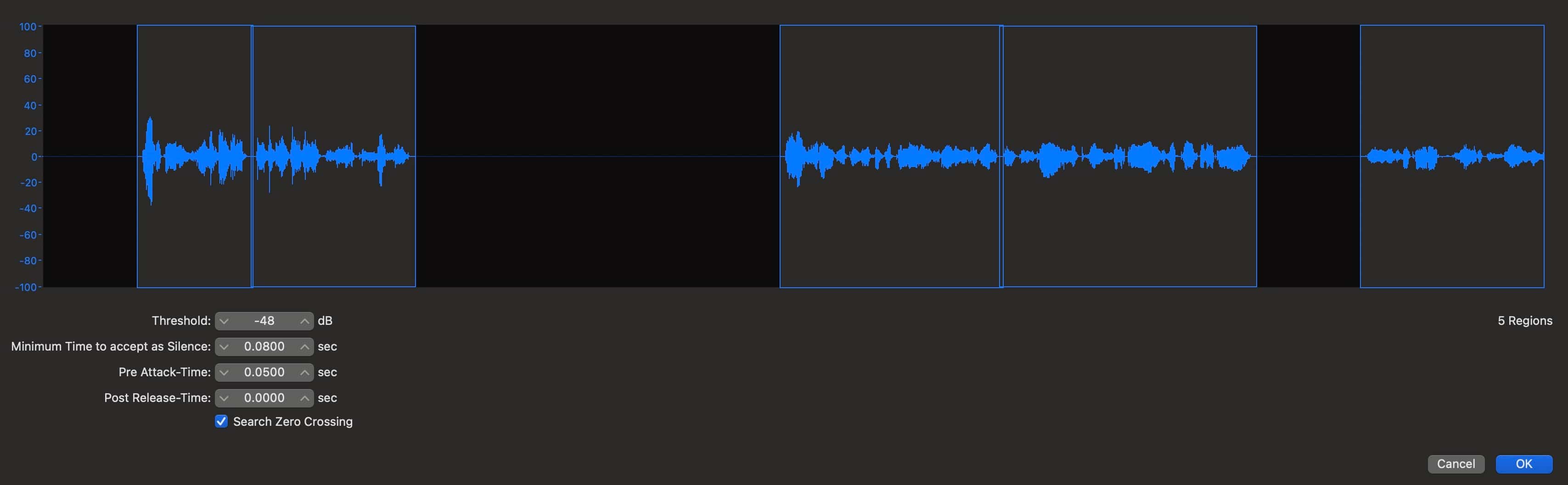 Strip Silence in Logic DAW
Do keep in mind, you'll hear a change in sonic character when two of these offending instruments (or people) overlap. No way around that. Personally, I find this method works best on toms.
Use a gate
You can use a single-band or multiband gate to pull bleed out of the sound. The Gate module in Neutron has two really useful presets for post production work.
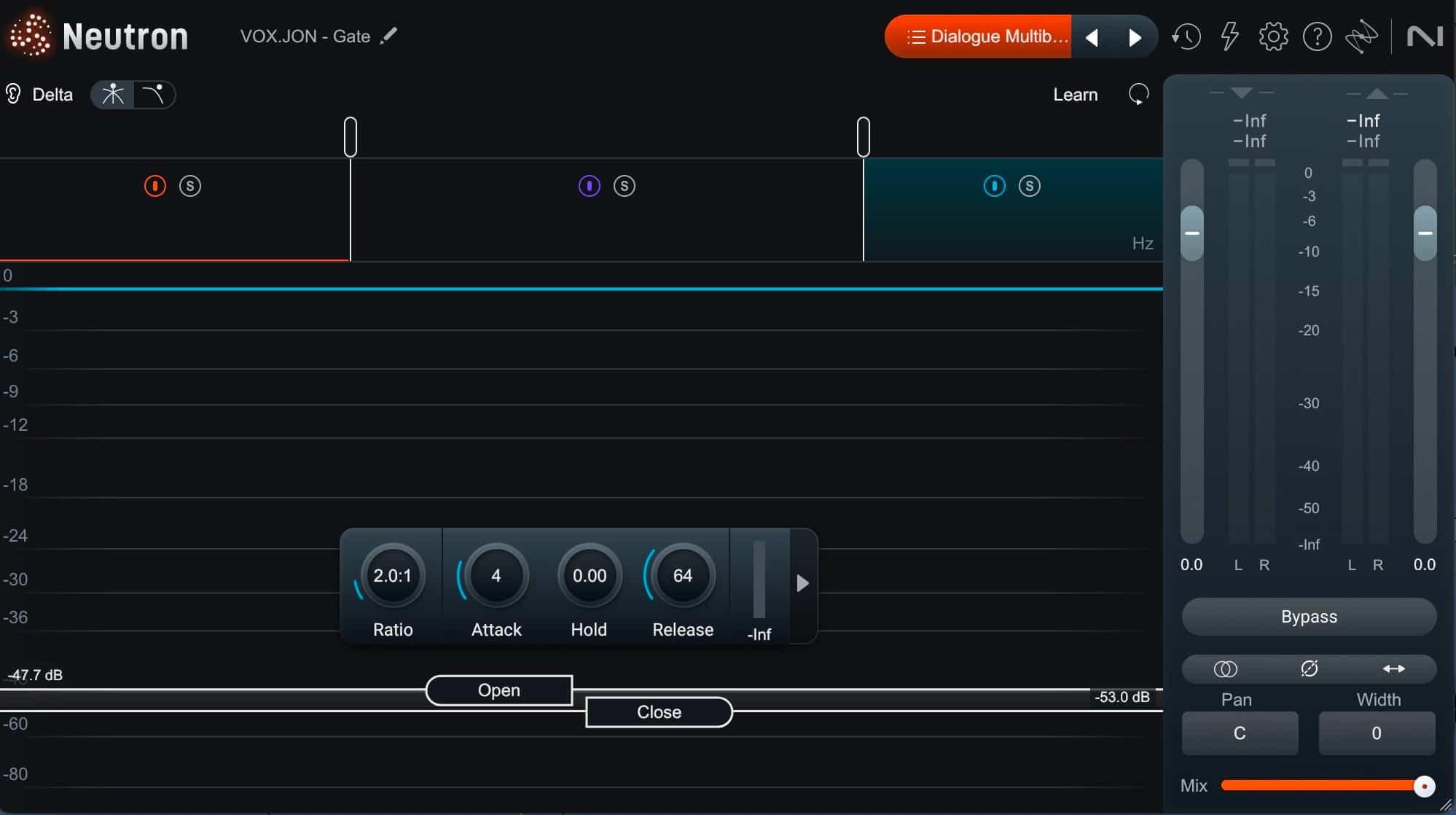 Neutron 5 preset - Dialogue, multiband gate
 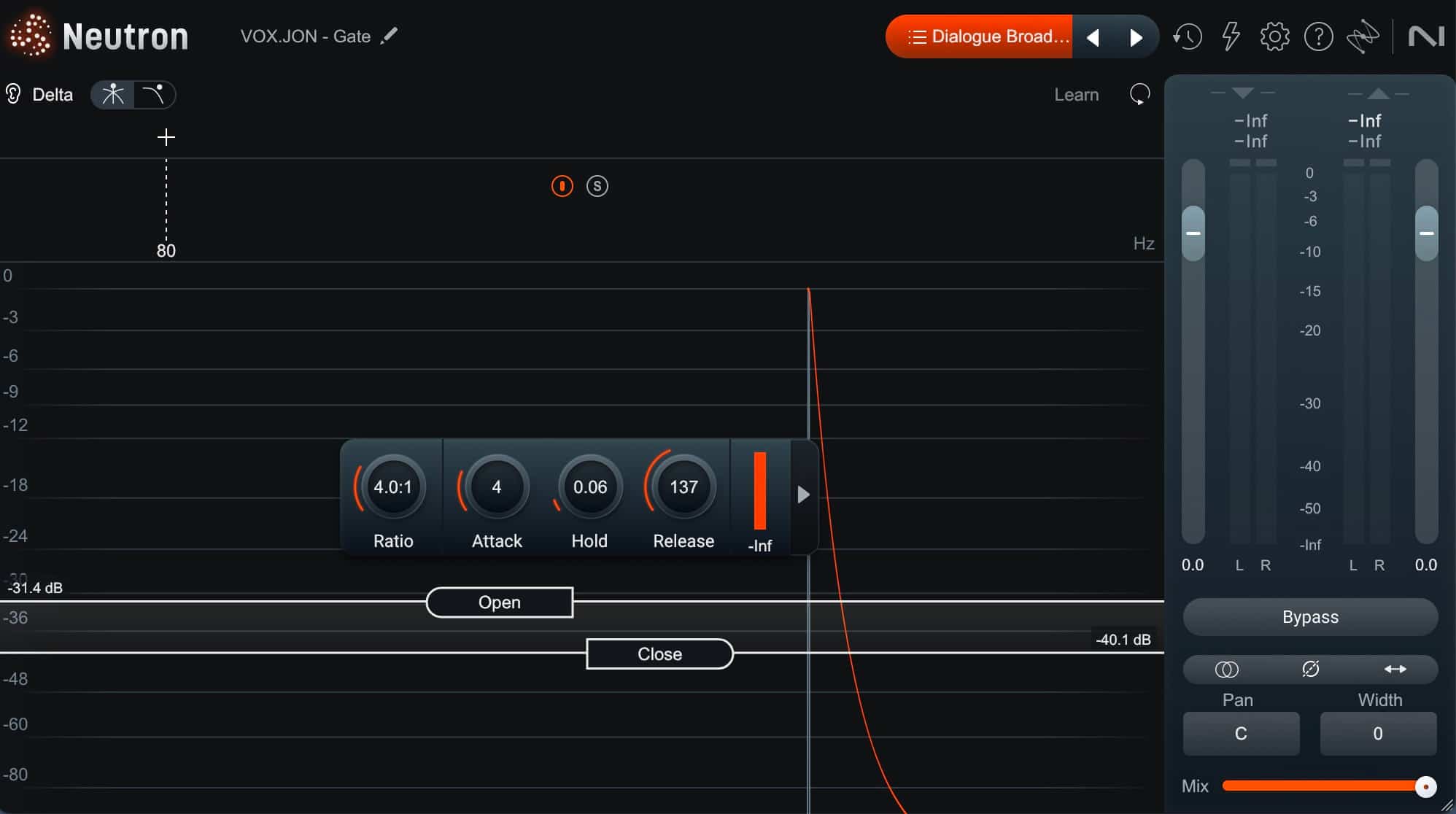 Neutron 5 preset - Dialogue, single band gate
Use iZotope's machine learning tools
Now we get to the creme de la creme: iZotope's smart tools for minimizing bleed.
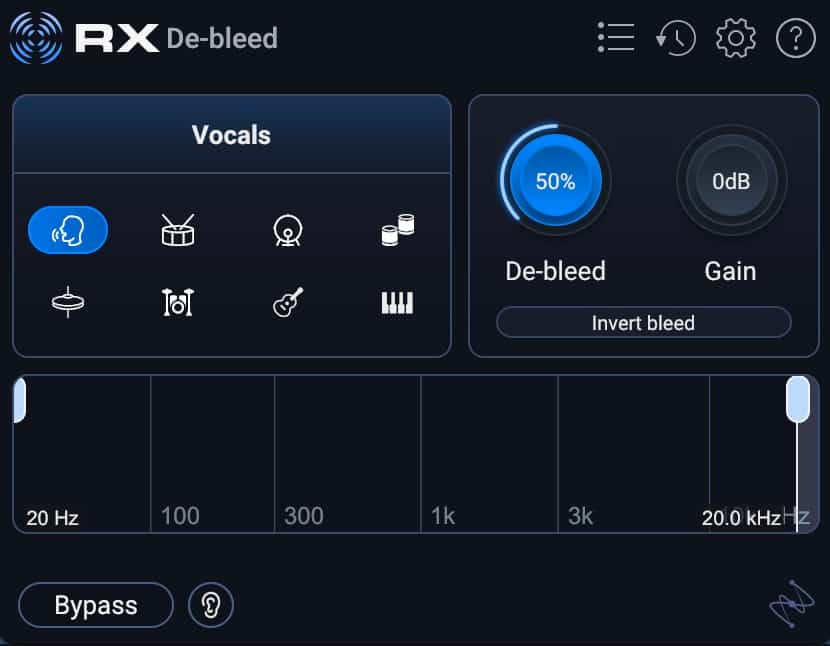 RX 12 De-bleed module
RX 12 De-bleed got a full rebuild with machine learning, and it's astonishingly good. It can pull the snare, toms, or cymbals out of a mic and work on vocals, guitar, and piano – no separate bleed reference track required. I wish I'd had it for some live records I did last year.
Observe how well it isolates a vocal.
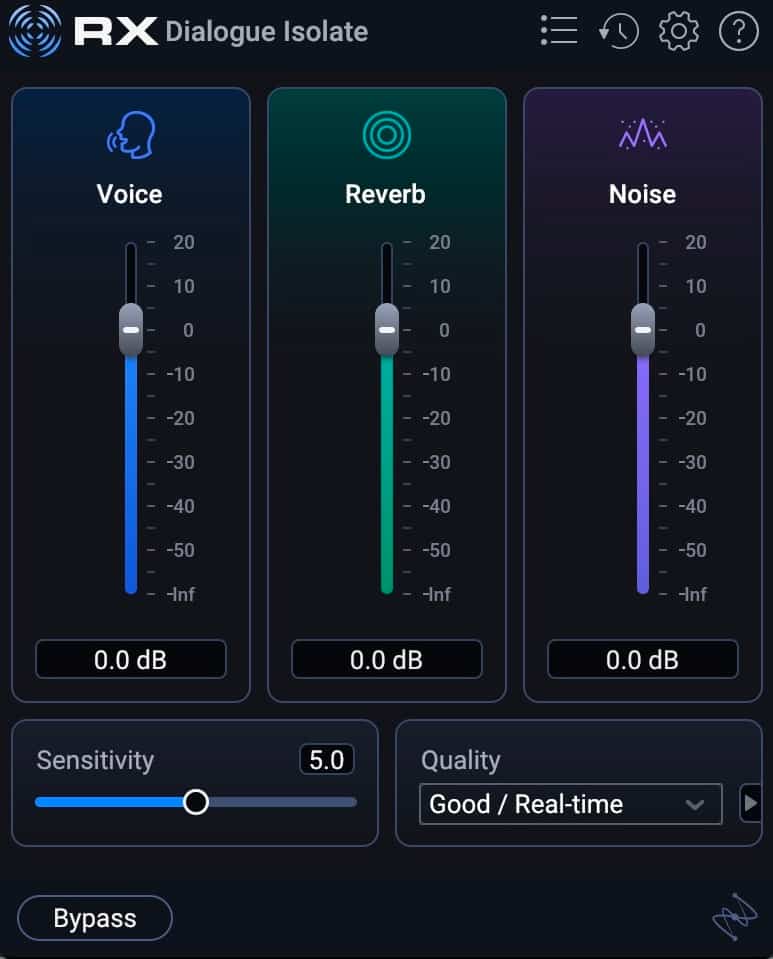 RX Dialogue Isolate module
Observe this remote interview, treated with Dialogue Isolate.
How to use mic bleed to your advantage
Don't be afraid to use all these tools together. Here's a method I love for live records: keep the bleed on the main track, where it sounds good, and take it out of your effects.
Say I'm working on a live rock concert recording. I want reverb and delay throws on the singer, plus parallel compression. Small problem: there's significant drum bleed in the singer's mic. Here's how the method works:
- Phase and time-align the vocal to the drums, so you don't have to gate the vocal. This way the character of the drums doesn't change whenever the singer is singing.
- Route your vocal to an aux track – or simply copy it and dead patch it (route it to nowhere).
- Run RX De-bleed on the copy to isolate the vocal.
- Send that clean copy into a parallel compressor, a reverb, a delay, or anything else.
Now your effects are free from bleed, but your vocal is still using it. That's thinking smart!
Get busy using bleed to your advantage
Now that you have the tools and a little bit of the know-how, you should be well on your way to dealing with mic bleed. Remember: just because there's blood in the name, you need not fear it. Blood is the stuff of life, after all – and the same goes for bleed.
FAQs
What causes mic bleed?
Mic bleed happens when a microphone picks up sound from a source other than its own. Common causes are loud headphone mixes, several musicians in one room, close mics on a drum kit, and podcast hosts sharing a space.
How do you stop headphone bleed?
Use closed-back headphones and keep the headphone mix only as loud as the performer needs. If a singer prefers one ear cup off, let them – then clean up the bleed in post with iZotope RX De-bleed.
How do you fix podcast mic bleed?
Start by time-aligning the hosts' tracks. Then mute or gate each mic when that host isn't speaking. For crosstalk you can't edit out, try a machine learning tool like iZotope RX De-bleed.
Can you completely remove mic bleed?
Not always. Alignment, editing, and gating reduce bleed, and iZotope RX De-bleed can isolate a source with high precision. When two sources overlap in time, some change in tone is hard to avoid.