

Table of Contents
Nobody said mixing vocals would be easy, but with powerful tools and some knowledge of tips and tricks to back you up, you’ll have everything you need to get those vocals finally sitting nicely in your mix.
In this article, we’re going to walk through six intuitive plug-ins for mixing vocals and teach you how to effectively use each one to improve your vocal mixes, including a free plug-in, the Vocal Doubler. We’ve also sprinkled in some “quick tips” throughout the article to give you some extra tricks to help you up your vocal mixing game. Let’s get rolling, shall we?
Let’s start with a free plug-in: Vocal Doubler
Vocal Doubler is a free plug-in that creates a natural doubling effect, adding richness and depth to any vocal track. Lead vocals are often supported with multiple vocal layers to add emotion, build intensity, and give your choruses and hooks a boost — if you're needing to add a little bit of width to your vocal, Vocal Doubler is the first plug-in I go to. You can download it for free below.
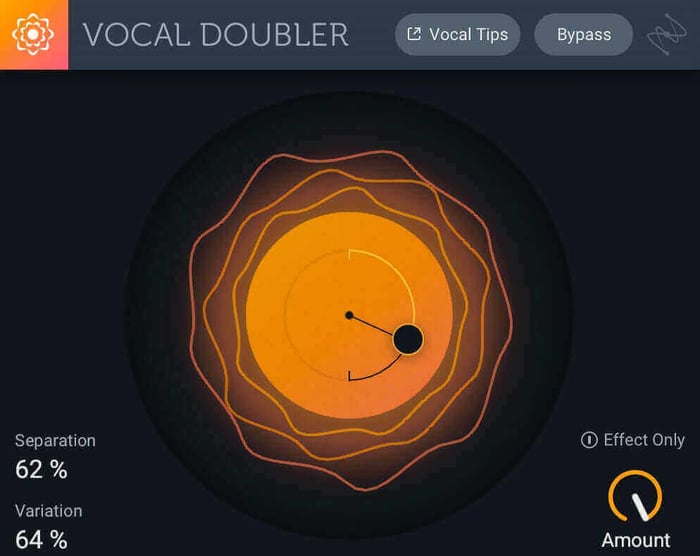
Vocal Doubler plug-in
Be sure to run Vocal Doubler on clean, "dry" vocals that don't have reverb or other effects. Vocal Doubler is super simple to use because it has only three parameters to edit:
Vocal Doubler parameter | What it does |
Separation | How "in time" the vocal double is with the original |
Variation | How much subtle pitch fluctuation is in the double |
Amount | How much of the doubling effect is mixed in with the original signal |
Hear how Vocal Doubler works:
Quick tip: Vocal Doubler also allows you to export only the effect with the "Effect Only" feature. This can be really useful for developing interesting vocal textures, or if you have Vocal Doubler on a bus track. For example, I like to send my main vocal to a bus that has Vocal Doubler on it. I'll turn on "Effect Only" and then add my reverb. This way, the reverb will be applied to a widened version of the vocal, making it sound very spacious and lush.
Vocal mixing 101
We've rounded up our most popular vocal mixing content to help you improve your skills.
What's a good vocal mixing workflow using iZotope tools?
If the free plug-in and mixing tutorials weren't enough, poke around iZotope Subscriptions, iZotope's toolkits dedicated to music producers and engineers. Enjoy a collection of plug-ins, sample packs, and more curated to help you get the sound you want. It includes some of our best vocal tools to assist you from the recording stage to the final mix.
How do you remove noise and repair a vocal recording?
iZotope RX is designed to repair audio by fixing all sorts of problems. If you're new to vocal production or want to save a bit of time cleaning vocals, try Repair Assistant in RX. Repair Assistant automatically finds noise within your vocal track and cleans it up.
Listen to a dry vocal before and after repair with RX:
If your headphones were a bit too loud during recording, or you're dealing with background noise or unwanted vocal artifacts, RX has a dedicated plug-in for each problem:
RX plug-in module | What it does |
De-bleed | Removes headphone bleed picked up in the vocal recording |
Voice De-noise | Removes unwanted background noise, like AC hum or sounds from the street outside |
Breath Control | Detects and suppresses breath sounds automatically, so you don't have to remove each one manually |
De-plosive | Acts as a virtual pop filter to tame plosives (popping sounds) in your vocal |
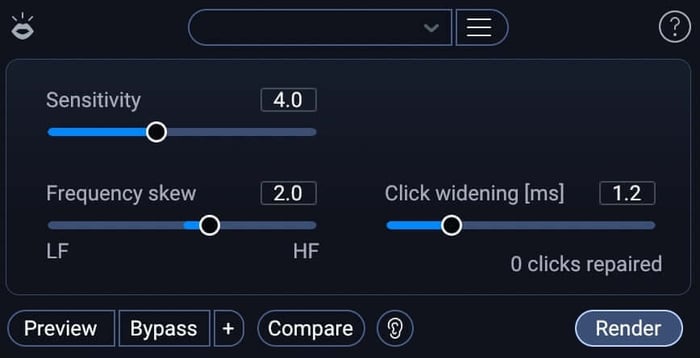 iZotope RX Mouth De-click
Mouth De-click automatically detects and reduces mouth noises like lip smacking and tongue clicks in your vocal recording.
Quick tip: It's always best to put the RX plug-in first on your channel strip since they typically work best on completely dry audio. While some of the RX plug-ins, like Voice De-noise and De-hum have zero latency, some RX plug-ins need to "look ahead" to work properly. This can cause a slight delay between pressing play and actually hearing the audio from your DAW. If I'm working with many RX plug-ins, I tend to add whichever RX module my vocal needs, bounce the entire vocal track to a new WAV file in my project, and then delete the original vocal track and channel strip. This way, I don't experience any unnecessary delays and I save my CPU to keep my project file running as quickly as possible.
How do you fix pitch problems in a vocal take?
The Pitch module in Nectar 4 provides powerful, transparent pitch correction designed to clean up vocal performances quickly. Whether you need subtle, natural tuning to keep a vocal in check or a fast, modern hard-tune effect, Nectar 4 makes it easy to snap your notes into key. Within its intuitive interface, you can quickly set your key and scale, dial in the correction speed, and adjust the amount of processing to reshape the overall intended performance without losing natural emotion.
Quick tip: Start by using Nectar 4’s Auto-Key detection (or set your project key manually) so the Pitch module knows exactly which notes your singer should be hitting. If you want a natural performance, keep the speed moderate so the transitions between notes feel organic. For a tighter, modern pop/hip-hop vibe, crank up the Correction speed and dial in the key tracking to lock every note firmly in place!
Hear the difference pitch correction with Nectar makes below:
How do you make a vocal fit into the mix?
After removing noise and correcting the pitch, it's time to add processing to sculpt the tone of the vocal. With nine different vocal processing modules to choose from (and the ability to change their order in the signal flow), Nectar is your one stop shop for processing vocals. Whether you need to add EQ, compression, or a handful of creative effects, Nectar has you covered.
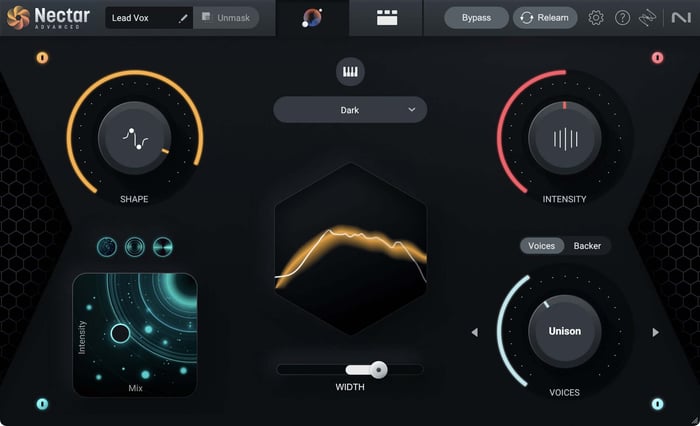 Nectar 4 Vocal Assistant
Here’s an example of before and after putting Nectar on one of my vocal takes.
In Nectar, you can apply several creative effects to make your vocal really shine:
iZotope Nectar 4 module | What it does |
Pitch | Applies pitch correction or changes the formant of your vocal |
Delay | Adds echoes |
Reverb | Gives your vocal a greater sense of space |
Harmony | Creates up to eight vocal harmonies |
Or, do a combination of all the above!
Want to learn more in-depth about vocal effects? In this audio effects article, you can find out every effect that vocalists should know. Hint: Nectar can do them all.
Adding this kind of processing to a vocal track will get you on your way to your finished vocal.
Quick tip: When using the Delay module, Nectar allows you to filter your delays with an EQ curve. To make sure your echoes don't get in the way of your main vocal and muddy up your mix, try shaving off some of the high and/or low frequencies from your delays. This will make sure they aren’t competing for attention, but will still be present enough to give your vocal that echoey effect.
How do you add creative vocal color and texture?
There are many plug-in options for adding creative vocal color and texture, but one that comes to the top of my list is iZotope VocalSynth 2. Like most audio processing, VocalSynth works best on audio free of clicks and artifacts, highlighting why the repair stage of vocal production is so important.
Watch what VocalSynth can do to a vocal below.
Quick tip: Use the MIDI mode in VocalSynth to allow you to control the pitch via MIDI. You can get some really interesting sounds by playing around with this, especially if the notes you play don’t quite match up with the timing of the original vocal. You can hear this VocalSynth technique during the intro of “Lakshmi,” a track I produced for vocalist Jenica Lake.
How do you add reverb to a vocal without muddying the mix?
Neoverb is an innovative reverb plug-in that actually listens to the audio being sent through it in order to unmask the original audio from the reverb. This means you'll get a rich reverb sound without having to worry about the reverb getting in the way of your vocal and muddying things up. In Neoverb, you can blend between three different types of reverb, and even use Reverb Assistant to help you craft a unique space that fits your song.
Hear some examples of Neoverb in action.
Quick tip: Although Neoverb makes creating your own reverb really easy, don’t be afraid to use the presets. I’ve been so impressed with the presets already loaded in the browser that I rarely bother starting from scratch anymore. My personal favorite Neoverb preset is called “Background Vocal Room.”
Common questions about mixing vocals
1. What is the best free plug-in for doubling vocals?
Vocal Doubler is a free iZotope plug-in that creates a natural vocal doubling effect using three controls: Separation (timing), Variation (pitch fluctuation), and Amount (how much of the effect blends in). Run it on clean, dry vocals for the best results.
2. What order should you process vocals in a mix?
A solid default order is: repair and noise reduction first with RX (RX plug-ins work best on dry audio, so they should sit first on the channel strip), then pitch correction with Nectar Pitch module, then tone-shaping and creative effects with Nectar, then character and texture with VocalSynth, and reverb with Neoverb last.
3. How do you remove background noise from a vocal recording?
RX's Voice De-noise plug-in removes unwanted background noise like AC hum or street sounds, and Repair Assistant can automatically detect noise issues in a vocal track and offer repair options.
4. How do you add reverb to a vocal without muddying the mix?
Neoverb listens to the audio passing through it and unmasks the original vocal from the reverb, so you get a rich reverb tail that doesn't crowd the vocal. Reverb Assistant and built-in presets, like "Background Vocal Room," help you get there quickly.
Try these vocal mixing tips on your projects
There are so many plug-ins available in Music Production Suite that can help you bring your vocal mixes to the next level. Get your copy of iZotope plug-ins and give some of the tips and tricks from this article a try. Happy mixing!
If you want more tips for vocal mixing, check out this article about how to get a professional vocal sound.