Skip to content
  • Music Production Mixing & mastering software
    • All Music Production
    • All products
      • All All products
      • Mixing
      • Mastering
      • Vocal processing
      • EQ
      • Reverb
      • Creative effects
    • Ozone
    • Neutron 5
    • Nectar 4
    • Bundles
      • All Bundles
      • Music Production Suite
      • Mix and Master Bundle
      • Subscription
    • Free plug-ins
  • Audio post Post production software
    • All Audio post
    • All products
    • RX 12
    • Bundles
  • Subscription Try it free
  • Deals
Support
USD

Country/Region

    No results found
  • Afghanistan USD $
  • Åland Islands EUR €
  • Albania USD $
  • Algeria USD $
  • Andorra EUR €
  • Angola USD $
  • Anguilla USD $
  • Antigua & Barbuda USD $
  • Argentina USD $
  • Armenia USD $
  • Aruba USD $
  • Ascension Island USD $
  • Australia AUD $
  • Austria EUR €
  • Azerbaijan USD $
  • Bahamas USD $
  • Bahrain USD $
  • Bangladesh USD $
  • Barbados USD $
  • Belarus USD $
  • Belgium EUR €
  • Belize USD $
  • Benin USD $
  • Bermuda USD $
  • Bhutan USD $
  • Bolivia USD $
  • Bosnia & Herzegovina USD $
  • Botswana USD $
  • Brazil USD $
  • British Indian Ocean Territory USD $
  • British Virgin Islands USD $
  • Brunei USD $
  • Bulgaria EUR €
  • Burkina Faso USD $
  • Burundi USD $
  • Cambodia USD $
  • Cameroon USD $
  • Canada CAD $
  • Cape Verde USD $
  • Caribbean Netherlands USD $
  • Cayman Islands USD $
  • Central African Republic USD $
  • Chad USD $
  • Chile USD $
  • China USD $
  • Christmas Island USD $
  • Cocos (Keeling) Islands USD $
  • Colombia USD $
  • Comoros USD $
  • Congo - Brazzaville USD $
  • Congo - Kinshasa USD $
  • Cook Islands USD $
  • Costa Rica USD $
  • Côte d’Ivoire USD $
  • Croatia EUR €
  • Curaçao USD $
  • Cyprus EUR €
  • Czechia EUR €
  • Denmark EUR €
  • Djibouti USD $
  • Dominica USD $
  • Dominican Republic USD $
  • Ecuador USD $
  • Egypt USD $
  • El Salvador USD $
  • Equatorial Guinea USD $
  • Eritrea USD $
  • Estonia EUR €
  • Eswatini USD $
  • Ethiopia USD $
  • Falkland Islands USD $
  • Faroe Islands EUR €
  • Fiji USD $
  • Finland EUR €
  • France EUR €
  • French Guiana EUR €
  • French Polynesia USD $
  • Gabon USD $
  • Gambia USD $
  • Georgia USD $
  • Germany EUR €
  • Ghana USD $
  • Greece EUR €
  • Greenland EUR €
  • Grenada USD $
  • Guadeloupe EUR €
  • Guatemala USD $
  • Guernsey EUR €
  • Guinea USD $
  • Guinea-Bissau USD $
  • Guyana USD $
  • Haiti USD $
  • Honduras USD $
  • Hong Kong SAR USD $
  • Hungary EUR €
  • Iceland EUR €
  • India USD $
  • Indonesia USD $
  • Iraq USD $
  • Ireland EUR €
  • Isle of Man EUR €
  • Israel USD $
  • Italy EUR €
  • Jamaica USD $
  • Japan JPY ¥
  • Jersey EUR €
  • Jordan USD $
  • Kazakhstan USD $
  • Kenya USD $
  • Kiribati USD $
  • Kosovo EUR €
  • Kuwait USD $
  • Kyrgyzstan USD $
  • Laos USD $
  • Latvia EUR €
  • Lebanon USD $
  • Lesotho USD $
  • Liberia USD $
  • Libya USD $
  • Lithuania EUR €
  • Luxembourg EUR €
  • Macao SAR USD $
  • Madagascar USD $
  • Malawi USD $
  • Malaysia USD $
  • Maldives USD $
  • Mali USD $
  • Malta EUR €
  • Martinique EUR €
  • Mauritania USD $
  • Mauritius USD $
  • Mayotte USD $
  • Mexico USD $
  • Moldova USD $
  • Monaco EUR €
  • Mongolia USD $
  • Montenegro EUR €
  • Montserrat USD $
  • Morocco USD $
  • Mozambique USD $
  • Myanmar (Burma) USD $
  • Namibia USD $
  • Nauru USD $
  • Nepal USD $
  • Netherlands EUR €
  • New Caledonia USD $
  • New Zealand USD $
  • Nicaragua USD $
  • Niger USD $
  • Nigeria USD $
  • Niue USD $
  • Norfolk Island USD $
  • North Macedonia USD $
  • Norway EUR €
  • Oman USD $
  • Pakistan USD $
  • Palestinian Territories USD $
  • Panama USD $
  • Papua New Guinea USD $
  • Paraguay USD $
  • Peru USD $
  • Philippines USD $
  • Pitcairn Islands USD $
  • Poland EUR €
  • Portugal EUR €
  • Qatar USD $
  • Réunion EUR €
  • Romania EUR €
  • Russia USD $
  • Rwanda USD $
  • Samoa USD $
  • San Marino EUR €
  • São Tomé & Príncipe USD $
  • Saudi Arabia USD $
  • Senegal USD $
  • Serbia USD $
  • Seychelles USD $
  • Sierra Leone USD $
  • Singapore USD $
  • Sint Maarten USD $
  • Slovakia EUR €
  • Slovenia EUR €
  • Solomon Islands USD $
  • Somalia USD $
  • South Africa USD $
  • South Georgia & South Sandwich Islands USD $
  • South Korea USD $
  • South Sudan USD $
  • Spain EUR €
  • Sri Lanka USD $
  • St. Barthélemy EUR €
  • St. Helena USD $
  • St. Kitts & Nevis USD $
  • St. Lucia USD $
  • St. Martin EUR €
  • St. Pierre & Miquelon EUR €
  • St. Vincent & Grenadines USD $
  • Sudan USD $
  • Suriname USD $
  • Svalbard & Jan Mayen EUR €
  • Sweden EUR €
  • Switzerland CHF CHF
  • Taiwan USD $
  • Tajikistan USD $
  • Tanzania USD $
  • Thailand USD $
  • Timor-Leste USD $
  • Togo USD $
  • Tokelau USD $
  • Tonga USD $
  • Trinidad & Tobago USD $
  • Tristan da Cunha USD $
  • Tunisia USD $
  • Türkiye EUR €
  • Turkmenistan USD $
  • Turks & Caicos Islands USD $
  • Tuvalu USD $
  • U.S. Outlying Islands USD $
  • Uganda USD $
  • Ukraine USD $
  • United Arab Emirates USD $
  • United Kingdom GBP £
  • United States USD $
  • Uruguay USD $
  • Uzbekistan USD $
  • Vanuatu USD $
  • Vatican City EUR €
  • Venezuela USD $
  • Vietnam USD $
  • Wallis & Futuna USD $
  • Western Sahara USD $
  • Yemen USD $
  • Zambia USD $
  • Zimbabwe USD $
  • Music production Mixing & mastering software
    • Mixing plugins
      • Neutron 5
      • Nectar 4
      • Tonal Balance Control 3
      • Insight 2
      • All mixing plugins →
    • Mastering plugins
      • Ozone 12
      • RX 12
      • Tonal Balance Control 3
    • Creative effects plugins
      • Trash
      • Vocalsynth 2
      • Neoverb
      • Catalyst Series
      • All effects plugins →
    • Plugin bundles
      • Music Production Suite 9
      • RX Post Production Suite 9
      • Mix & Master Bundle Advanced
      • Elements Suite
    • Learn
      • Beginner mixing guide
      • How to EQ vocals
      • Mastering for streaming platforms
      • Digital audio basics
      • All audio mastering articles →
  • Audio post Post production software
    • Repair and enhancement
      • RX 12 Advanced
      • RX 12 Standard
      • RX 12 Elements
      • VEA
    • Specialty tools
      • Equinox
      • Insight 2
      • Tonal Balance Control 3
    • Post production bundles
      • RX Post Production Suite 9
      • Music Production Suite 9
      • Everything Bundle
      • Elements Suite
    • Learn
      • Understanding spectrograms
      • Repairing a distorted audio track
      • Remove clicks and pops from audio
      • All audio post production articles →
  • Subscription Try it free
  • Learn Tips & tutorials
  • Deals
  • Country/Region

      No results found
    • Afghanistan USD $
    • Åland Islands EUR €
    • Albania USD $
    • Algeria USD $
    • Andorra EUR €
    • Angola USD $
    • Anguilla USD $
    • Antigua & Barbuda USD $
    • Argentina USD $
    • Armenia USD $
    • Aruba USD $
    • Ascension Island USD $
    • Australia AUD $
    • Austria EUR €
    • Azerbaijan USD $
    • Bahamas USD $
    • Bahrain USD $
    • Bangladesh USD $
    • Barbados USD $
    • Belarus USD $
    • Belgium EUR €
    • Belize USD $
    • Benin USD $
    • Bermuda USD $
    • Bhutan USD $
    • Bolivia USD $
    • Bosnia & Herzegovina USD $
    • Botswana USD $
    • Brazil USD $
    • British Indian Ocean Territory USD $
    • British Virgin Islands USD $
    • Brunei USD $
    • Bulgaria EUR €
    • Burkina Faso USD $
    • Burundi USD $
    • Cambodia USD $
    • Cameroon USD $
    • Canada CAD $
    • Cape Verde USD $
    • Caribbean Netherlands USD $
    • Cayman Islands USD $
    • Central African Republic USD $
    • Chad USD $
    • Chile USD $
    • China USD $
    • Christmas Island USD $
    • Cocos (Keeling) Islands USD $
    • Colombia USD $
    • Comoros USD $
    • Congo - Brazzaville USD $
    • Congo - Kinshasa USD $
    • Cook Islands USD $
    • Costa Rica USD $
    • Côte d’Ivoire USD $
    • Croatia EUR €
    • Curaçao USD $
    • Cyprus EUR €
    • Czechia EUR €
    • Denmark EUR €
    • Djibouti USD $
    • Dominica USD $
    • Dominican Republic USD $
    • Ecuador USD $
    • Egypt USD $
    • El Salvador USD $
    • Equatorial Guinea USD $
    • Eritrea USD $
    • Estonia EUR €
    • Eswatini USD $
    • Ethiopia USD $
    • Falkland Islands USD $
    • Faroe Islands EUR €
    • Fiji USD $
    • Finland EUR €
    • France EUR €
    • French Guiana EUR €
    • French Polynesia USD $
    • Gabon USD $
    • Gambia USD $
    • Georgia USD $
    • Germany EUR €
    • Ghana USD $
    • Greece EUR €
    • Greenland EUR €
    • Grenada USD $
    • Guadeloupe EUR €
    • Guatemala USD $
    • Guernsey EUR €
    • Guinea USD $
    • Guinea-Bissau USD $
    • Guyana USD $
    • Haiti USD $
    • Honduras USD $
    • Hong Kong SAR USD $
    • Hungary EUR €
    • Iceland EUR €
    • India USD $
    • Indonesia USD $
    • Iraq USD $
    • Ireland EUR €
    • Isle of Man EUR €
    • Israel USD $
    • Italy EUR €
    • Jamaica USD $
    • Japan JPY ¥
    • Jersey EUR €
    • Jordan USD $
    • Kazakhstan USD $
    • Kenya USD $
    • Kiribati USD $
    • Kosovo EUR €
    • Kuwait USD $
    • Kyrgyzstan USD $
    • Laos USD $
    • Latvia EUR €
    • Lebanon USD $
    • Lesotho USD $
    • Liberia USD $
    • Libya USD $
    • Lithuania EUR €
    • Luxembourg EUR €
    • Macao SAR USD $
    • Madagascar USD $
    • Malawi USD $
    • Malaysia USD $
    • Maldives USD $
    • Mali USD $
    • Malta EUR €
    • Martinique EUR €
    • Mauritania USD $
    • Mauritius USD $
    • Mayotte USD $
    • Mexico USD $
    • Moldova USD $
    • Monaco EUR €
    • Mongolia USD $
    • Montenegro EUR €
    • Montserrat USD $
    • Morocco USD $
    • Mozambique USD $
    • Myanmar (Burma) USD $
    • Namibia USD $
    • Nauru USD $
    • Nepal USD $
    • Netherlands EUR €
    • New Caledonia USD $
    • New Zealand USD $
    • Nicaragua USD $
    • Niger USD $
    • Nigeria USD $
    • Niue USD $
    • Norfolk Island USD $
    • North Macedonia USD $
    • Norway EUR €
    • Oman USD $
    • Pakistan USD $
    • Palestinian Territories USD $
    • Panama USD $
    • Papua New Guinea USD $
    • Paraguay USD $
    • Peru USD $
    • Philippines USD $
    • Pitcairn Islands USD $
    • Poland EUR €
    • Portugal EUR €
    • Qatar USD $
    • Réunion EUR €
    • Romania EUR €
    • Russia USD $
    • Rwanda USD $
    • Samoa USD $
    • San Marino EUR €
    • São Tomé & Príncipe USD $
    • Saudi Arabia USD $
    • Senegal USD $
    • Serbia USD $
    • Seychelles USD $
    • Sierra Leone USD $
    • Singapore USD $
    • Sint Maarten USD $
    • Slovakia EUR €
    • Slovenia EUR €
    • Solomon Islands USD $
    • Somalia USD $
    • South Africa USD $
    • South Georgia & South Sandwich Islands USD $
    • South Korea USD $
    • South Sudan USD $
    • Spain EUR €
    • Sri Lanka USD $
    • St. Barthélemy EUR €
    • St. Helena USD $
    • St. Kitts & Nevis USD $
    • St. Lucia USD $
    • St. Martin EUR €
    • St. Pierre & Miquelon EUR €
    • St. Vincent & Grenadines USD $
    • Sudan USD $
    • Suriname USD $
    • Svalbard & Jan Mayen EUR €
    • Sweden EUR €
    • Switzerland CHF CHF
    • Taiwan USD $
    • Tajikistan USD $
    • Tanzania USD $
    • Thailand USD $
    • Timor-Leste USD $
    • Togo USD $
    • Tokelau USD $
    • Tonga USD $
    • Trinidad & Tobago USD $
    • Tristan da Cunha USD $
    • Tunisia USD $
    • Türkiye EUR €
    • Turkmenistan USD $
    • Turks & Caicos Islands USD $
    • Tuvalu USD $
    • U.S. Outlying Islands USD $
    • Uganda USD $
    • Ukraine USD $
    • United Arab Emirates USD $
    • United Kingdom GBP £
    • United States USD $
    • Uruguay USD $
    • Uzbekistan USD $
    • Vanuatu USD $
    • Vatican City EUR €
    • Venezuela USD $
    • Vietnam USD $
    • Wallis & Futuna USD $
    • Western Sahara USD $
    • Yemen USD $
    • Zambia USD $
    • Zimbabwe USD $

    Account

    Other sign in options Log in / Create account
    • Orders
    • Profile

    Account

    Account

    Other sign in options Log in / Create account
    • Orders
    • Profile

    Your cart is empty

    Have an account? Log in to check out faster.

    Continue shopping
    • All posts
    • Audio mastering
    • Audio mixing
    • Audio repair
    • Dialogue editing
    • iZotope product news
    • Mixing vocals
    • Music production
    • Nectar
    • Neutron
    • Ozone
    • Post Production
    • Reverb
    • RX
    ✕

    10 steps to a quick master in iZotope Ozone

    10 steps to a quick master in iZotope Ozone

    Margaret Luthar Margaret Luthar Audio mastering | Ozone
    Oct 6th, 2025

    Mastering music is often seen as a “dark art,” but the phrase is really a misnomer – it isn’t any more of a secret than any other part of the production process. Learning how to critically listen and understand best practices to finish a mix are important skills for an engineer to learn, even if they aren’t always wearing the shoes of a mastering engineer. 

    The goal of mastering is to achieve a cohesive sound that stands up against other tracks in the same genre or playlist, or across an entire album. iZotope Ozone empowers you to make a quick master without compromising on quality, and the new features of  Ozone 12  improve your workflow even further, so you can focus on the art.

    In this article on mastering for beginners and experts alike, we’ll review the new and improved Master Assistant, how to control your low end with the new Bass Control, and explore some of the 25+ new Stabilizer targets, among other things. We’ll review these modules by revisiting mastering guidelines so you can work quickly and efficiently.

    Follow along with iZotope Ozone, the ultimate collection of mastering tools to help you make your tracks release-ready. 

     Get Ozone      


    Before we begin, let's take a listen to the difference mastering with Ozone can make for your track. Listening on good-quality headphones will give you the best audio experience when listening to subtle differences in mastering. 

    The song is "Basta" by the band The Braided Janes. The song has been level-matched so you’re able to hear the changes without being swayed by loudness.

    Mastered Song


    1. Prep your workstation & DAW for mastering

    Having a trustworthy room and setup is important, but if your space isn’t dedicated to mastering, I find it helps to shift both my mindset and my environment into “mastering mode.”

    This is especially true when I’m doing both the mixing and mastering on a project. In those cases, I like to export my mixes and start a brand-new session just for mastering. It makes the process feel fresh and helps me hear things more objectively. I also try to take at least a day off before diving into the mastering stage. Even a short break gives me some distance and lets me come back with a clearer perspective.

    Monitoring, metering, quality assessment

    Calibrate your playback monitoring to a fixed gain level for mastering. This is more crucial for a multipurpose studio environment because it trains your ears to develop an internalized compass for both loudness and tonal balance that effectively translates to the outside world.

    A well-rounded set of metering tools, along with properly calibrated monitoring, is crucial to giving you the most accurate picture of the sound you’re aiming for while mastering. 

    Tools such as  Insight provide detailed information about:

    • Levels
    • Crest factor
    • Loudness targets
    • Stereo imaging

    But another metering tool that’s worth having in your arsenal is  Tonal Balance Control , which gives you a contextual picture of your master’s tonal balance in relation to a reference target (album, genre, etc).

    Another important step is making sure all your files are technically correct. I’ve had to reach out to clients or mixers for new exports more than once. Sometimes a file comes through in mono when it shouldn’t, a track goes missing, or there’s audible distortion that simply can’t be fixed in the mastering stage.


    File & metadata check

    Double check that you have the right files, and ensure that your mixes are at the optimal format/resolution for mastering. Although different mastering houses have their own set of preferred specifications, you’ll be well on your way by exporting mixes in the WAV format, keeping it at its native sample rate, and setting the bit depth to at least 24-bit or 32-bit float. Having the essential metadata on hand before mastering (artist name, song title, album title, sequence, ISRC if it’s available, etc) ensures a smooth, efficient session.

    Dig deeper: Learn more about the importance of monitor gain in mastering and discover how to use metering in mastering. 

    2. Load Ozone’s Master Assistant as a starting point

    Ozone’s Master Assistant helps you quickly analyze a song and determine what might be needed to have the mastering sit competitively against other tracks in the same genre.

    This can be helpful if you’re new to mastering or perhaps a little less experienced with a specific genre. Before working on this track, I threw Master Assistant into my chain to get an overview of what might be needed in the mastering process.
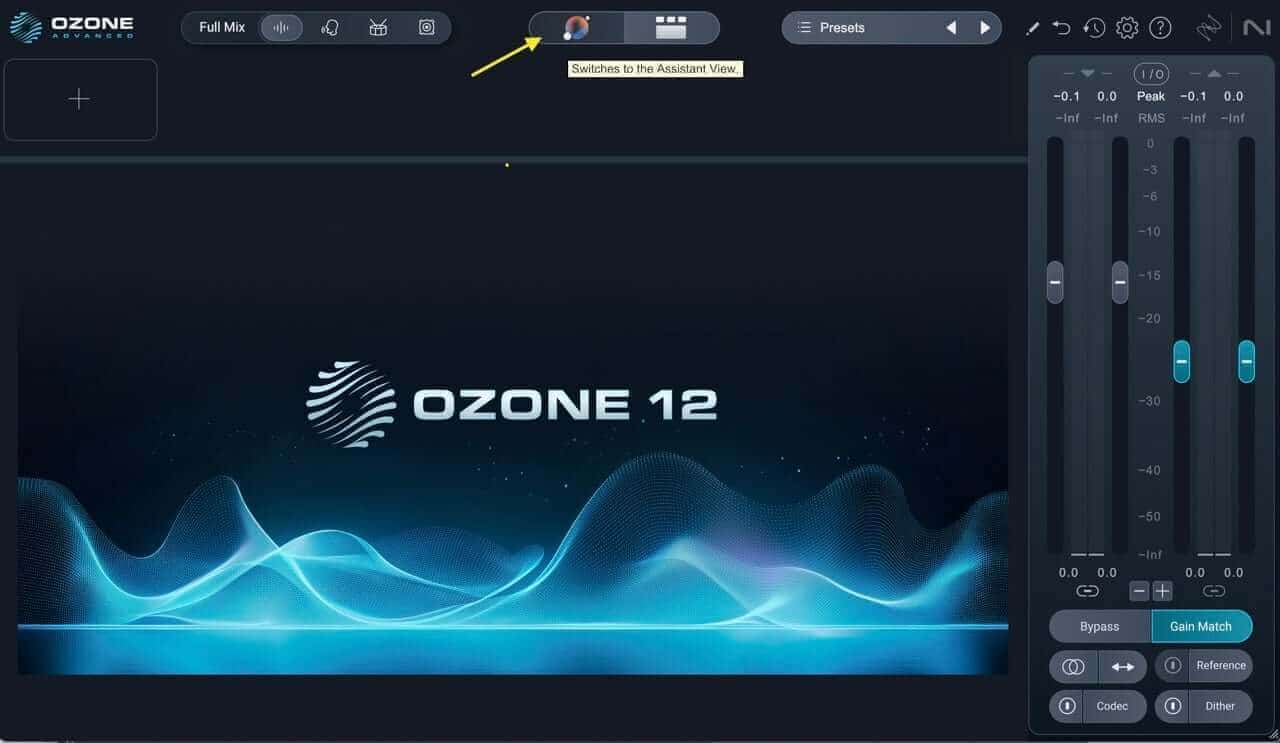
    01 Master Assistant Choice Large.jpeg

    Ozone 12 Master Assistant button

    I inserted the Ozone 12 plugin, and then clicked on the little colorful globe up in the titlebar. I chose the Custom setting as opposed to One-Click, which would allow me to bypass customizing all the information below and just perform an analysis. 

    Depending on the track, I might not want certain plugins to be considered, so I like the option of being able to take them out. For this track, I left all modules under consideration, set loudness to -9 dB, and engaged True Peak and the Maximizer. 

    In the latest version of Ozone, there are over 25 new targets to use in the Master Assistant. I chose “All-Purpose” for this track, but you have the option of really honing in on something more genre-specific, if you’d like.
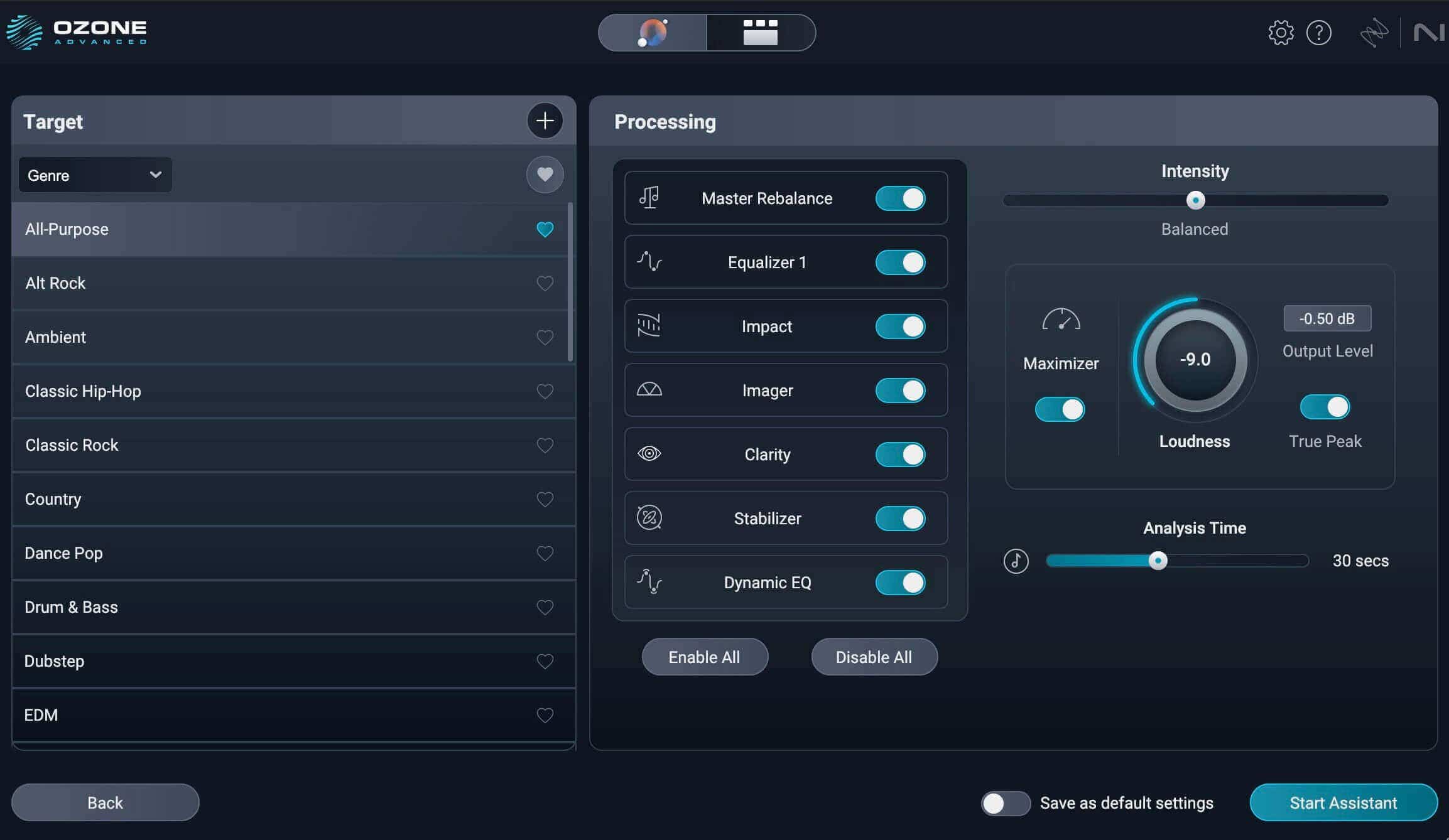
    02 Custom MA setup.jpeg

    Custom Master Assistant settings

    I set the Analysis time to 30 seconds to get a good cross-section of the chorus into the verse. Then I hit Start Assistant and pressed the spacebar. Be aware that there’s probably going to be a loudness jump as it analyzes the audio.
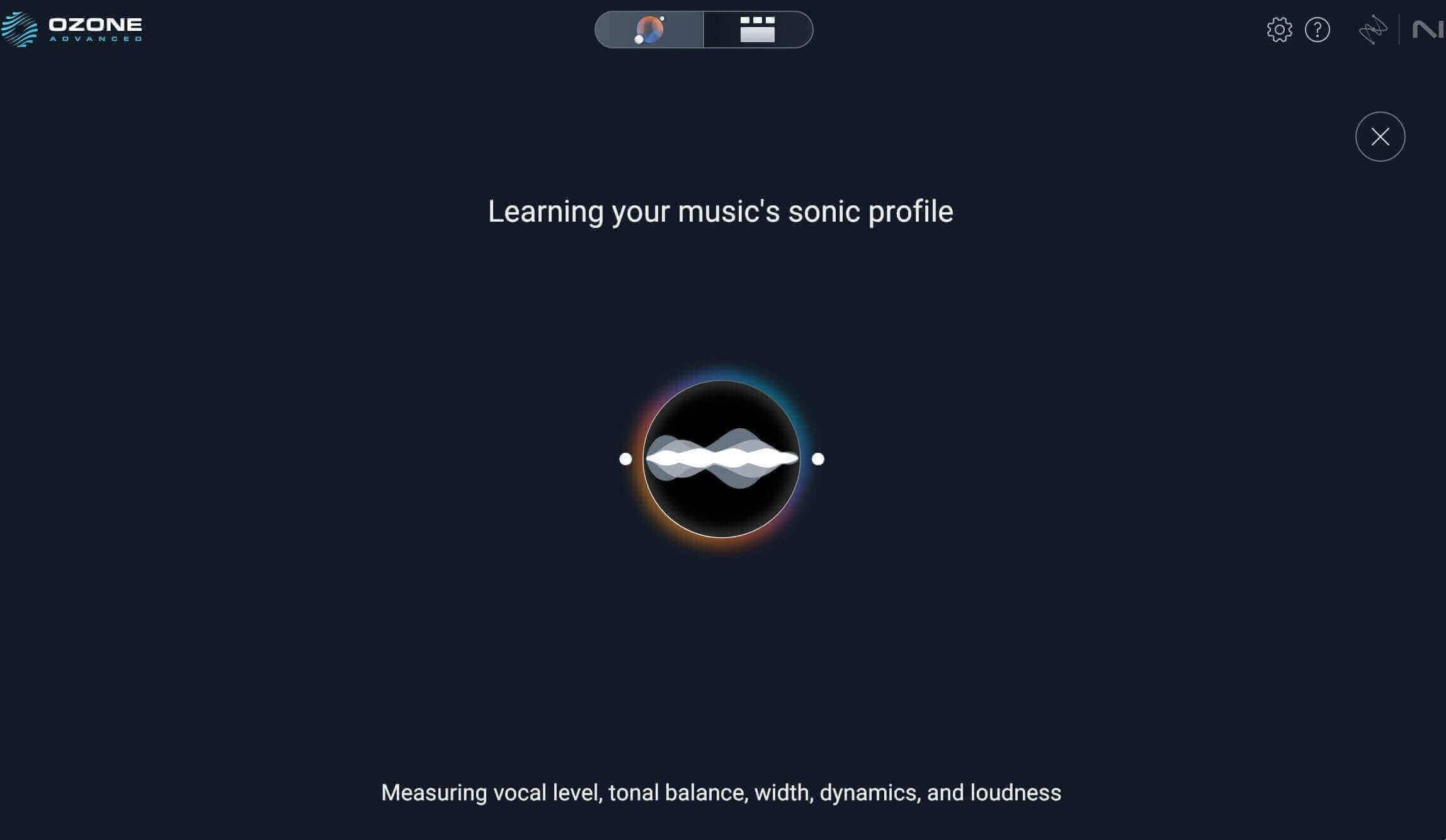
    03 Learning MA.jpeg

    Ozone Master Assistant learning

    Here's the results from the Master Assistant. 

    Master Assistant Results


    I switched back over to the Detailed View to take a look at my plugins. While there was a lot I liked with the choices the Master Assistant gave me, there were some things I felt I could tweak better, knowing what the artist wants as well as what sounded more appropriate to my ear. 
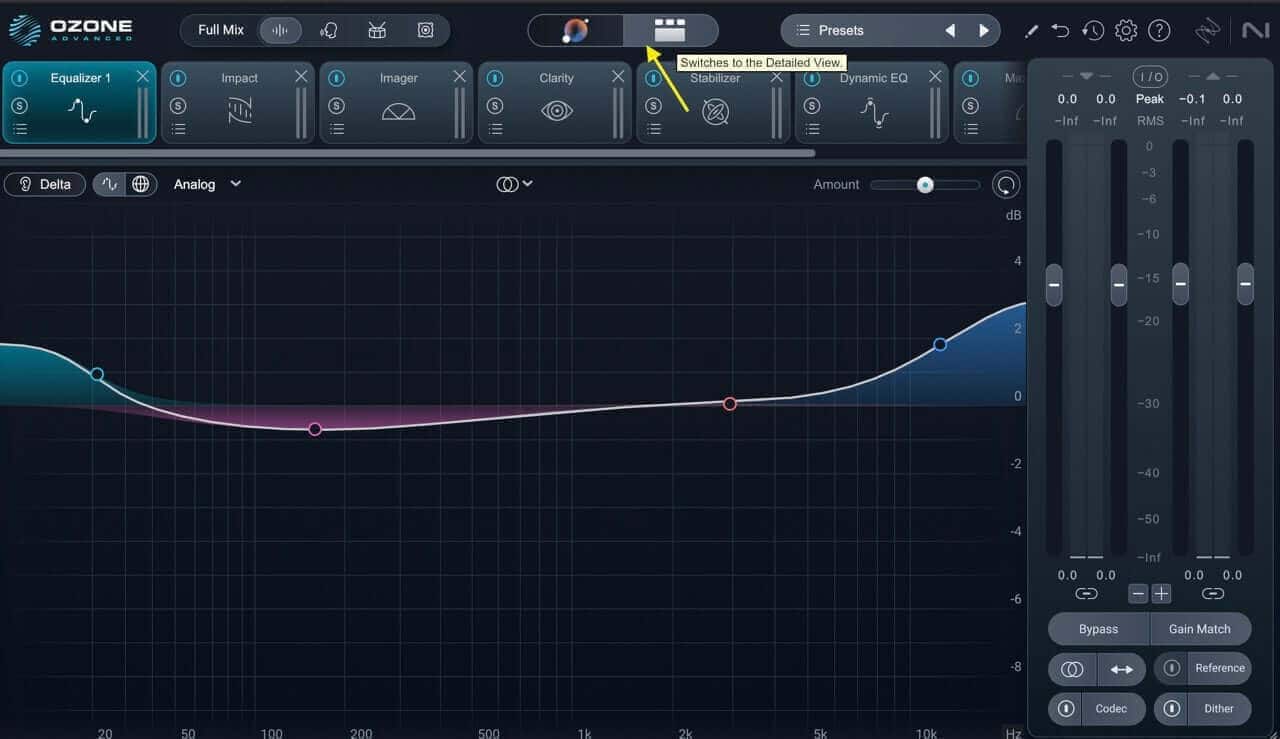
    04 Detailed view MA Large.jpeg

    Ozone 12 Detailed View

    Which leads me to…

    3. Level matching and auditioning settings

    As I said above, there are a few things about the modules I wanted to change. I heard a little bit of crackle on the loudest part of the chorus in the vocals, and I think adjusting the Clarity module may help. 

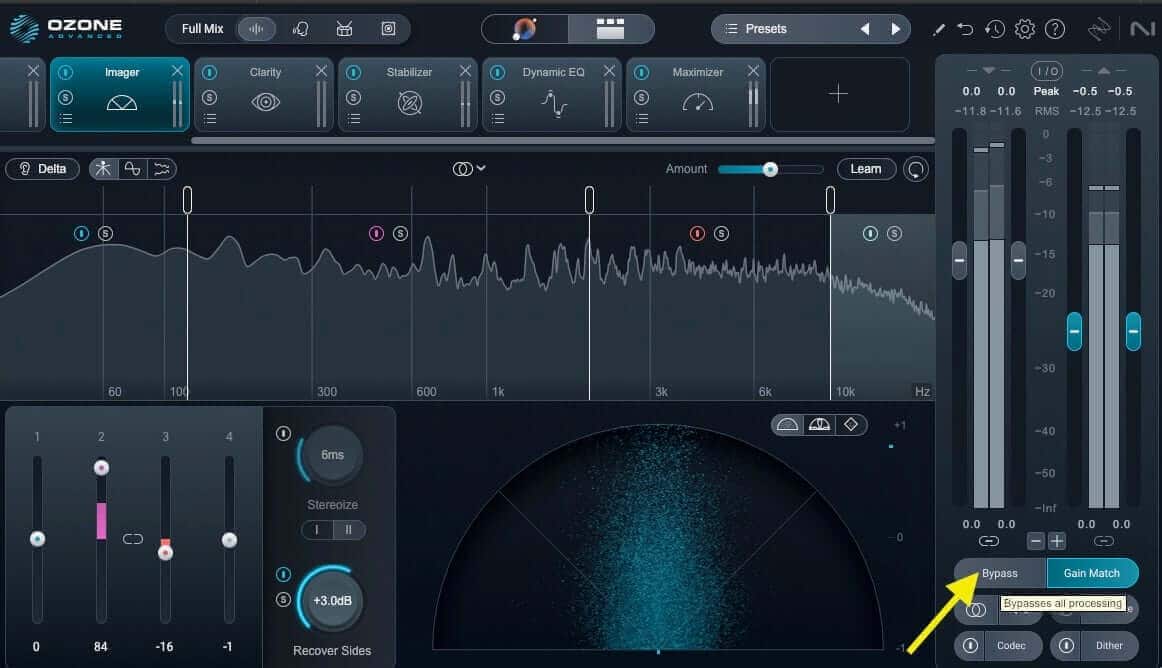
    I also wanted to adjust the Imager settings as I didn’t think it flattered the tightness of the midrange. I was able to make these initial choices by engaging Gain Matching and soloing, bypassing, and listening to different modules level-matched against the original mix. It’s important to match level, as even just increasing gain without any other adjustments can deceptively sound better, but on closer inspection, that may not be the case.
    05 MA bypass gain.jpeg

    Clicking Gain Match to bypass level adjustments

    From here, you may want to explore different settings. One way to accomplish this is through the Ozone mastering presets.

    Dig deeper: Learn more below about 5 ear training exercises to listen like a mastering engineer. 

    4. Explore presets, adjust modules

    Once you have an idea of what is needed or what you’d like to adjust, it can be helpful to start with module presets that come with the software. As an aside, I often like to start with a preset when auditioning a new plugin I’d like to demo before buying – it’s a good way to learn how something works without wasting time.

    As with anything in the creative process, it’s important to listen and adjust to taste – but presets can be a good jumping off point.

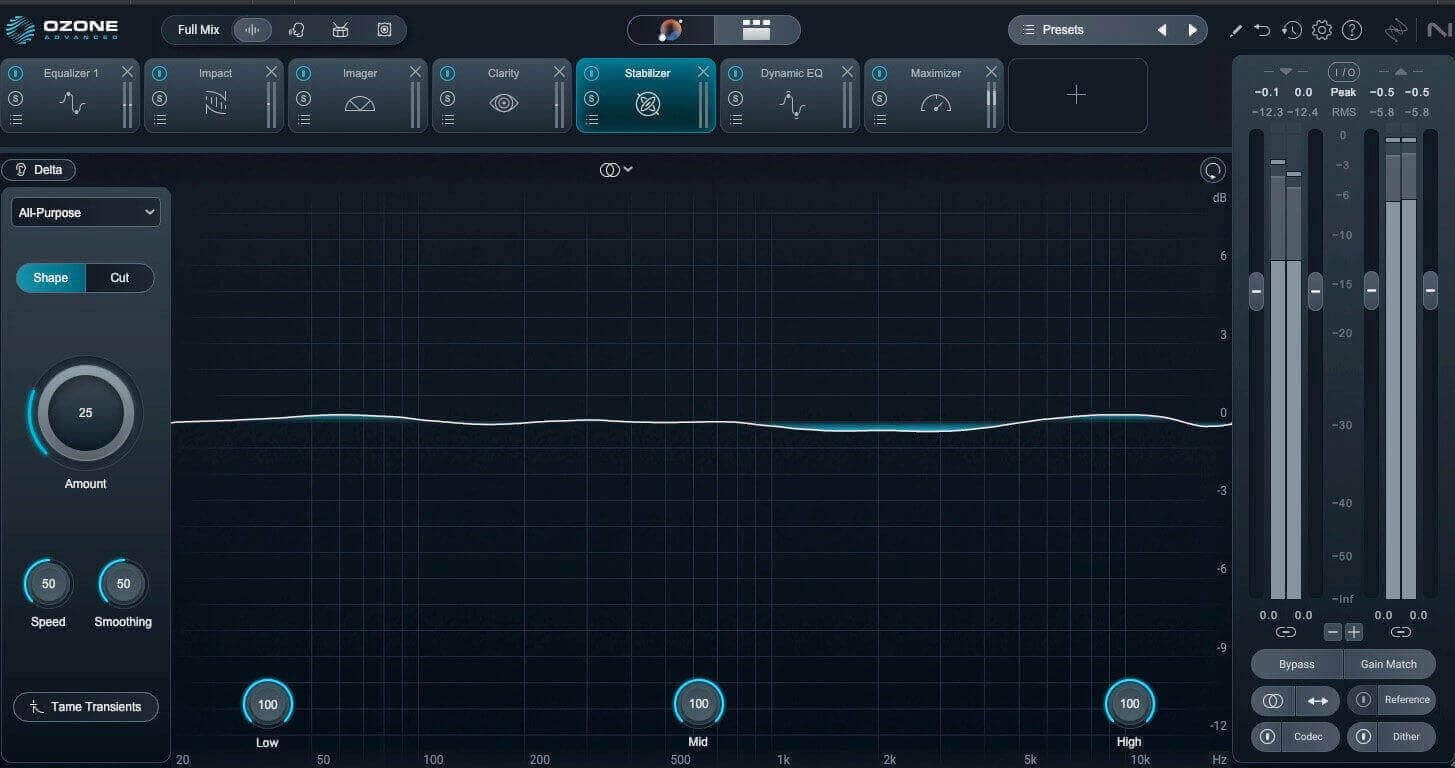
    For example, I wasn’t particularly keen on how the Stabilizer was working on this track, using the Master Assistant’s choice.
    06 MA Stab.jpeg

    Initial suggested Stabilizer settings

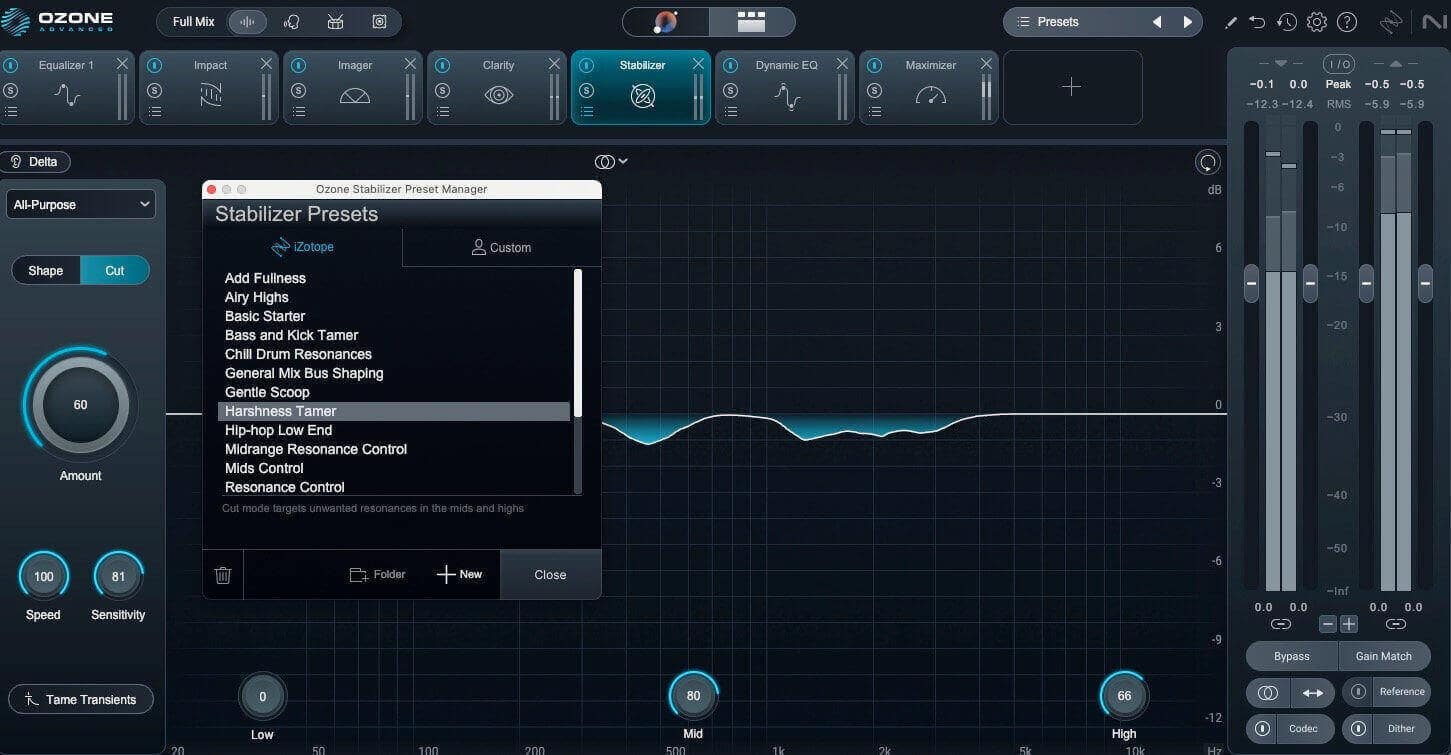
    I brought up the Harshness Tamer preset and adjusted the settings while listening to the gain-matched and non-gain-matched settings, and found a better setup for what I need. I wanted to help shape the harshness of the vocals a bit, and I think it did the trick.
    07 Preset adj Stab.jpeg

    The Harshness Tamer preset of the Stabilizer

    I ended up removing the Imager module. After adjusting my equalization settings, I might put it back in, but for now, it feels a bit unnecessary for this track.

    5. Adjust your EQ settings and dynamics processing

    EQ and dynamics processing are essential tools used to sculpt the overall sonic balance, shape the tonal characteristics, and control the dynamic range of a master, ensuring it sounds polished and cohesive.

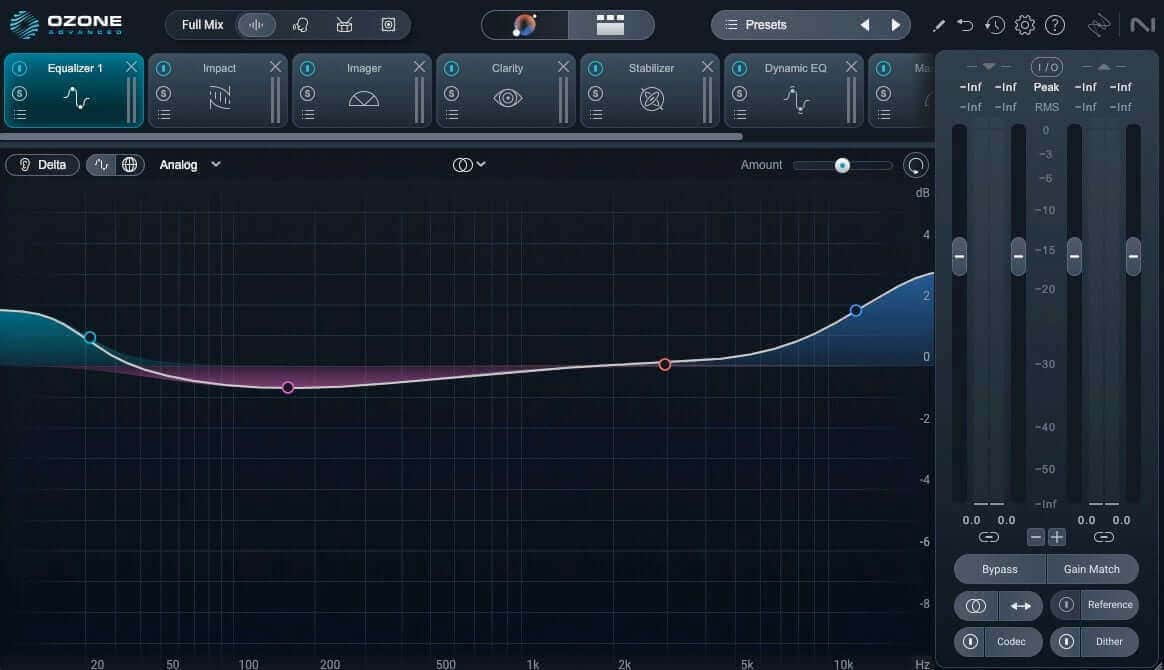
    Before I do anything else, I want to check the Equalizer 1 and Dynamic EQ settings that the Assistant lined up in my workflow. 
    08 EQ initial.jpeg

    Initial Equalizer 1 settings

    I think that the bottom and top shelf bumps are a bit much for this track, so I’m going to adjust that curve a bit. Again, I listened to the initial curve against the bypassed mix, and dialed back both settings and took out a little low end mud to tighten up the bass and kick. I listened to my changes against the level-matched mix and was happy with the changes.
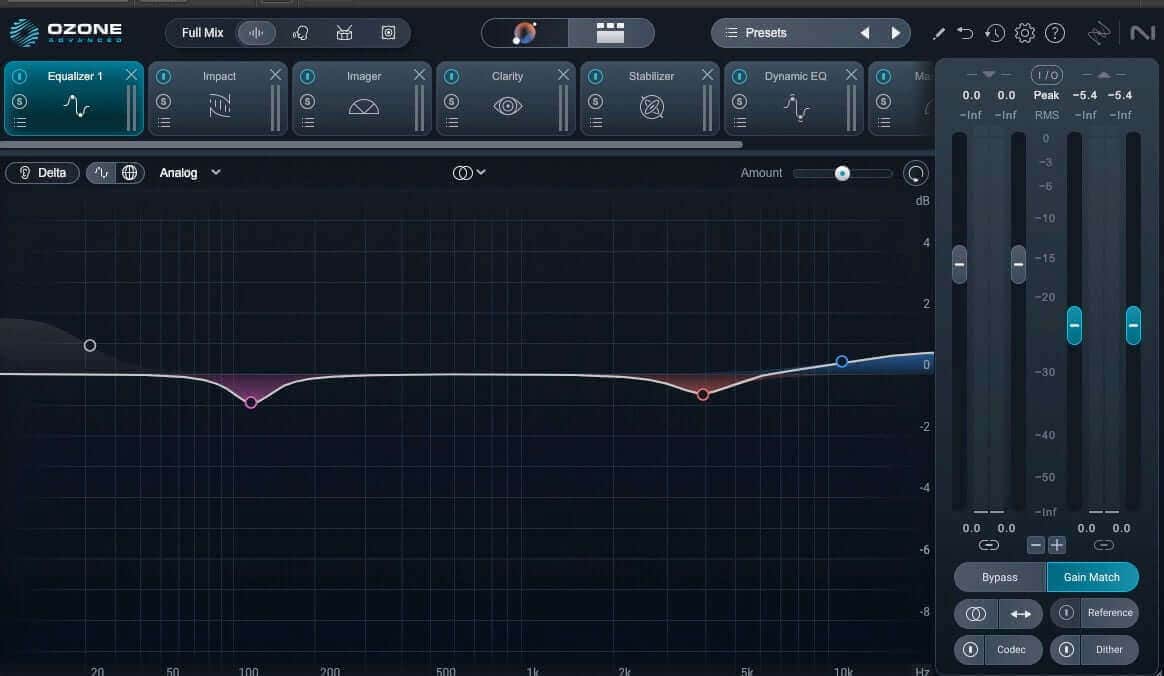
    09 EQ adjusted.jpeg

    Adjusted equalization settings

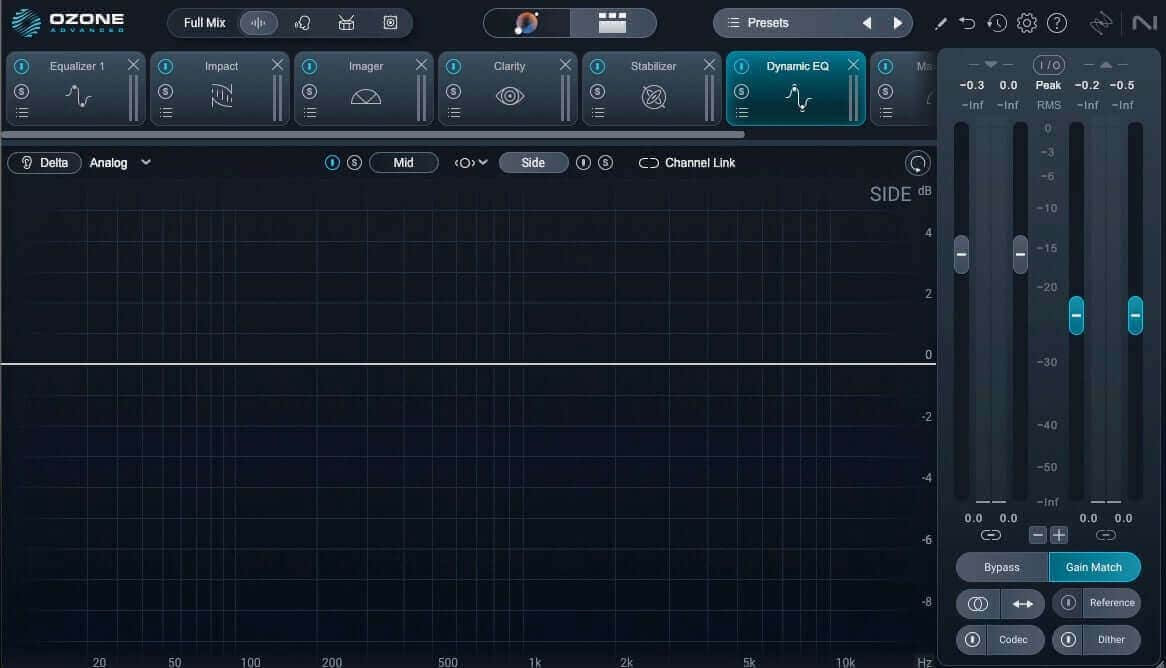
    With my Dynamic EQ settings, I didn’t want the little dips or the high cut shelf to affect the overall stereo image, as I liked those frequencies in the side information. 
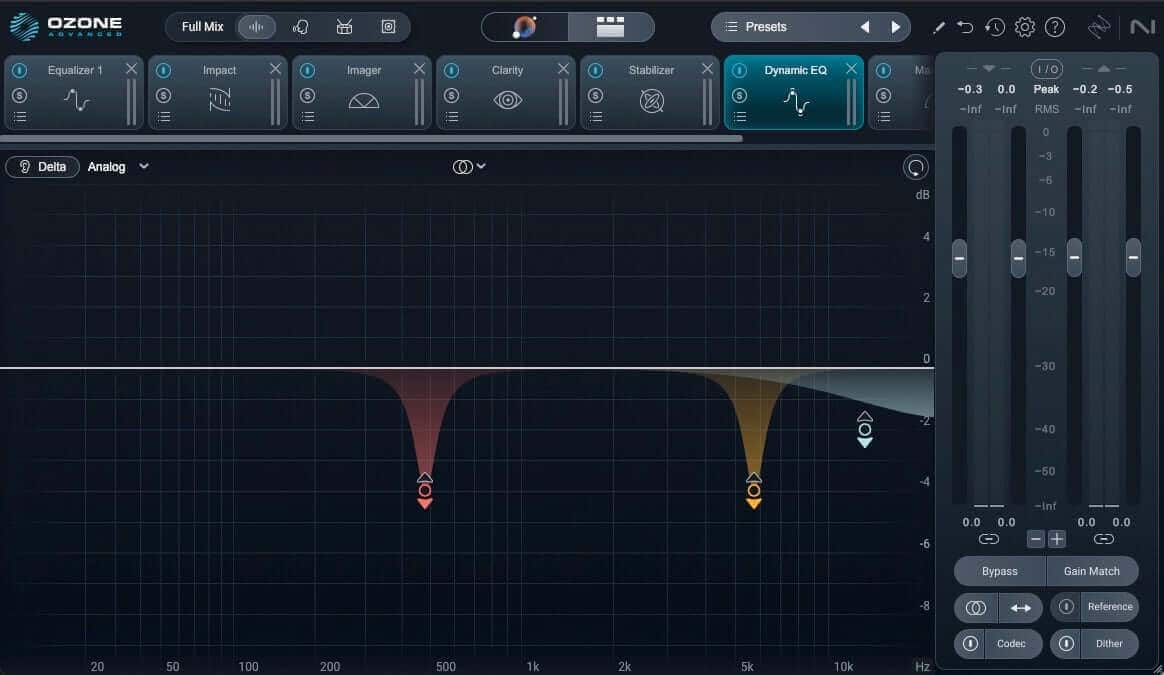
    10 Dyn EQ initial.jpeg

    Initial Dynamic EQ settings

    So, I kept the initial settings but adjusted the Dynamic EQ to only affect the mid channel and leave the sides untouched.
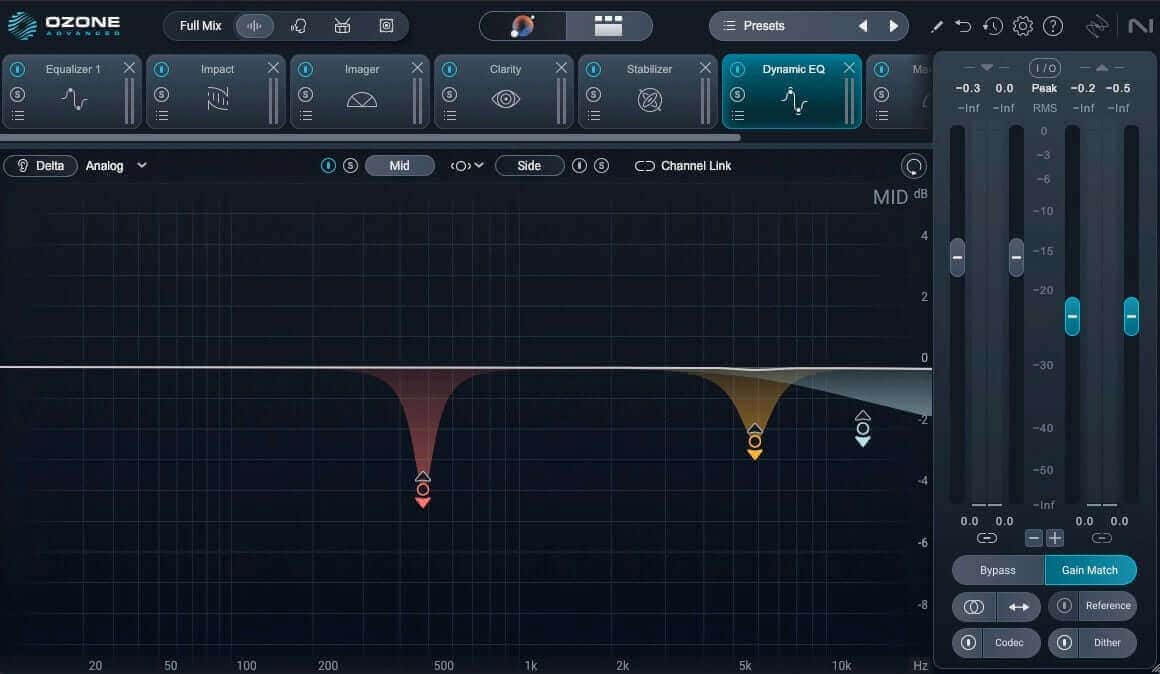
    11 Dyn EQ adjusted.jpeg

    Adjusted Dynamic EQ

    12 Dyn EQ side only adjusted.jpeg

    Adjusting the side channel on the Dynamic EQ

    That way, the buildup of the frequencies I didn’t like as much in the vocals was still present in the rest of the mix. Learn more about mid/side processing if you need a refresher. 

    Also, rather than leaving in the Imager but just bypassing each band, I’m just going to bypass the modules entirely. After the equalization adjustments, it really feels like this isn’t really needed.
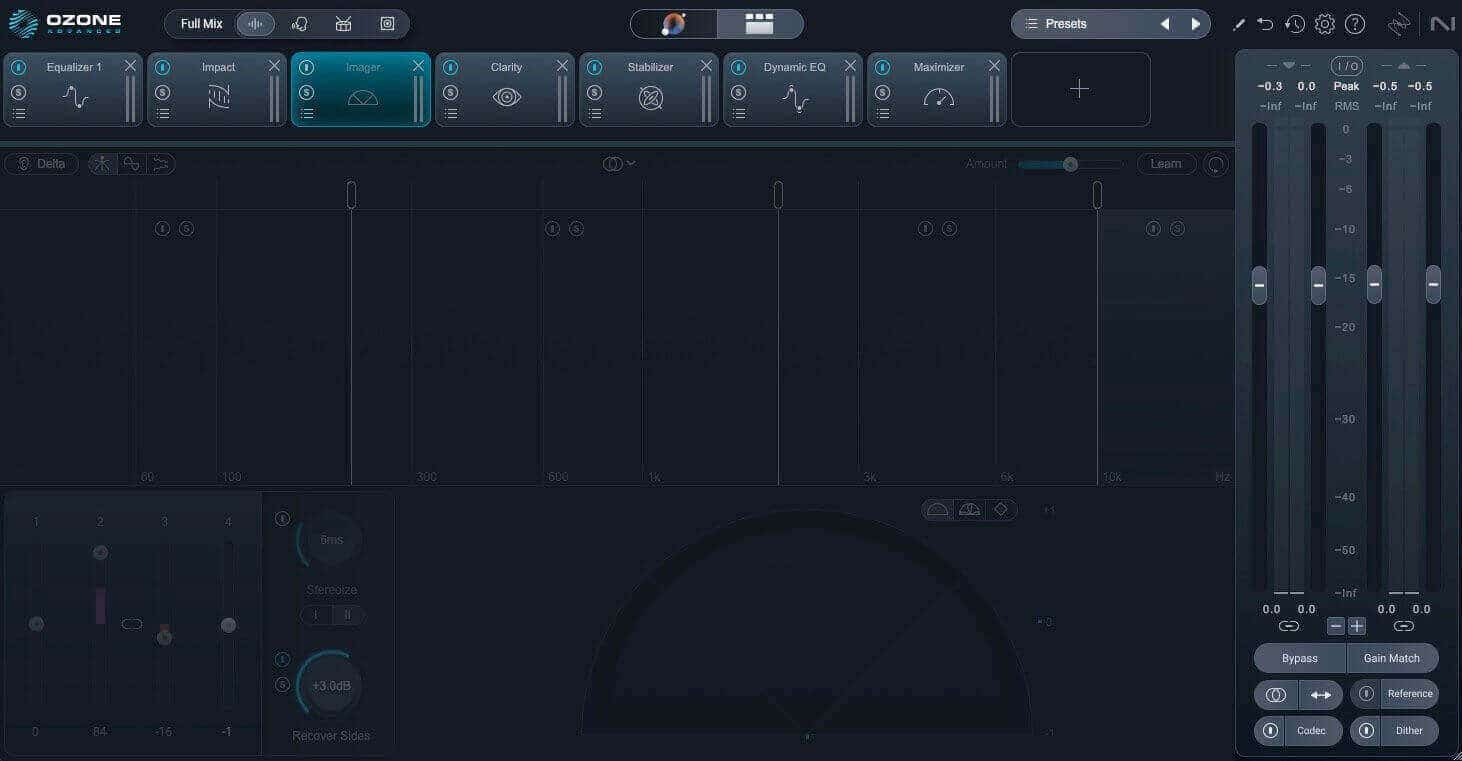
    13 Bypassed Imager.jpeg

    The bypassed Imager

    I also made adjustments to the following:

    Clarity module: I backed off on how much it was working, and it feels more natural now. 
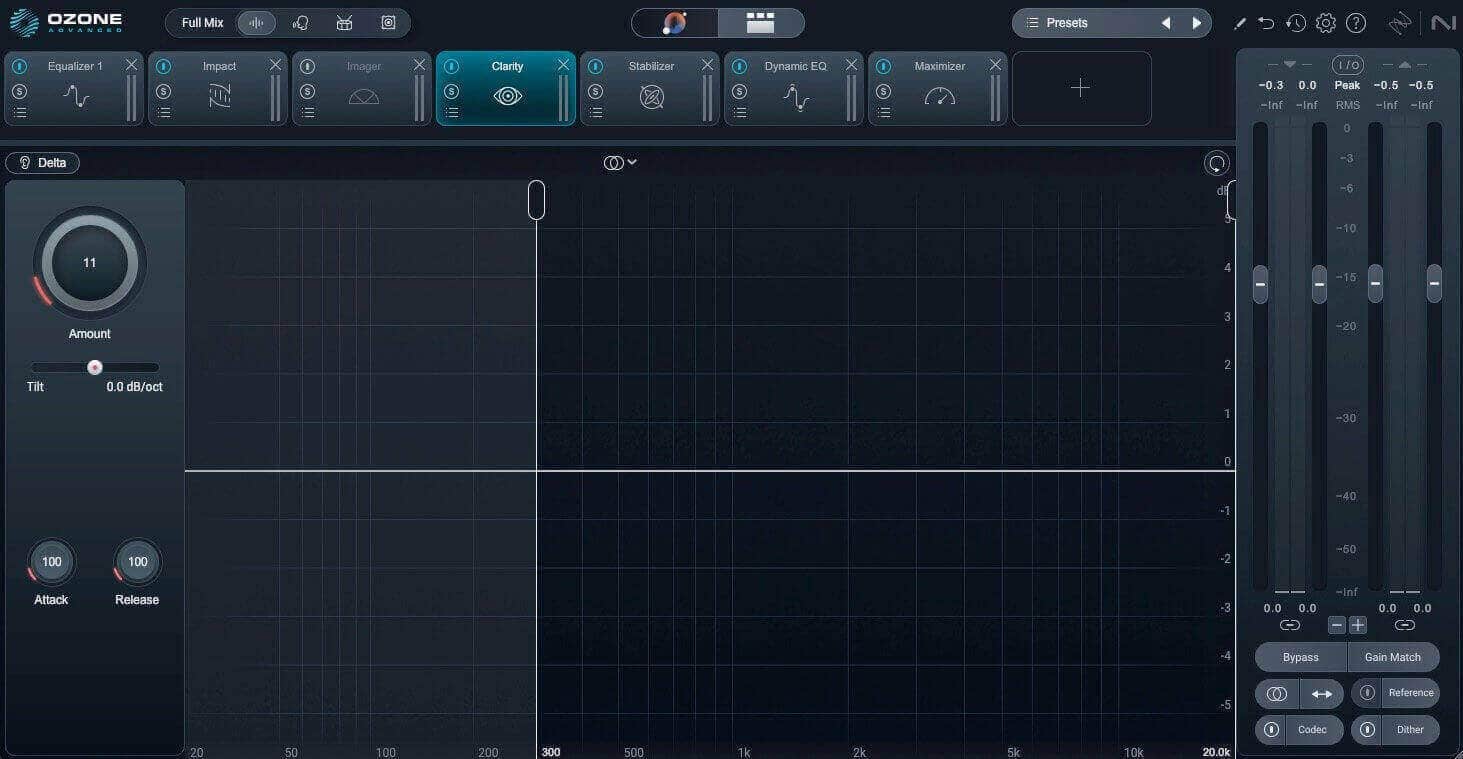
    14 Clarity Adjusted.jpeg

    Adjusted Clarity module

    Impact module: I adjusted the lower frequencies to help tighten things up. 
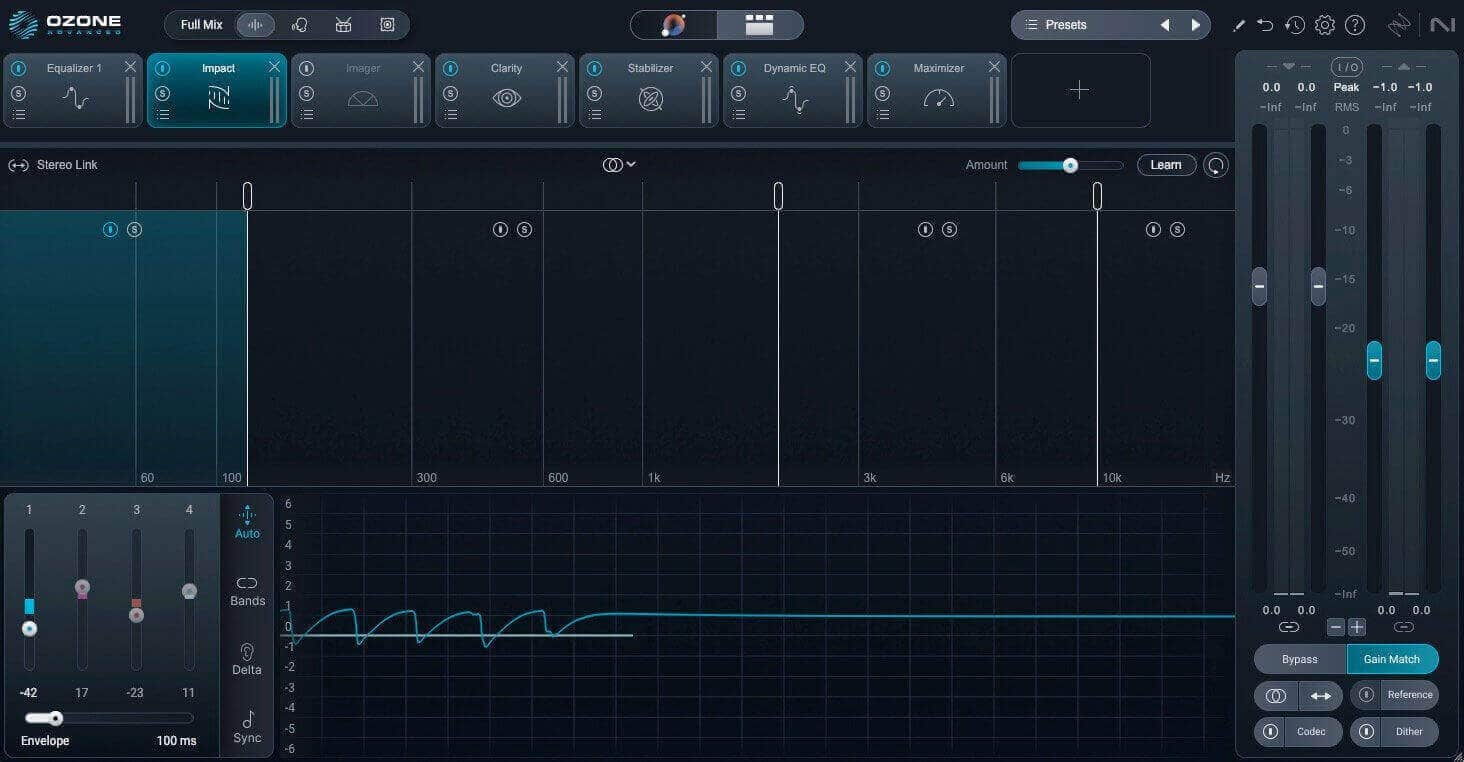
    15 Impact Adjusted.jpeg

    Adjusted Impact module

    Stabilizer module: I also backed off on the settings to make it feel more natural and less pumping. 
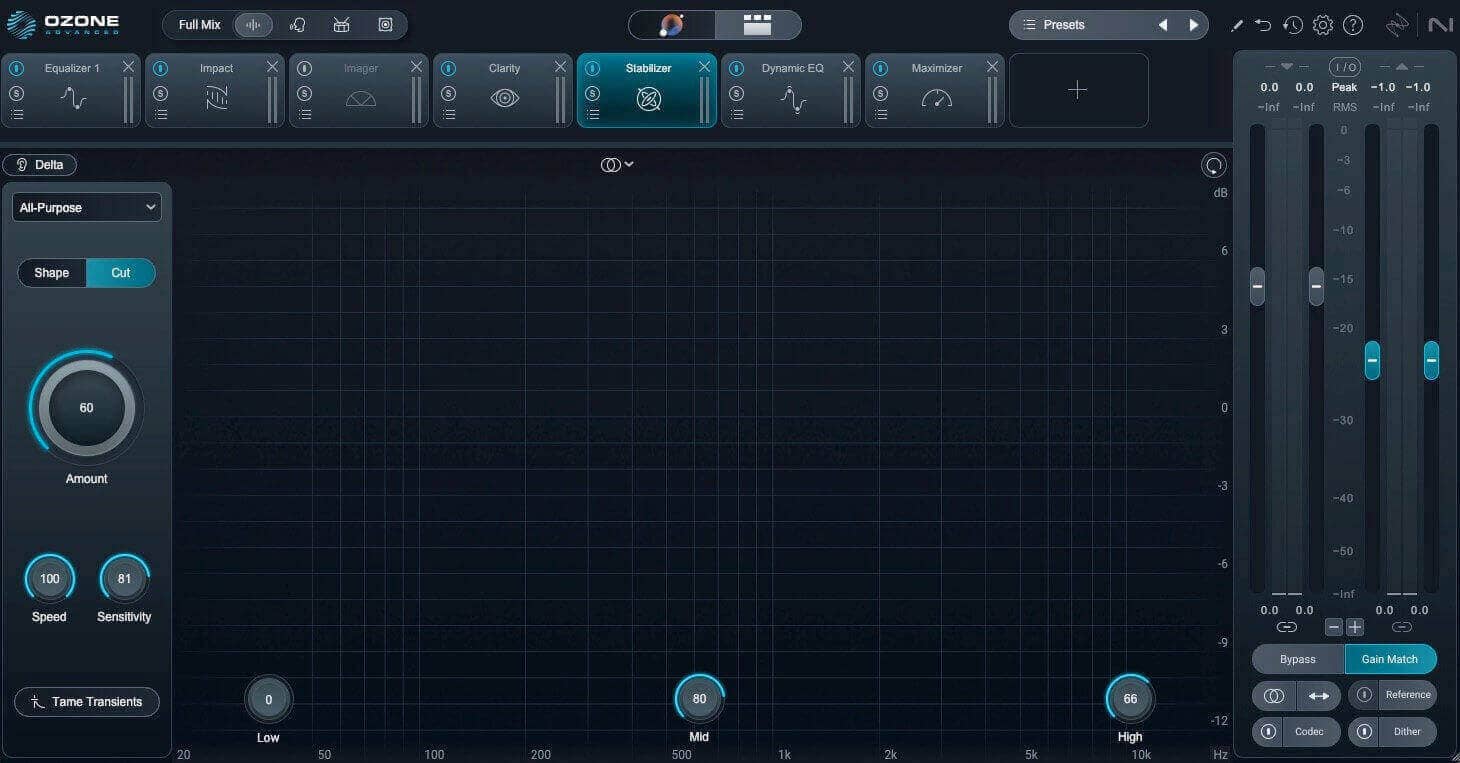
    16 Stabilizer Adjusted.jpeg

    Adjusted Stabilizer

    6. Manage low end with Bass Control 

    One of the new modules in Ozone 12 is called Bass Control, and I felt like this was a good opportunity to see how it works in a track where the beat is so important. I felt this mix would benefit from a little more control, a little more punch, and a little more sustain.

    You can also control the peaks in the frequency range you are affecting. That way, each hit sounds even within the track. I’m using it subtly in this master, but the module offers a lot of control and room to create something more dramatic. I felt putting this before Impact in my chain would be most useful.
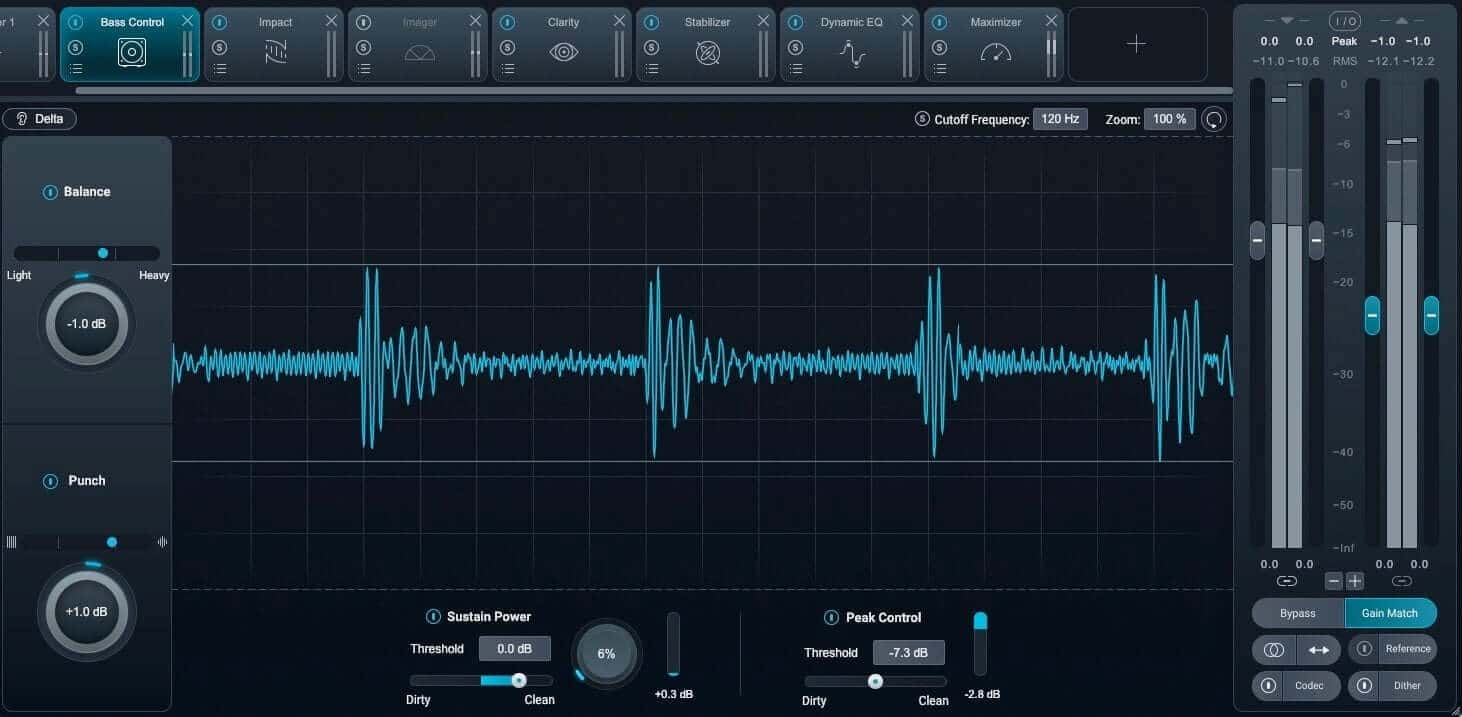
    17 Bass Control.jpeg

    Giving the master more punch and sustain with the Bass Control module

    7. Adjust the loudness and limiting with the Maximizer

    We are getting towards the finish line with crafting this quick master.

    Loudness is usually the first thing that comes to mind when people think of mastering, but every step that comes before the limiter also impacts the overall loudness and feeling of the track. When you drop that Maximizer track into your chain, everything – good and bad – comes more into focus.

    I’m using the new IRC 5 algorithm, which is extremely transparent and is designed not to add pumping or other artifacts to get a loud master that isn’t fatiguing or harsh.
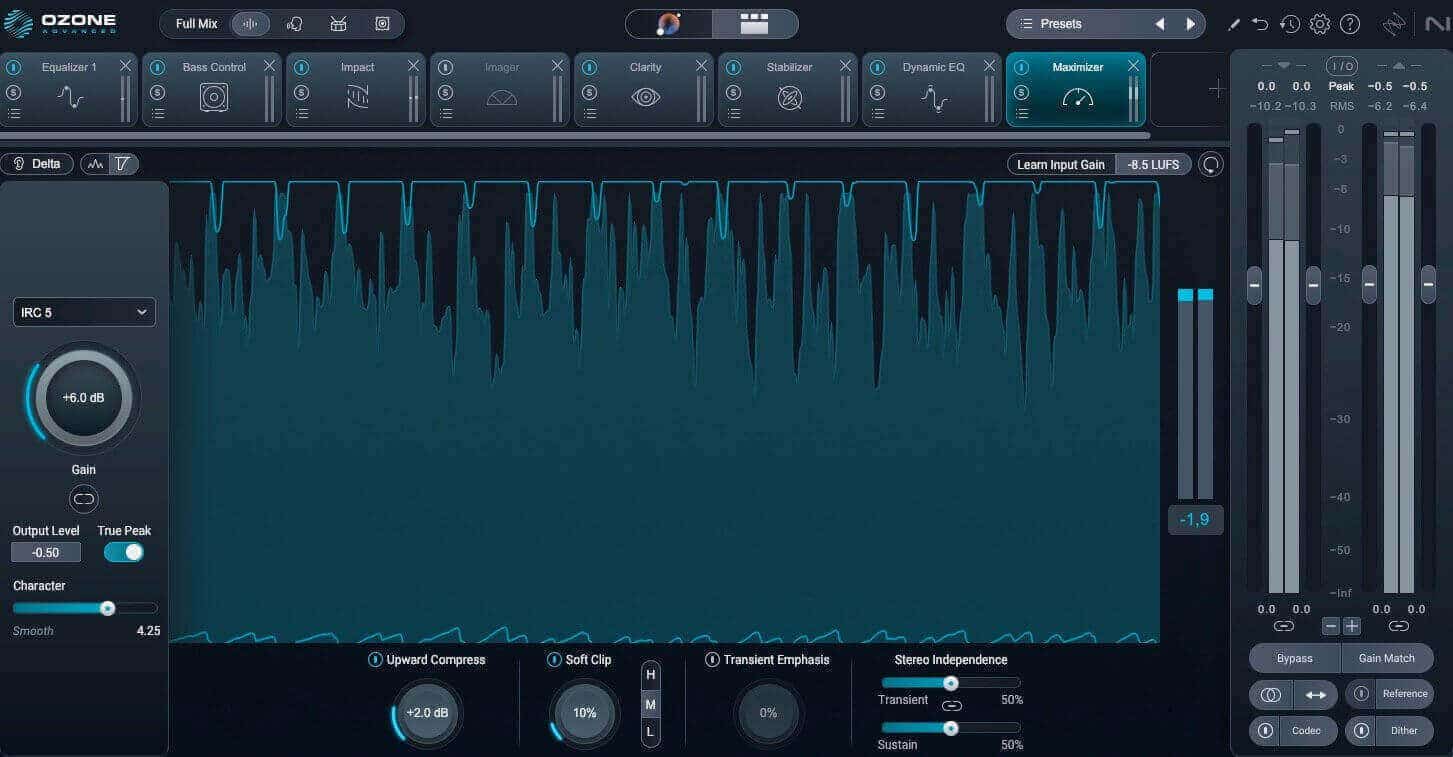
    18 Maximizer adjusted.jpeg

    The adjusted Maximizer settings

    I adjusted the settings a bit from what the Master Assistant gave me, but it wasn’t far off.

    8. Preview your sound using the Codec Preview feature

    The Codec Preview in Ozone is a nice way to double check how your masters will sound when converted to different audio codecs, such as AAC and MP3 at varying bit rates. You can also solo artifacts that might occur through conversion.
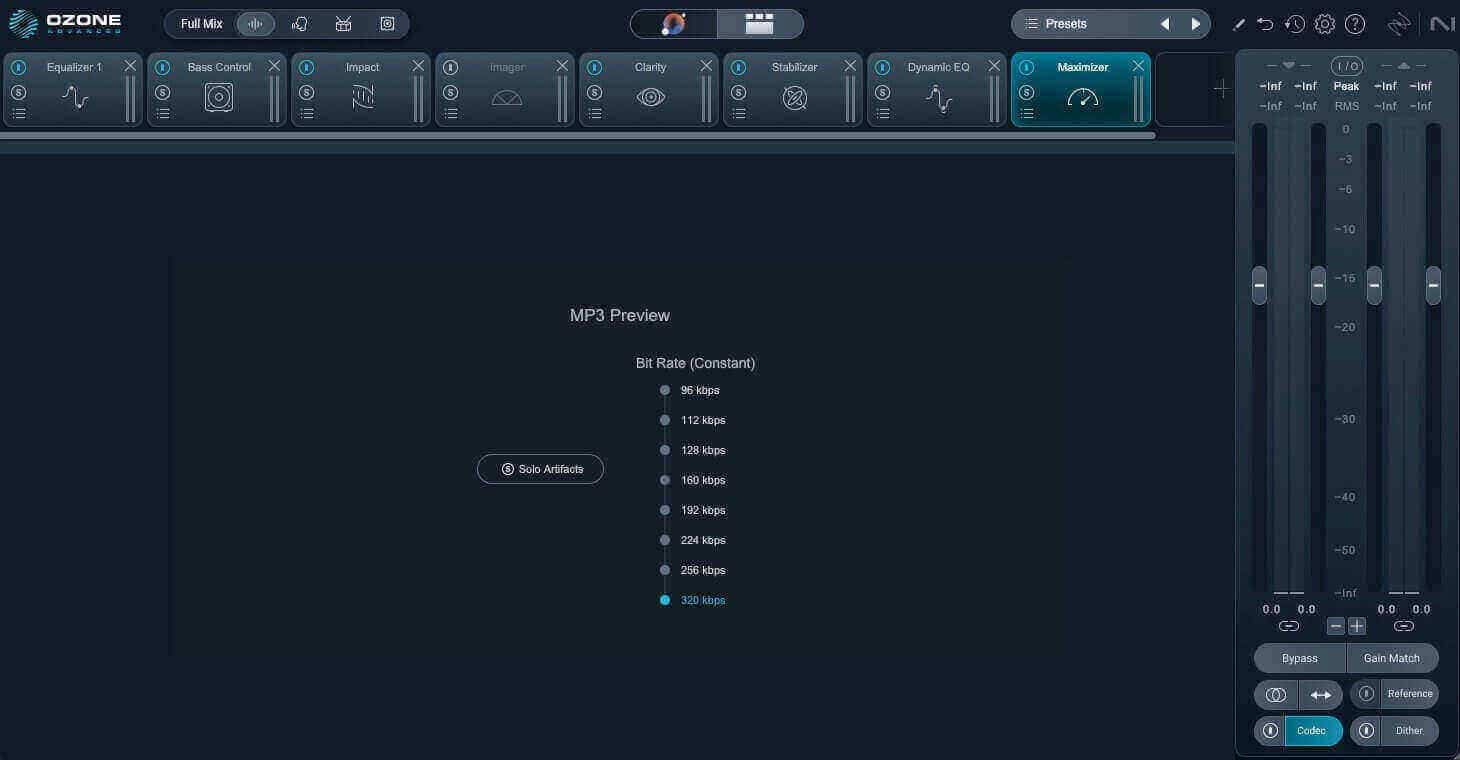
    19 Codec.jpeg

    Previewing a 320 kbps version of our master

    9. Export your master and listen back in various playback systems

    Once you’re satisfied with your mastering adjustments, export your master to a lossless audio format. Avoid the mistake of exporting to lossy MP3. Different digital service providers (DSP) will have different specifications, but a common delivery spec for streaming and digital download is 44.1kHz / 24-bit WAV (a few DSPs still require 16-bit resolution so double check on your end). 

    Your mastering session doesn’t end here, however. Your critical listening continues outside your workstation. Remember that one of the goals of mastering is translatability—to make sure that your master sounds good across various commercial playback systems, whether it’s a high-end speaker system, headphones, car stereo or even a bluetooth speaker. 

    When listening, it’s good to preview on multiple systems, like: 

    • A car stereo
    • Home stereo
    • Your friend’s stereo
    • Headphones

    Also, reference the song against other songs in the same genre if you haven’t been doing that already.

    Take note of anything that needs to be adjusted to improve your master’s translatability (e.g. low-end could sound a little less boomy, the master could sound brighter, the sibilance could be tamed a bit better, etc.) Make notes and revisit the master. 

    Dig deeper: Learn more about audio sample rate and bit depth and how those factors play into audio production.


    10. Revise your masters if necessary

    Revisions are a normal part of the process. While it feels great to get everything set right on the first go, sometimes mastering brings out elements in the mix that the client wants you to change. Sometimes they’ll even want to change the mix.

    The more you practice, the more you fall into a good workflow, and the easier it becomes. Creativity is fluid, and music doesn’t work within a framework of a factory. But having a solid workflow makes all the revisions easier, and hopefully results in more emails that say “you got it!” on the first go.

    Dig deeper: Learn more about revising masters in this interview with professional mastering engineers.

    The final, mastered result

    The files are level-matched, so you can hear the differences between the mixes and masters.

    Once again, here is our original mix:


    Here is the master with the Master Assistant’s suggestions, and the "after" is the final master, made from the Master Assistant suggestions and then further adjustments to taste.

    Master Assistant results vs. final master


    Start mastering your music with Ozone

    iZotope Ozone 12 is a powerful set of tools that helps you work quickly and efficiently to master a track that is ready for distribution and can compete with other music of the same genre on playback systems. 

    Bass Control, Master Assistant, and the new IRC algorithm help take your track to the next level, but at the end of the day, these tools lie in your very human hands. Your ears should have the final say.

    Download Ozone today and experiment with its newest modules.

     Get iZotope Ozone      

    « Back to Blog

    Related Articles

    Mastering Video Game Music: Celeste, Battlewake, and More

    Mastering video game music: Celeste, Battlewake, and more

    Jan 8th, 2020

    From subtle to saturated: how to use tape emulation in your mix

    From subtle to saturated: how to use tape emulation in your mix

    Oct 22nd, 2025

    Mastering with Mat Leffler-Schulman: why attention, relationships, and perspective matter

    Mastering with Mat Leffler-Schulman: why attention, relationships, and perspective matter

    Sep 18th, 2025

    Together with Boris FX, we’re obsessed with driving creative tech forward, committed to excellence in everything you see and hear.

    Company Company
    • About iZotope
    • Contact
    • Work with us
    • Research team
    • Media & press resources
    • Enterprise and Education
    • Cookie Notice
    • Do Not Share My Personal Information
    • License Agreement
    • Accessibility Statement
    • Subscription Terms
    • Cancel Subscription
    • Analytics Opt-in
    Useful links Useful links
    • Product authorization
    • Knowledge base
    • Free audio plug-ins
    • Product downloads
    • Product portal
    • Loyalty program
    • Deals
    • Dealers
    • Product support & FAQs
    Explore Products Explore Products
    • RX
    • Ozone
    • Neutron
    • Nectar
    • Vocalsynth
    • Aurora
    • Neoverb
    • Tonal Balance Control
    • Music Production Suite
    • RX Post Production Suite
    • Reverb plug-ins
    • View all audio software
    Newsletter
    Social Social
    Facebook
    Instagram
    Youtube
    Soundcloud
    Learn more about Learn more about
    • Audio mastering
    • Audio mixing
    • Audio post production
    • Audio repair
    • Dialogue editing
    • Music production
    • Reverb
    • Vocal production
    • View all topics
    Payment methods
    • American Express
    • Apple Pay
    • Bancontact
    • Diners Club
    • Discover
    • Google Pay
    • Mastercard
    • MB WAY
    • PayPal
    • Visa
    © 2026 iZotope
    • Privacy policy
    • Terms of service
    • Refund policy

    Search