


$1,399.00

Award-winning audio restoration software to fix every flaw
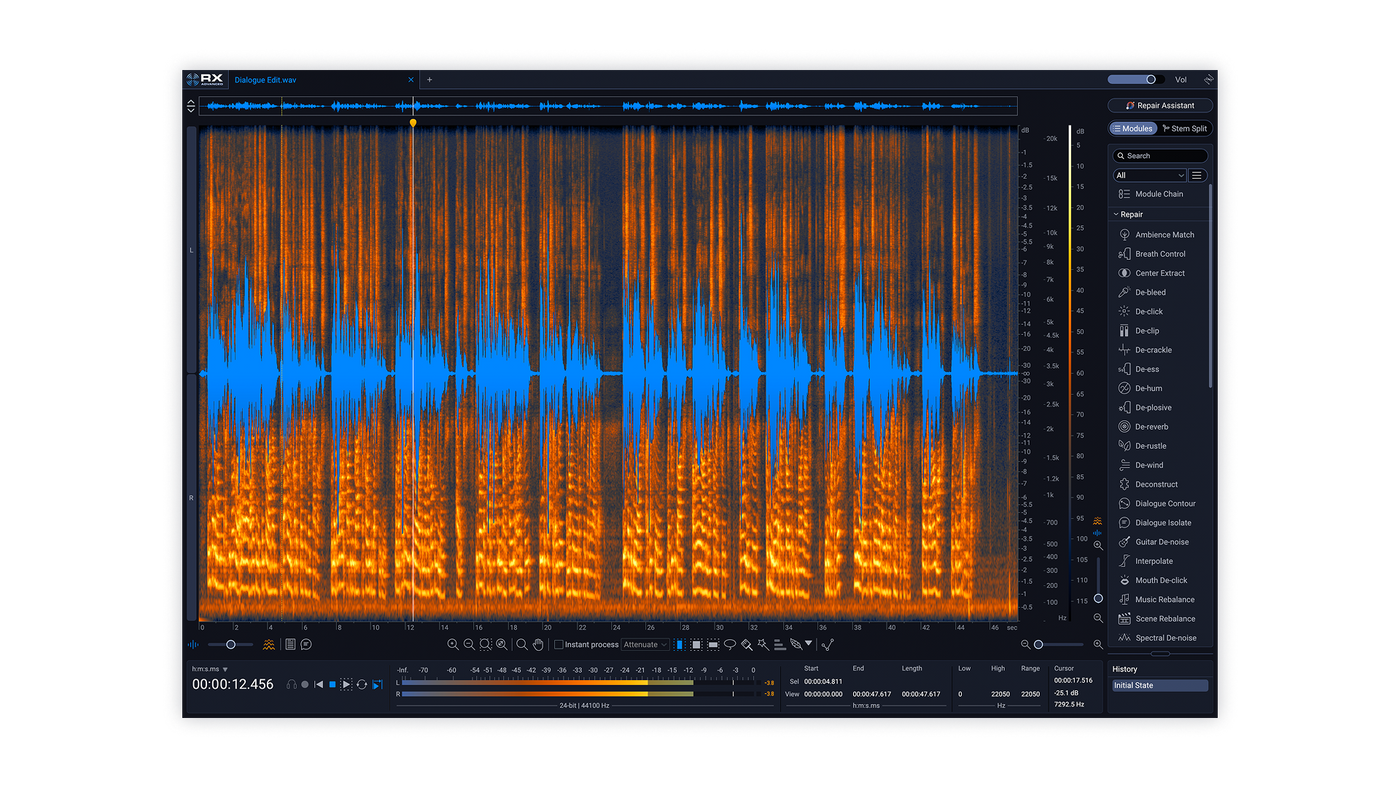
All-in-one audio restoration

Paint problems away

Make surgical edits

Release with confidence

Rescue audio in seconds
Audio repair for any project

Post Production

Music Production

Content Creation
What's new in RX 12?

Brand-new modules

Deeper control

Better results, faster

Overhauled experience


— Easton Allyn, Executive Producer at iHeartRadio


Award-winning audio repair and restoration tech




Scene Rebalance


Stems View
De-bleed

Breath Control

Music Rebalance

Dialogue Isolate


Trim Silence
Overhauled experience and design

Larger Default Spectrogram

Module Search Bar

Instant Stem Splitting

Resizable History Panel
Listen to the new RX 12 neural nets in action

Every audio restoration plugin you need
Which edition of RX is right for you?
Crafting an Oscar-worthy sound mix? Adding the final polish to chart-topping tracks?
Making sure your home recordings are clean, clear, and crisp? There’s an RX just for you.

RX 12 Elements
$99.00

RX 12 Standard
$399.00

RX 12 Advanced
$1,399.00

RX Post Production Suite 9
$1,799.00
Audio example credits

Explore every tool in RX 12
Popular RX features

Spectral De-noise

De-click

Music Rebalance

Spectral Repair

Voice De-noise

De-clip

Guitar De-noise

De-hum

Mouth De-click
Table of Contents

Ambience Match

Azimuth
![[REBUILT] Breath Control](http://www.izotope.com/cdn/shop/files/e5082ec3d765-RX-12-Webtour-All-Modules-paragraph-04.png?v=1777923877&width=3840)
[REBUILT] Breath Control

Center Extract
![[REBUILT] De-bleed](http://www.izotope.com/cdn/shop/files/764c95c9737d-RX-12-Webtour-All-Modules-De-bleed.png?v=1777923877&width=3840)
[REBUILT] De-bleed

De-click

De-clip

De-crackle

De-ess

De-hum

De-plosive

De-reverb

De-rustle

De-wind

Deconstruct
![[IMPROVED] Dialogue Isolate](http://www.izotope.com/cdn/shop/files/cdebfb7392de-RX-12-Webtour-All-Modules-Dialogue-Isolate.png?v=1777923877&width=3840)
[IMPROVED] Dialogue Isolate

Dialogue Contour

Dither

EQ

EQ Match

Fade

Find Similar

Gain

Guitar De-noise

Interpolate

Leveler

Loudness Control

Loudness Optimize

Markers

Mixing

Mouth De-click
![[IMPROVED] Music Rebalance](http://www.izotope.com/cdn/shop/files/185b6cd9abc0-RX-12-Webtour-All-Modules-Music-Rebalance.png?v=1777923877&width=3840)
[IMPROVED] Music Rebalance

Normalize

Phase

Plug-in
![[IMPROVED] Repair Assistant](http://www.izotope.com/cdn/shop/files/8e8088c9c1c8-RX-12-Webtour-All-Modules-Repair-Assistant.png?v=1777923877&width=3840)
[IMPROVED] Repair Assistant

Resample
![[NEW] Scene Rebalance](http://www.izotope.com/cdn/shop/files/5a887e59b3d6-RX-12-Webtour-All-Modules-Scene-rebalance.png?v=1777923877&width=3840)
[NEW] Scene Rebalance

Signal Generator

Spectral De-noise

Spectral Recovery

Spectral Repair

Spectrum

Streaming Preview

Time & Pitch
![[NEW] Trim Silence](http://www.izotope.com/cdn/shop/files/4ccc9ba014c7-RX-12-Webtour-All-Modules-Trim-silence.png?v=1777923877&width=3840)
[NEW] Trim Silence
Which edition of RX is right for you?


RX New Features Comparison
| Elements | Standard | Advanced | |
|---|---|---|---|
| New: Scene Rebalance | ✓ | ||
| New: Stems View | ✓ | ✓ | |
| New: Trim Silence | ✓ | ||
| New: Music Rebalance Realtime plugin | ✓ | ✓ | |
| New: De-bleed Realtime plugin | ✓ | ✓ | |
| Rebuilt: De-bleed (now ML-based) | ✓ | ✓ | |
| Rebuilt: Breath Control (now ML-based) | ✓ | ✓ | |
| Improved: Music Rebalance neural nets | ✓ | ✓ | |
| Improved: Dialogue Isolate neural nets | ✓ | ✓ | |
| Improved: Repair Assistant neural nets | ✓ | ✓ | ✓ |
RX Plugin Comparison
| Elements | Standard | Advanced | |
|---|---|---|---|
| Ambience Match* | ✓ | ||
| Breath Control | ✓ | ✓ | |
| Connect | ✓ | ✓ | |
| De-bleed [NEW] | ✓ | ✓ | |
| De-click | ✓ | ✓ | ✓ |
| De-clip | ✓ | ✓ | ✓ |
| De-crackle | ✓ | ✓ | |
| De-ess | ✓ | ✓ | |
| De-hum | ✓ | ✓ | ✓ |
| De-plosive | ✓ | ✓ | |
| De-reverb | ✓ | ✓ | ✓ |
| De-rustle* | ✓ | ||
| Dialogue Isolate | ✓ | ✓ | |
| Guitar De-noise | ✓ | ✓ | |
| Monitor | ✓ | ✓ | |
| Mouth De-click | ✓ | ✓ | |
| Music Rebalance [NEW] | ✓ | ✓ | |
| Repair Assistant | ✓ | ✓ | ✓ |
| Scene Rebalance* [NEW] | ✓ | ||
| Spectral De-noise | ✓ | ✓ | |
| Spectral Editor** | ✓ | ✓ | |
| Voice De-noise | ✓ | ✓ | ✓ |
RX Audio Editor – Module Comparison
| Standard | Advanced | |
|---|---|---|
| Ambience Match | ✓ | |
| Azimuth | ✓ | |
| Breath Control [IMPROVED] | ✓ | ✓ |
| Center Extract | ✓ | |
| De-bleed [REBUILT] | ✓ | ✓ |
| De-click | ✓ | ✓ |
| De-clip | ✓ | ✓ |
| De-crackle | ✓ | ✓ |
| De-ess | ✓ | ✓ |
| De-hum | ✓ | ✓ |
| De-plosive | ✓ | ✓ |
| De-reverb | ✓ | ✓ |
| De-rustle | ✓ | |
| De-wind | ✓ | |
| Deconstruct | ✓ | |
| Dialogue Isolate^ [IMPROVED] | ✓ | ✓ |
| Dialogue Contour | ✓ | |
| Dither | ✓ | ✓ |
| EQ | ✓ | ✓ |
| EQ Match | ✓ | |
| Fade | ✓ | ✓ |
| Find Similar | ✓ | ✓ |
| Gain | ✓ | ✓ |
| Guitar De-noise | ✓ | ✓ |
| Interpolate | ✓ | ✓ |
| Leveler | ✓ | |
| Loudness Control | ✓ | ✓ |
| Loudness Optimize | ✓ | ✓ |
| Markers | ✓ | ✓ |
| Mixing | ✓ | ✓ |
| Mouth De-click | ✓ | ✓ |
| Music Rebalance [IMPROVED] | ✓ | ✓ |
| Normalize | ✓ | ✓ |
| Phase | ✓ | ✓ |
| Plug-in | ✓ | ✓ |
| Repair Assistant [IMPROVED] | ✓ | ✓ |
| Resample | ✓ | ✓ |
| Scene Rebalance | ✓ | |
| Signal Generator | ✓ | ✓ |
| Spectral De-noise | ✓ | ✓ |
| Spectral Recovery | ✓ | |
| Spectral Repair | ✓ | ✓ |
| Spectrum | ✓ | ✓ |
| Streaming Preview | ✓ | ✓ |
| Time & Pitch | ✓ | ✓ |
| Trim Silence | ✓ | |
| Variable Pitch | ✓ | ✓ |
| Variable Time | ✓ | ✓ |
| Voice De-noise | ✓ | ✓ |
| Waveform Stats | ✓ | ✓ |
| Wow & Flutter | ✓ |
RX Audio Editor – Non-Module Features Comparison
| Standard | Advanced | |
|---|---|---|
| Batch Processor | ✓ | ✓ |
| Instant Process | ✓ | ✓ |
| Mid/Side Mode | ✓ | ✓ |
| Module Chain | ✓ | ✓ |
| Module List View Filters | ✓ | ✓ |
| MP3 Export | ✓ | ✓ |
| Multichannel Processing | ✓ | |
| Multiple Speaker Detection | ✓ | |
| Recording & Monitoring | ✓ | ✓ |
| Restore Selection | ✓ | ✓ |
| Spectral Editing Tools | ✓ | ✓ |
| Spectrogram | ✓ | ✓ |
| Text Navigation | ✓ | ✓ |
| Time/Frequency Feathering | ✓ | ✓ |
Compare versions of RX Advanced
| RX 9 Advanced | RX 10 Advanced | RX 11 Advanced | RX 12 Advanced |
|---|---|---|---|
| Neural Nets: Improved Dialogue Isolate | Neural Nets: Improved Spectral Recovery | Neural Nets: Dialogue Isolate HQ Offline Mode, Multi-Band Processing | Module: Scene Rebalance |
| Neural Nets: Improved Ambience Match | Feature: Multiple Speaker Detection in Text Navigation | Neural Nets: Improved Dialogue Contour | Module: Trim Silence |
Compare versions of RX Standard
| RX 9 Standard | RX 10 Standard | RX 11 Standard | RX 12 Standard |
|---|---|---|---|
| Plugin: Spectral Editor for Logic | Module: Rebuilt Repair Assistant | Feature: De-reverb in Dialogue Isolate | Workflow: Stems View |
| Feature: Dynamic De-hum | Feature: Dynamic Adaptive Mode in De-hum | Neural Nets: Improved Dialogue Isolate | Module: Rebuilt ML De-bleed |
| Feature: Restore Selection | Feature: Text Navigation | Plugin: Realtime Dialogue Isolate | Module: Rebuilt ML Breath Control |
| Feature: Selection Feathering | Neural Nets: Improved Music Rebalance | Plugin: Realtime De-bleed | |
| Module: Streaming Preview | Plugin: Realtime Music Rebalance | ||
| Module: Loudness Optimize | Neural Nets: Improved Music Rebalance | ||
| Feature: Mid / Side Mode | Neural Nets: Improved Dialogue Isolate | ||
| Plugin: Spectral Editor ARA for Pro Tools, Studio ONe, Logic (Rosetta) |
Compare feature of RX Elements
| RX 9 Elements | RX 10 Elements | RX 11 Elements | RX 12 Elements |
|---|---|---|---|
| None | Plugin: Rebuilt Repair Assistant | Neural Nets: Improved Repair Assistant | Neural Nets: Improved Repair Assistant |
Which edition of RX is right for you?
Crafting an Oscar-worthy sound mix? Adding the final polish to chart-topping tracks?
Making sure your home recordings are clean, clear, and crisp? There’s an RX just for you.
RX 12 Elements
$99.00
RX 12 Standard
$399.00
RX 12 Advanced
$1,399.00
RX Post Production Suite 9
$1,799.00


